LitePhysics
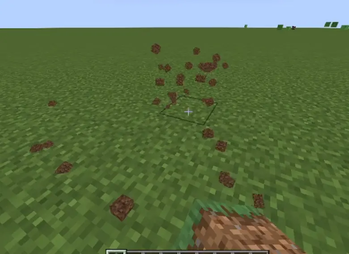
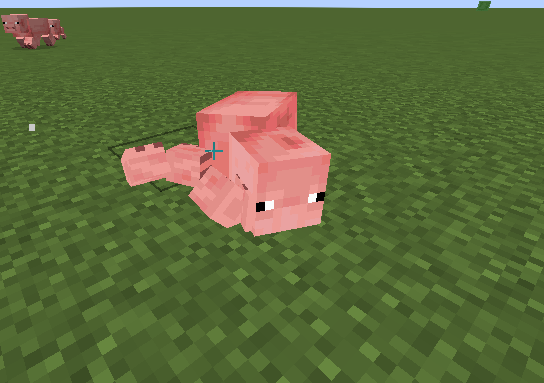
Realistic collapse, explosions, debris, item physics, and mob ragdolls make destruction feel alive. Builds fall naturally, blasts launch blocks, debris bounces, items tumble, and mobs slide, float, and fade away.
Screenshots
About this Mod
Experience a far more dynamic and immersive world with realistic structural collapse, where unsupported buildings and constructions break apart and fall naturally using a fully tag-driven system that leaves terrain untouched. Explosions no longer simply erase blocks—instead, powerful blasts launch them through the air in believable arcs, creating dramatic destruction. Shattered blocks transform into physical 3D debris that bounces, drifts, and settles in the environment, while dropped items gain proper physics, tumbling with momentum and coming to rest naturally instead of hovering and spinning. Every mob is also equipped with detailed ragdoll physics built from its actual model and textures, allowing defeated creatures to be knocked back by the force of their killer, slide across surfaces, float in water, and eventually fade away in a puff of smoke.
Available Versions
How to Install LitePhysics on Your Server
Order Server
Order a Minecraft Java server with at least 3 GB RAM (4 GB recommended).
Set fabric Loader
In the panel under "Egg", select the fabric loader and matching Minecraft version (1.21.11).
Install Mod
Open the mod browser in the dashboard and search for "LitePhysics". Click "Install" – done! Alternatively, upload the .jar via SFTP to the /mods folder.
Compatibility
Mod Loaders
Minecraft Versions
1.21.11, 1.21.10, 1.21.9 (+8 more)
Server-side
✓ RequiredRecommended RAM
4 GB(min. 3 GB)Frequently Asked Questions
LitePhysics server crashes on startup – what to do?
Most common cause: wrong fabric version or insufficient RAM. Check the server log (latest.log) for "OutOfMemoryError" or "Mixin" errors. With Mado Hosting: ensure at least 3 GB RAM is allocated and the loader matches the mod version (1.21.11). You can switch loaders with one click in the panel.
Is LitePhysics compatible with fabric?
LitePhysics officially supports fabric for Minecraft 1.21.11, 1.21.10, 1.21.9. The Mado dashboard automatically detects incompatible loader combinations.
Server lagging with LitePhysics – how to optimize performance?
Recommended RAM: 4 GB (per 8 players). Use /spark profiler to check if LitePhysics consumes the most tick time. Common fixes: reduce server view-distance to 8-10, install "performant" or "starlight" as supplementary mods on Forge. With Mado Hosting, your server runs on NVMe SSDs with dedicated CPU cores for minimal latency.
Similar Mods





Rent Modded Server
Install LitePhysics with just one click on your server.