
LiveBuddy
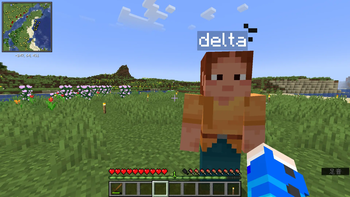
Adds "LiveBuddy," an autonomous, human-type NPC that performs tasks and combat on behalf of the player
Screenshots

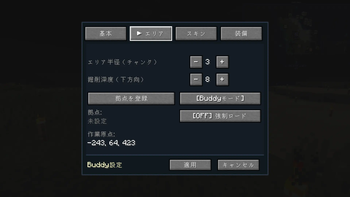
About this Mod
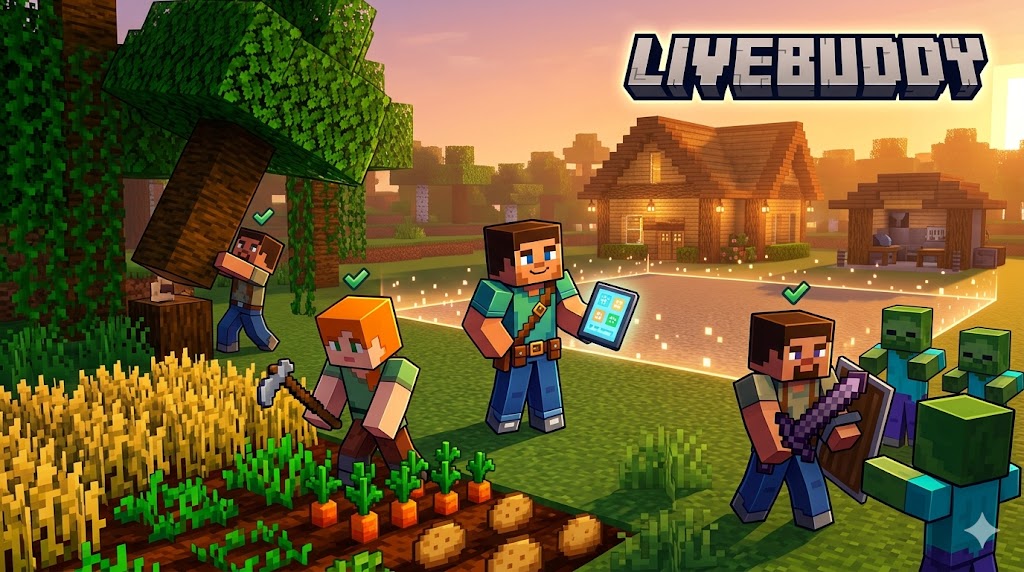
LiveBuddy: Your Autonomous Minecraft Companion
LiveBuddy adds intelligent, humanoid NPCs to Minecraft that work for you. Whether you need a lumberjack, a terrain carver, a farmer, or a base-lighter, your Buddy is ready to help — no complex AI APIs or heavy dependencies required. Built on stable vanilla pathfinding and goal algorithms, LiveBuddy is lightweight, performant, and reliable.
🤖 Meet Your New Best Friend
LiveBuddy NPCs are more than just pets; they are functional workers designed to take the tedium out of resource gathering.
Key Features:
- Multiple Buddies: Spawn as many as you need! Each Buddy has its own name, individual settings, and unique skin.
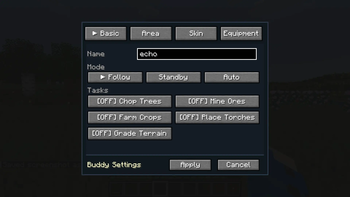
- Three Operational Modes:
- Follow: Your Buddy stays close to you.
- Standby: Your Buddy stays in place (and still sleeps at night).
- Auto: The autonomous workhorse mode where they execute assigned tasks.
- Intelligent Navigation: Buddies automatically open doors, swim in water, and navigate terrain using vanilla pathfinding.
- Rest & Recovery: When night falls, your Buddy will automatically find and sleep in a bed near its registered home position.
- Chest Auto-Deposit: When a Buddy's storage fills up, it will automatically return to a designated chest near home and deposit its items.
🛠️ Powerful Management (Buddy Tablet)
Right-click any Buddy to open the Buddy Tablet GUI, giving you full control over their behavior:
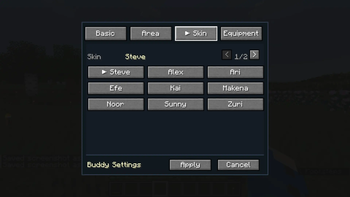
- Personalization: Change your Buddy's name and choose from 9 preset skins (Steve, Alex, Ari, Efe, Kai, Makena, Noor, Sunny, Zuri).
- Custom Skins: Drop any 64×64 PNG skin into
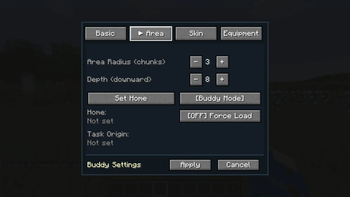
config/livebuddy/skins/— no restart needed. It will appear in the skin tab the next time you open the Buddy Tablet. - Work Area Controls: Define exactly where your Buddy works by setting a chunk radius (max 3) and downward Y depth.
- Home Position: Register a home base for your Buddy to return to and sleep.
- Force Chunk Load: Optionally keep the Buddy's chunk loaded so it keeps working even when you're away.
🪓 Autonomous Work Tasks (AUTO Mode)
Switch your Buddy to Auto mode to see them in action:
- Chop Trees: Uses a BFS (Breadth-First Search) algorithm to fell entire trees, not just the trunk.
- Farm Crops: Automatically harvests mature crops (including sugar cane) and replants seeds.
- Place Torches: Checks surrounding light levels and places torches in dark spots within the work area to prevent mob spawns. No torch items required.
- Grade Terrain: Levels the surface of your work area, clearing dirt, grass, gravel, sand, and other surface blocks down to your specified depth. Skips ore blocks.
- Carve Terrain: Excavates horizontally across a fixed Y plane, 4 blocks tall. Great for clearing mining floors or widening cave passages. Skips columns containing ores — those are left for you to mine. Grade and Carve are mutually exclusive.
- Combat: Detects and engages hostile mobs within range. Buddies are invulnerable so they never retreat.
🎒 Inventory
Each Buddy has 27 dedicated storage slots. Items collected during work are stored automatically.
When storage reaches 18 of 27 slots, the Buddy will head to a nearby chest to deposit its items.
All tasks run without tools or consumables. Chopping, farming, grading, carving, and torch placement require no items in inventory. Combat damage is fixed at iron sword equivalent. No durability is ever consumed.
💻 Commands
/lb spawn [name]— Spawn a new LiveBuddy/lb call [name|all]— Teleport a Buddy to you (omit name for nearest,allfor everyone)/lb list— List all Buddies with mode, tasks, and position/lb mode <name> <mode>— Change a Buddy's mode (FOLLOW / STANDBY / AUTO)/lb bye [name|all]— Remove a Buddy (omit name for nearest,allfor everyone)
📌 Requirements
- Minecraft: 1.21.4 / 1.21.9 / 1.21.10 / 1.21.11
- Loader: Fabric
- Dependencies: Fabric API
⚖️ License
All Rights Reserved.
Redistribution or modification of this mod is not permitted without explicit permission from the authors.
Available Versions
How to Install LiveBuddy on Your Server
Order Server
Order a Minecraft Java server with at least 3 GB RAM (4 GB recommended).
Set fabric Loader
In the panel under "Egg", select the fabric loader and matching Minecraft version (1.21.11).
Install Mod
Open the mod browser in the dashboard and search for "LiveBuddy". Click "Install" – done! Alternatively, upload the .jar via SFTP to the /mods folder.
Compatibility
Mod Loaders
Minecraft Versions
1.21.11, 1.21.10, 1.21.9 (+1 more)
Server-side
✓ RequiredRecommended RAM
4 GB(min. 3 GB)Frequently Asked Questions
LiveBuddy server crashes on startup – what to do?
Most common cause: wrong fabric version or insufficient RAM. Check the server log (latest.log) for "OutOfMemoryError" or "Mixin" errors. With Mado Hosting: ensure at least 3 GB RAM is allocated and the loader matches the mod version (1.21.11). You can switch loaders with one click in the panel.
Is LiveBuddy compatible with fabric?
LiveBuddy officially supports fabric for Minecraft 1.21.11, 1.21.10, 1.21.9. The Mado dashboard automatically detects incompatible loader combinations.
Server lagging with LiveBuddy – how to optimize performance?
Recommended RAM: 4 GB (per 8 players). Use /spark profiler to check if LiveBuddy consumes the most tick time. Common fixes: reduce server view-distance to 8-10, install "performant" or "starlight" as supplementary mods on Forge. With Mado Hosting, your server runs on NVMe SSDs with dedicated CPU cores for minimal latency.
Similar Mods




Rent Modded Server
Install LiveBuddy with just one click on your server.