
Living Trees
Come night time, trees become alive and attack anything!
About this Mod
Living Trees
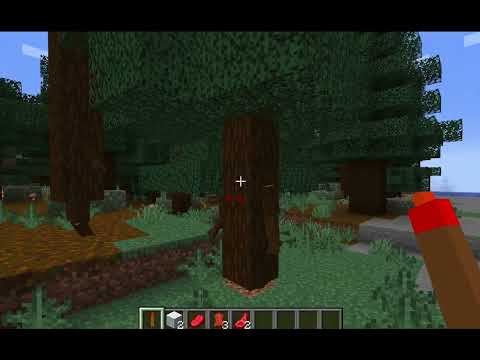
A Minecraft Fabric mod that brings trees to life. At night, trees wake up, grow arms and legs, and roam the world.
Features
- Trees Come Alive: Trees grow glowing red eyes, wooden arms, and legs
- Night Awakening: ~20% of nearby trees automatically wake up at night
- Day Slumber: When the sun rises, living trees return to their original form
- Dynamic Tree Capture: Works with any tree type (oak, birch, spruce, jungle, etc.)
- Smooth Animations: Eyes open/close, limbs grow/retract with fluid animations
- Hostile Behavior: Some trees are aggressive and attack players and mobs
- Tree Waker Item: Right-click any tree with the wand to wake it up manually
- Loot Drops: Kill a living tree to get a Tree Waker wand
Installation
- Install Fabric Loader for Minecraft 1.21.1
- Install Fabric API
- Download the mod JAR file and place it in your
modsfolder - Launch Minecraft
Usage
Automatic Mode:
- Play normally and wait for night
- Trees around you will start waking up
- At dawn, they go back to sleep
Manual Mode:
- Get the Tree Waker item from the Tools creative tab
- Right-click any tree to wake it up
- Right-click a living tree to put it back to sleep
Tree Behavior
- ~60% of awakened trees are hostile
- Hostile trees attack players, zombies, animals, and other mobs
- Peaceful trees just wander around
- Trees won't attack each other
- Killing a tree drops a Tree Waker wand
Requirements
- Minecraft 1.21.1
- Fabric Loader 0.16.0+
- Fabric API
- Java 21+
Supported Tree Types
Oak, Spruce, Birch, Jungle, Acacia, Dark Oak, Mangrove, Cherry, Crimson, Warped
License
MIT License - Feel free to use, modify, and distribute.
Support
- Discord: Join our Discord
Made by Orca
Available Versions
How to Install Living Trees on Your Server
Order Server
Order a Minecraft Java server with at least 3 GB RAM (4 GB recommended).
Set fabric Loader
In the panel under "Egg", select the fabric loader and matching Minecraft version (1.21.11).
Install Mod
Open the mod browser in the dashboard and search for "Living Trees". Click "Install" – done! Alternatively, upload the .jar via SFTP to the /mods folder.
Compatibility
Mod Loaders
Minecraft Versions
1.21.11, 1.21.10, 1.21.9 (+8 more)
Server-side
✓ RequiredRecommended RAM
4 GB(min. 3 GB)Frequently Asked Questions
Living Trees server crashes on startup – what to do?
Most common cause: wrong fabric version or insufficient RAM. Check the server log (latest.log) for "OutOfMemoryError" or "Mixin" errors. With Mado Hosting: ensure at least 3 GB RAM is allocated and the loader matches the mod version (1.21.11). You can switch loaders with one click in the panel.
Is Living Trees compatible with fabric?
Living Trees officially supports fabric for Minecraft 1.21.11, 1.21.10, 1.21.9. The Mado dashboard automatically detects incompatible loader combinations.
Server lagging with Living Trees – how to optimize performance?
Recommended RAM: 4 GB (per 8 players). Use /spark profiler to check if Living Trees consumes the most tick time. Common fixes: reduce server view-distance to 8-10, install "performant" or "starlight" as supplementary mods on Forge. With Mado Hosting, your server runs on NVMe SSDs with dedicated CPU cores for minimal latency.
Rent Modded Server
Install Living Trees with just one click on your server.