
Log Dialog
Viewing logs in the game. Mod tool for debugging resource packs and more.
Screenshots


About this Mod
Log Dialog
1.21.6 - 1.21.11

EN:
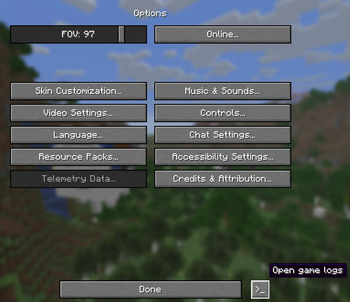
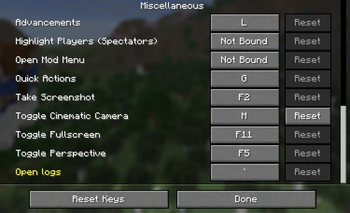
This little mod will add a built-in game log, which can be opened in the options or by pressing the key (~ by default). In the log you can view detailed information about the game's operation, see warnings and errors.
You can change the game log open button in the key binding options.
In the game options, a small button ">_" appeared next to the "Done" button. If you click it, the game log will open.
In the links category you can find a discord server for reporting bugs or questions and the source code of the mod.
DE (Auto):
Dieser kleine Mod fügt ein integriertes Spielprotokoll hinzu, das in den Optionen oder durch Drücken der Taste (standardmäßig ~) geöffnet werden kann. Im Protokoll finden Sie detaillierte Informationen zum Spielverlauf sowie Warnungen und Fehler.
Sie können die Schaltfläche zum Öffnen des Spielprotokolls in den Tastenbelegungsoptionen ändern.
In den Spieloptionen erscheint neben der Schaltfläche „Fertig“ ein kleiner Button „>_“. Wenn Sie darauf klicken, öffnet sich das Spielprotokoll.
In der Kategorie „Links“ finden Sie einen Discord-Server zum Melden von Fehlern oder Fragen sowie den Quellcode des Mods.
RU:
Этот небольшой мод добавит встроенный игровой журнал(логи), который можно открыть в настройках или нажатием клавиши (~ по умолчанию). В логах можно просмотреть подробную информацию о работе игры, увидеть предупреждения и ошибки.
Кнопку открытия логов можно изменить в настройках привязки клавиш.
В настройках игры рядом с кнопкой «Готово» появилась небольшая кнопка «>_». Нажав на неё, можно открыть игровой журнал.
В категории «Ссылки» вы найдёте Discord-сервер для сообщения об ошибках или вопросов, а также исходный код мода.
FR (Auto) :
Ce petit mod ajoute un journal de jeu intégré, accessible depuis les options ou en appuyant sur la touche (~ par défaut). Ce journal vous permet de consulter des informations détaillées sur le fonctionnement du jeu, ainsi que les avertissements et les erreurs.
Vous pouvez modifier le bouton d'ouverture du journal de jeu dans les options de raccourcis clavier.
Dans les options du jeu, un petit bouton « >_ » est apparu à côté du bouton « Terminé ». Cliquez dessus pour ouvrir le journal de jeu.
Dans la catégorie « Liens », vous trouverez un serveur Discord pour signaler des bugs ou poser des questions, ainsi que le code source du mod.
Available Versions
How to Install Log Dialog on Your Server
Order Server
Order a Minecraft Java server with at least 3 GB RAM (4 GB recommended).
Set fabric Loader
In the panel under "Egg", select the fabric loader and matching Minecraft version (1.21.11).
Install Mod
Open the mod browser in the dashboard and search for "Log Dialog". Click "Install" – done! Alternatively, upload the .jar via SFTP to the /mods folder.
Compatibility
Mod Loaders
Minecraft Versions
1.21.11, 1.21.8, 1.21.7 (+1 more)
Server-side
✗ UnsupportedRecommended RAM
4 GB(min. 3 GB)Frequently Asked Questions
Log Dialog server crashes on startup – what to do?
Most common cause: wrong fabric version or insufficient RAM. Check the server log (latest.log) for "OutOfMemoryError" or "Mixin" errors. With Mado Hosting: ensure at least 3 GB RAM is allocated and the loader matches the mod version (1.21.11). You can switch loaders with one click in the panel.
Is Log Dialog compatible with fabric?
Log Dialog officially supports fabric for Minecraft 1.21.11, 1.21.8, 1.21.7. The Mado dashboard automatically detects incompatible loader combinations.
Server lagging with Log Dialog – how to optimize performance?
Recommended RAM: 4 GB (per 8 players). Use /spark profiler to check if Log Dialog consumes the most tick time. Common fixes: reduce server view-distance to 8-10, install "performant" or "starlight" as supplementary mods on Forge. With Mado Hosting, your server runs on NVMe SSDs with dedicated CPU cores for minimal latency.
Similar Mods






Rent Modded Server
Install Log Dialog with just one click on your server.