
Logout Timer
This mod allows you to set a timer in game and when the timer reaches your desired time it boots you from the world/server you were in. This is great for afking on large servers where you dont want to be found or just to not die in game.
Screenshots
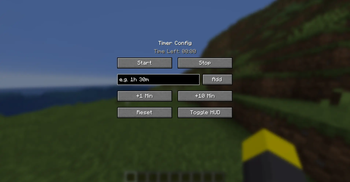
About this Mod
⏳ Session Timer
Take control of your playtime.
Ever find yourself saying "just five more minutes" and suddenly it's 3 AM? Session Timer is a simple, lightweight utility mod designed to help you manage your gaming sessions effectively. Set a time limit, track it with a clean HUD, and when time runs out, the mod automatically disconnects you from the world or server.
Whether you are trying to stay productive, managing screen time, or just doing a speedrun challenge, Session Timer keeps you on track.
✨ Key Features
⏱️ flexible Time Input: No math required. Type naturally like /timer set 1h 30m or /timer add 10m to adjust your session on the fly.

🖥️ Visual HUD: A clean, unobtrusive timer in the top-left corner keeps you aware of your remaining time.

🎛️ Easy Configuration Menu: Press K (default) to open a user-friendly menu. Start, stop, add time, or reset the timer with a single click.

🧠 Smart Pausing:

    Singleplayer: The timer respects your pause menu. If you press ESC to take a break, the timer stops.

    Multiplayer: The timer keeps running even if you are in a menu, ensuring you don't lose track of real-world time.

🔌 Auto-Disconnect: When the clock hits 00:00:00, you are instantly disconnected from the server or world. No overrides, no cheating!
🎮 How to Use
The Menu (Recommended)
Press K to open the Session Timer GUI.
Input Box: Type a duration (e.g., 45m or 1h 15m) and click Add to set the timer.

Quick Buttons: Use +1 Min or +10 Min for quick adjustments.

Controls: Click Start to begin the countdown or Stop to pause it.

Toggle HUD: Hide the on-screen timer if you want full immersion (the disconnect will still happen!).
Commands
Prefer using the chat? We have you covered:
/timer set <time> - Set the timer (e.g., /timer set 20m).

/timer add <time> - Add more time to the current clock.

/timer start - Resume the countdown.

/timer stop - Pause the countdown.

/timer reset - Reset the clock to 0.

/timer togglehud - Show or hide the overlay.
📥 Installation
Download and install the Fabric Loader.

Download the Fabric API mod.

Drop SessionTimer.jar into your mods folder.

Launch the game and press K to get started!
Available Versions
How to Install Logout Timer on Your Server
Order Server
Order a Minecraft Java server with at least 3 GB RAM (4 GB recommended).
Set fabric Loader
In the panel under "Egg", select the fabric loader and matching Minecraft version (1.21.4).
Install Mod
Open the mod browser in the dashboard and search for "Logout Timer". Click "Install" – done! Alternatively, upload the .jar via SFTP to the /mods folder.
Compatibility
Mod Loaders
Minecraft Versions
1.21.4
Server-side
✗ UnsupportedRecommended RAM
4 GB(min. 3 GB)Frequently Asked Questions
Logout Timer server crashes on startup – what to do?
Most common cause: wrong fabric version or insufficient RAM. Check the server log (latest.log) for "OutOfMemoryError" or "Mixin" errors. With Mado Hosting: ensure at least 3 GB RAM is allocated and the loader matches the mod version (1.21.4). You can switch loaders with one click in the panel.
Is Logout Timer compatible with fabric?
Logout Timer officially supports fabric for Minecraft 1.21.4. The Mado dashboard automatically detects incompatible loader combinations.
Server lagging with Logout Timer – how to optimize performance?
Recommended RAM: 4 GB (per 8 players). Use /spark profiler to check if Logout Timer consumes the most tick time. Common fixes: reduce server view-distance to 8-10, install "performant" or "starlight" as supplementary mods on Forge. With Mado Hosting, your server runs on NVMe SSDs with dedicated CPU cores for minimal latency.
Similar Mods






Rent Modded Server
Install Logout Timer with just one click on your server.