
Loot Bags
Discover rare loot bags from mob kills! Hunt for mobs and find epic rewards in these Loot Bags.
Screenshots

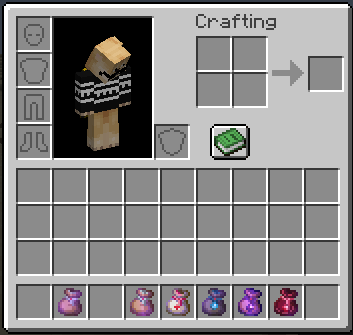
About this Mod

Loot Bags!
Discover six new types of loot bags—Common, Uncommon, Rare, Health, Epic and Mythic—when you defeat mobs! Each bag holds exciting and balanced rewards.
Varying Drop Rates
Not all mobs drop loot bags. Some are rarer than others, making every kill a thrilling chance for a special prize!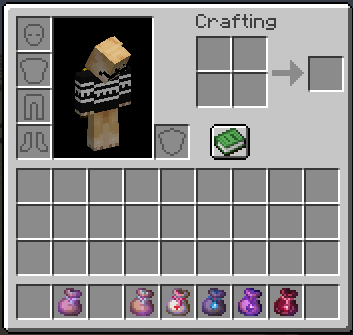
Hunt for Rewards
Keep your eyes peeled and your sword sharp. The rarer the loot bag, the greater the reward! Happy hunting!
Cheats
To get all available loot bags, type the following command:
/function loot_bags:cheat/give_all
Config
To modify the drop rates of the loot bags:
- Go to the datapack folder, then navigate to
Loot Bags [DP]/data/loot_bags/function/kill_entity.
You will find three files: Easy, Medium, and Hard.
...
execute store result score $x __variable__ run random value 1..<value to modify>
...
To increase the chances of getting a loot bag, decrease the value
And do the opposite for each difficulty level.
Uninstalling
- Access the Chat Window.
- Enter the Uninstall Command and press Enter:
/function lbags:uninstall
Links


Available Versions
How to Install Loot Bags on Your Server
Order Server
Order a Minecraft Java server with at least 3 GB RAM (4 GB recommended).
Set datapack Loader
In the panel under "Egg", select the datapack loader and matching Minecraft version (1.21.2).
Install Mod
Open the mod browser in the dashboard and search for "Loot Bags". Click "Install" – done! Alternatively, upload the .jar via SFTP to the /mods folder.
Compatibility
Mod Loaders
Minecraft Versions
1.21.2, 1.21.1, 1.21
Server-side
✓ RequiredRecommended RAM
4 GB(min. 3 GB)Frequently Asked Questions
Loot Bags server crashes on startup – what to do?
Most common cause: wrong datapack version or insufficient RAM. Check the server log (latest.log) for "OutOfMemoryError" or "Mixin" errors. With Mado Hosting: ensure at least 3 GB RAM is allocated and the loader matches the mod version (1.21.2). You can switch loaders with one click in the panel.
Is Loot Bags compatible with datapack and fabric and forge and neoforge and quilt?
Loot Bags officially supports datapack, fabric, forge, neoforge, quilt for Minecraft 1.21.2, 1.21.1, 1.21. Note: Forge and Fabric mods are NOT cross-compatible – pick one loader and stick with it. The Mado dashboard automatically detects incompatible loader combinations.
Server lagging with Loot Bags – how to optimize performance?
Recommended RAM: 4 GB (per 8 players). Use /spark profiler to check if Loot Bags consumes the most tick time. Common fixes: reduce server view-distance to 8-10, install "performant" or "starlight" as supplementary mods on Forge. With Mado Hosting, your server runs on NVMe SSDs with dedicated CPU cores for minimal latency.
Similar Mods




Rent Modded Server
Install Loot Bags with just one click on your server.