
Loot Table Manager
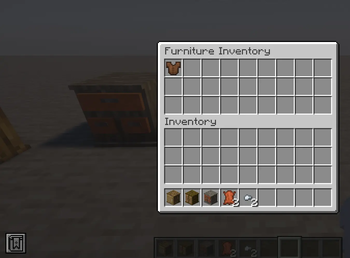
LootTable Manager is a Minecraft mod that allows you to add, replace, or customize loot tables for any block that contains an inventory, including vanilla blocks and blocks added by other mods (furniture, cupboards, drawers, shelves, etc.).
Screenshots
About this Mod
📦 LootTable Manager
LootTable Manager is a Minecraft mod that allows you to add, replace, or customize loot tables for any block that contains an inventory, including vanilla blocks and blocks added by other mods (furniture, cupboards, drawers, shelves, etc.).
The mod is designed to give server owners and modpack creators full control over loot generation using simple and clean JSON configuration files, without needing datapacks or code changes.
✨ Features
- ✔ Add or override loot tables for any inventory-based block
- ✔ Works with vanilla and modded blocks
- ✔ Fully configurable loot (items, weights, rolls, counts)
- ✔ Per-block loot respawn cooldown system
- ✔ Simple JSON-based configuration
- ✔ Ideal for RPG, survival, apocalypse, and roleplay servers
⚙️ How It Works
📁 Loot Tables
Each loot table is defined in a JSON file named exactly after the block ID.
Example file name:
This file controls the loot generated inside:
🧪 Example Loot Table
🔹 This loot table randomly generates books, paper, and rare items inside the block.
🔹 weight controls item probability.
🔹 rolls defines how many items are selected per interaction.
⏱ Loot Respawn Cooldown
Loot respawn is controlled by a dedicated JSON file.
Each block can have its own cooldown time (in seconds) before the loot can regenerate.
🧾 Example Cooldown File
(cooldown.json)
180= loot respawns after 3 minutes120= loot respawns after 2 minutes90= loot respawns after 1.5 minutes
This system prevents infinite farming and allows balanced, immersive gameplay.
🎯 Use Cases
- 🧟 Apocalypse / zombie survival servers
- 🏹 RPG and adventure maps
- 🏠 Furniture mods with functional storage loot
- 🌍 Custom survival experiences
- 🛠 Modpacks with controlled loot economy
🧠 Design Philosophy
Powerful customization with zero coding.
LootTable Manager focuses on flexibility, simplicity, and compatibility, making it easy to integrate into any modded Minecraft environment.
Available Versions
How to Install Loot Table Manager on Your Server
Order Server
Order a Minecraft Java server with at least 3 GB RAM (4 GB recommended).
Set forge Loader
In the panel under "Egg", select the forge loader and matching Minecraft version (1.20.6).
Install Mod
Open the mod browser in the dashboard and search for "Loot Table Manager". Click "Install" – done! Alternatively, upload the .jar via SFTP to the /mods folder.
Compatibility
Mod Loaders
Minecraft Versions
1.20.6, 1.20.5, 1.20.4 (+3 more)
Server-side
✓ RequiredRecommended RAM
4 GB(min. 3 GB)Frequently Asked Questions
Loot Table Manager server crashes on startup – what to do?
Most common cause: wrong forge version or insufficient RAM. Check the server log (latest.log) for "OutOfMemoryError" or "Mixin" errors. With Mado Hosting: ensure at least 3 GB RAM is allocated and the loader matches the mod version (1.20.6). You can switch loaders with one click in the panel.
Is Loot Table Manager compatible with forge?
Loot Table Manager officially supports forge for Minecraft 1.20.6, 1.20.5, 1.20.4. The Mado dashboard automatically detects incompatible loader combinations.
Server lagging with Loot Table Manager – how to optimize performance?
Recommended RAM: 4 GB (per 8 players). Use /spark profiler to check if Loot Table Manager consumes the most tick time. Common fixes: reduce server view-distance to 8-10, install "performant" or "starlight" as supplementary mods on Forge. With Mado Hosting, your server runs on NVMe SSDs with dedicated CPU cores for minimal latency.
Similar Mods






Rent Modded Server
Install Loot Table Manager with just one click on your server.