
Lootrun Delight
This mod makes Lootruning on Wynncraft a delight by adding a challenge estimator, beacon counter, red challenge counter, a stats command to see current lootrun stats and info about when to start aqua stacking
Screenshots



About this Mod
This mod makes Lootruning on Wynncraft a delight!
It includes:
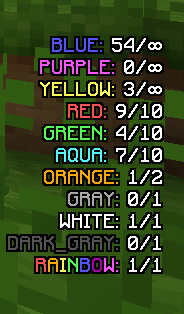
- A Beacon count tracker so you know how many of each beacon are remaining which is saved on restarts and bound to classes! So no problem if you want to pause a Lootrun to Lootrun on another class! This is disabled by default and can be enabled by doing /togglebeacons
- A Beacon challenge estimator to know what challenge each beacon is and how far away it is. This is toggled off by default and can be enabled by doing /toggledestinations
- Tons of stats that you can view at any time with /lootrunstats to see total mob buffs, pulls, effective pulls and much more! This is, like the beacon, being saved class wise, so feel free to take a break!
- A red beacon counter in the Scoreboard, which means you will always know how many more challenges you have to do to get more time in your lootruns
- An aqua beacon indicator which tells you if it right now is a good idea to take the aqua beacon. This is shown in chat after the beacon options show up
Available Versions
How to Install Lootrun Delight on Your Server
Order Server
Order a Minecraft Java server with at least 3 GB RAM (4 GB recommended).
Set fabric Loader
In the panel under "Egg", select the fabric loader and matching Minecraft version (1.19.4).
Install Mod
Open the mod browser in the dashboard and search for "Lootrun Delight". Click "Install" – done! Alternatively, upload the .jar via SFTP to the /mods folder.
Compatibility
Mod Loaders
Minecraft Versions
1.19.4
Server-side
✗ UnsupportedRecommended RAM
4 GB(min. 3 GB)Frequently Asked Questions
Lootrun Delight server crashes on startup – what to do?
Most common cause: wrong fabric version or insufficient RAM. Check the server log (latest.log) for "OutOfMemoryError" or "Mixin" errors. With Mado Hosting: ensure at least 3 GB RAM is allocated and the loader matches the mod version (1.19.4). You can switch loaders with one click in the panel.
Is Lootrun Delight compatible with fabric?
Lootrun Delight officially supports fabric for Minecraft 1.19.4. The Mado dashboard automatically detects incompatible loader combinations.
Server lagging with Lootrun Delight – how to optimize performance?
Recommended RAM: 4 GB (per 8 players). Use /spark profiler to check if Lootrun Delight consumes the most tick time. Common fixes: reduce server view-distance to 8-10, install "performant" or "starlight" as supplementary mods on Forge. With Mado Hosting, your server runs on NVMe SSDs with dedicated CPU cores for minimal latency.
Similar Mods




Rent Modded Server
Install Lootrun Delight with just one click on your server.