
LootSelect
A sleek UI to selectively loot nearby items.
Screenshots
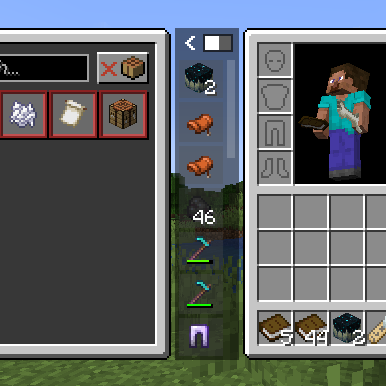


About this Mod


When your inventory is full and the ground is littered with loot, constantly dropping items to pick up the ones you want is a hassle. LootSelect solves this by adding a sleek, scrollable list next to your inventory screen, showing all items within reach and allowing you to pick up just the ones you want directly from there.
Requirements & Recommendations
Fabric: Fabric API
Forge (1.20.1/1.21.1): Sinytra Connector + Forgified Fabric API
Recommended: InvMove, Stxck
Key Features
Pick & Swap: Click any item in the list to "grab" it. You can place it directly into an empty slot or swap it with an existing item in your inventory.
Auto-Pickup Toggle: Easily switch vanilla auto-pickup on or off using the toggle button in the panel or shortcut (Default:
P). While disabled, item can only be collectible via the LootSelect panel.Minimize/Maximize Toggle: Easily switch the panel size using the button in the panel.
Half Pickup:
Right-clickan item in the list to take half of the stack instead of the full amount.Dispose:
Middle-clickan item to discard it directly from the ground.Rapid Collection: Use
Shift-Clickto instantly move items from the ground into your bags. This is useful for quickly equipping armor, shields, or totem.Sticky Item Hovering: The scroll position intelligently adjusts when the item list updates, keeping your hovered item under the cursor whenever possible.
Hotbar Swap: Pressing
Ctrl + 1-9while hovering over an item allows quick-swapping to your hotbar.Offhand Swap: Press the
Fkey while hovering over an item to instantly swap it with your offhand slot.Detailed Tooltips: Hover over items in the list to view full tooltips, including enchantments, potion effects, and durability—no need to pick them up first.
Mod Compatibility
LootSelect features seamless integration with several popular mods to enhance your looting experience:
Staaaaaaaaaaaack (Stxck): Grouped item entities are correctly reflected in the list. When items are stacked on the ground, the list displays the total quantity (e.g., "2x", "12x") in yellow, matching the mod's overlay.
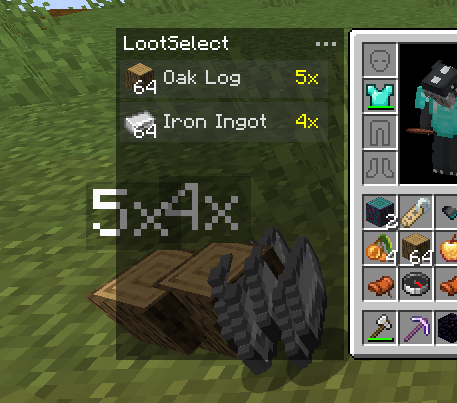
Inventorio: Smartly sorts tools and off-hand items into the correct Toolbelt or Utility Belt slots when using Shift-Click or F key. It prioritizes the currently selected utility slot and respects Inventorio's UI toggle states.
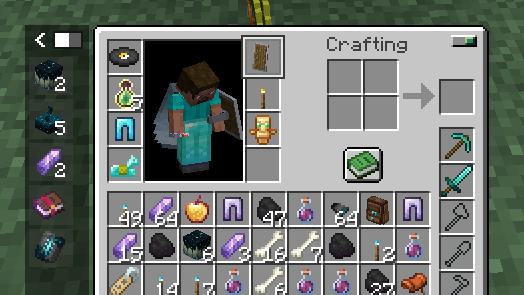
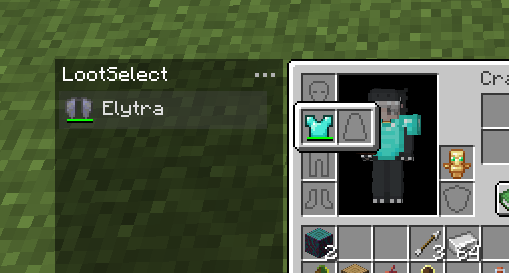
Elytra Slot & Charm of Undying: When using Shift-Click to pick up items, LootSelect intelligently prioritizes moving Elytras and Totems of Undying into the dedicated slots provided by these mods.
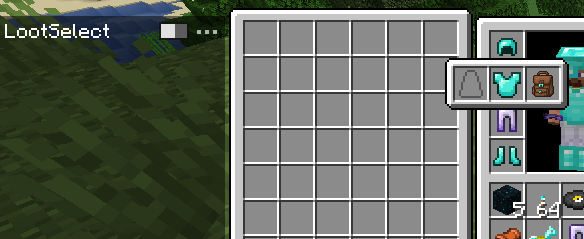
YyzsBackpack: Full integration for dynamic inventory layouts. LootSelect's panel automatically adjusts its position when the backpack is equipped or opened. Additionally, items from this mod (and others) intelligently prioritize Trinkets or Curios slots when using Shift-Click.
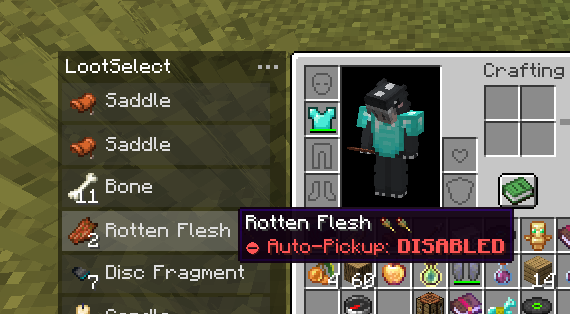
Auto Pickup Filter: Items you've configured to "Auto-Pickup: DISABLED" will only be collectible via the LootSelect list. You can quickly toggle the auto-pickup status for any item directly in the list by pressing the "I" key.
Modpacks
Feel free to include LootSelect in modpacks.
Available Versions
How to Install LootSelect on Your Server
Order Server
Order a Minecraft Java server with at least 3 GB RAM (4 GB recommended).
Set fabric Loader
In the panel under "Egg", select the fabric loader and matching Minecraft version (1.21.11).
Install Mod
Open the mod browser in the dashboard and search for "LootSelect". Click "Install" – done! Alternatively, upload the .jar via SFTP to the /mods folder.
Compatibility
Mod Loaders
Minecraft Versions
1.21.11, 1.21.1, 1.20.1
Server-side
✓ RequiredRecommended RAM
4 GB(min. 3 GB)Frequently Asked Questions
LootSelect server crashes on startup – what to do?
Most common cause: wrong fabric version or insufficient RAM. Check the server log (latest.log) for "OutOfMemoryError" or "Mixin" errors. With Mado Hosting: ensure at least 3 GB RAM is allocated and the loader matches the mod version (1.21.11). You can switch loaders with one click in the panel.
Is LootSelect compatible with fabric and forge and neoforge?
LootSelect officially supports fabric, forge, neoforge for Minecraft 1.21.11, 1.21.1, 1.20.1. Note: Forge and Fabric mods are NOT cross-compatible – pick one loader and stick with it. The Mado dashboard automatically detects incompatible loader combinations.
Server lagging with LootSelect – how to optimize performance?
Recommended RAM: 4 GB (per 8 players). Use /spark profiler to check if LootSelect consumes the most tick time. Common fixes: reduce server view-distance to 8-10, install "performant" or "starlight" as supplementary mods on Forge. With Mado Hosting, your server runs on NVMe SSDs with dedicated CPU cores for minimal latency.
Similar Mods


Rent Modded Server
Install LootSelect with just one click on your server.