
Lore Keeper
This project adds an easy and intuitive way to add lore to your world!
Screenshots

About this Mod
Lorekeeper
Lorekeeper is an in-game compendium and discovery system built for creators, modpacks, and servers. You can create custom books, organize information into categories and entries, add images, and let players uncover knowledge naturally as they play.
Create Your Own Compendiums
Build custom collections of information for your world. This can include Beastiaries, Regions, Lore, Quests, Guides and so much more!
Organize everything into categories and detailed entries with custom titles, descriptions, and images!
Discovery and Progression
Knowledge does not have to be available immediately. By simply traveling around a world players can discover regions, unlock entries in the compendium, reveal hidden information about that area and even progress through exploration!
This makes it perfect for adventure maps, RPG experiences, and progression-focused gameplay. Explore and have fun with it!
Features
Lorekeeper includes simple tools to help creators build and manage their own in-game information system. There is a simple difference between admins and default players that allows for full customization!
Features include:
- Custom compendiums
- Categories and entries
- Entry titles, descriptions, and images
- Category images
- Discovery-based unlocking
- Region-based discoveries
- Discovery popups
- Player progress tracking
- External image support
- Admin/editor tools
- Teleport buttons for entries with saved locations
- Server and modpack support
How It Works
Creators can make a compendium, add categories, create entries, and attach images directly through the in-game editor.
Entries can then be connected to discoveries, allowing players to unlock information naturally as they explore the world.
An example would be:
Player might discover a forest, ruin, town, dungeon, or landmark. At that point, Lorekeeper can unlock the related entry inside the compendium.
Designed to Fit However You Need It To
Lorekeeper focuses on a clean interface and immersive presentation. You can be as simple or as detailed as you want!
Supports:
- Discovery popups
- Organized browsing
- External assets
- Modpack and server integration
- Creator-controlled progression
Here are the basic steps to get started!
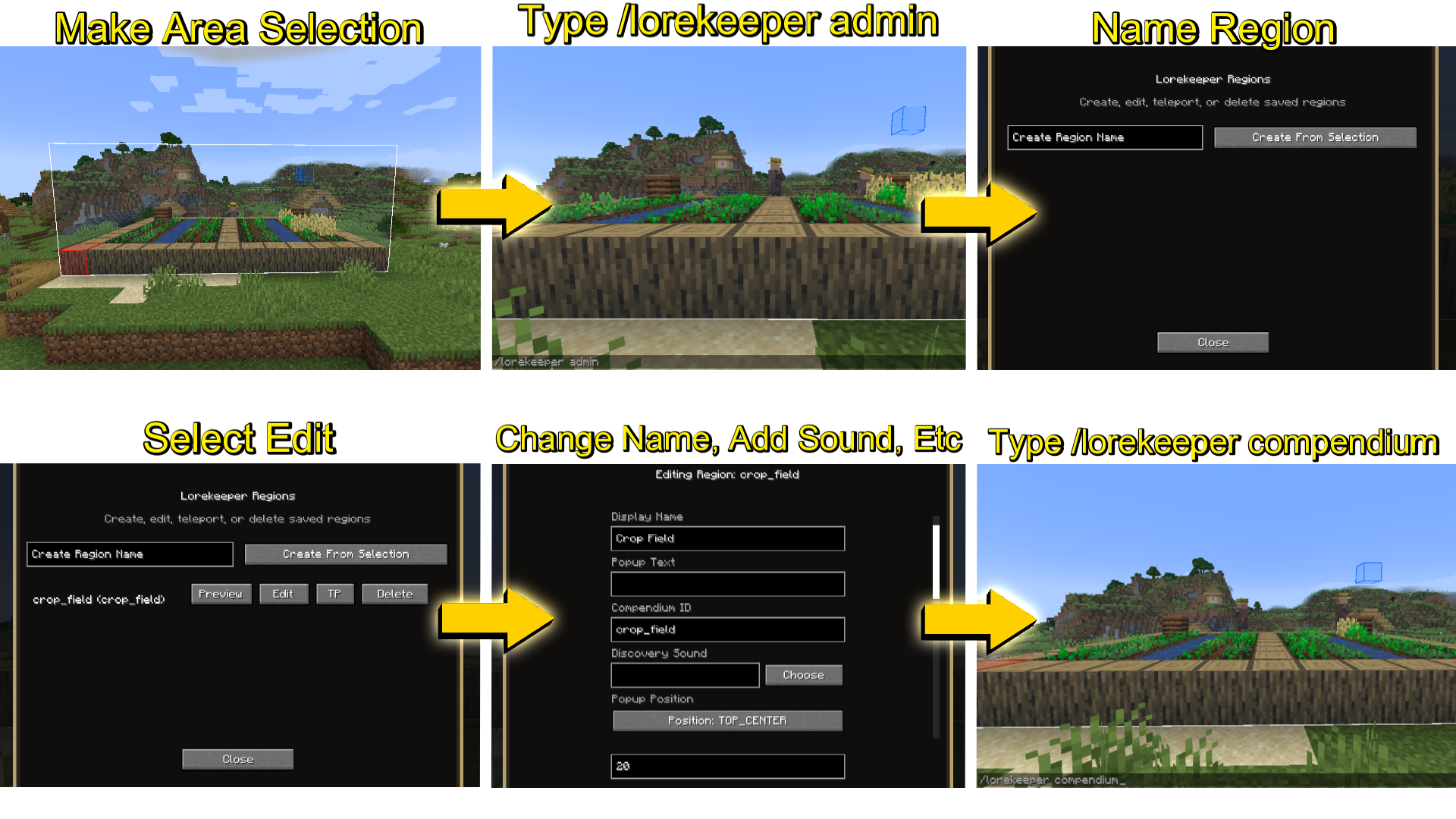
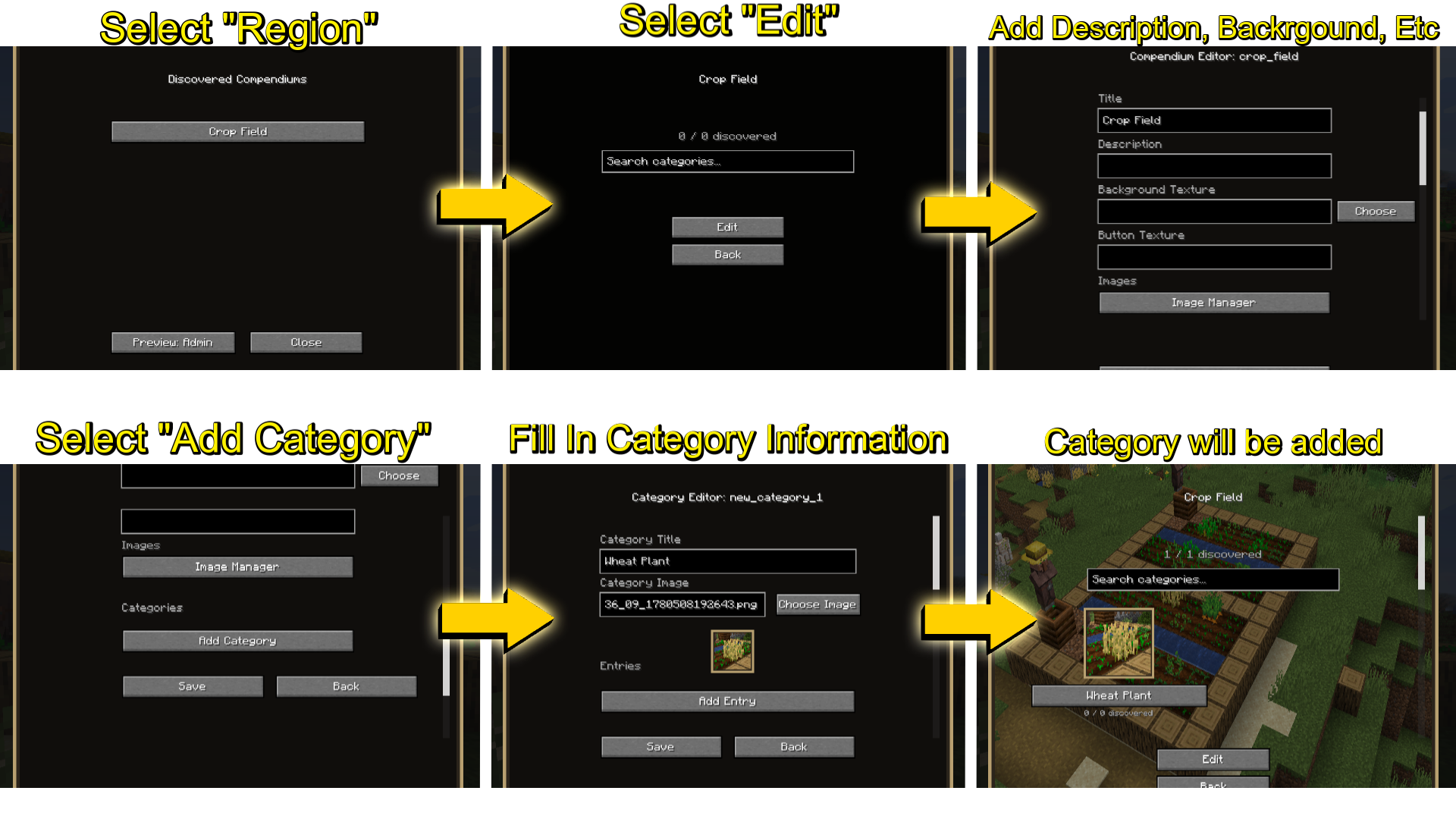
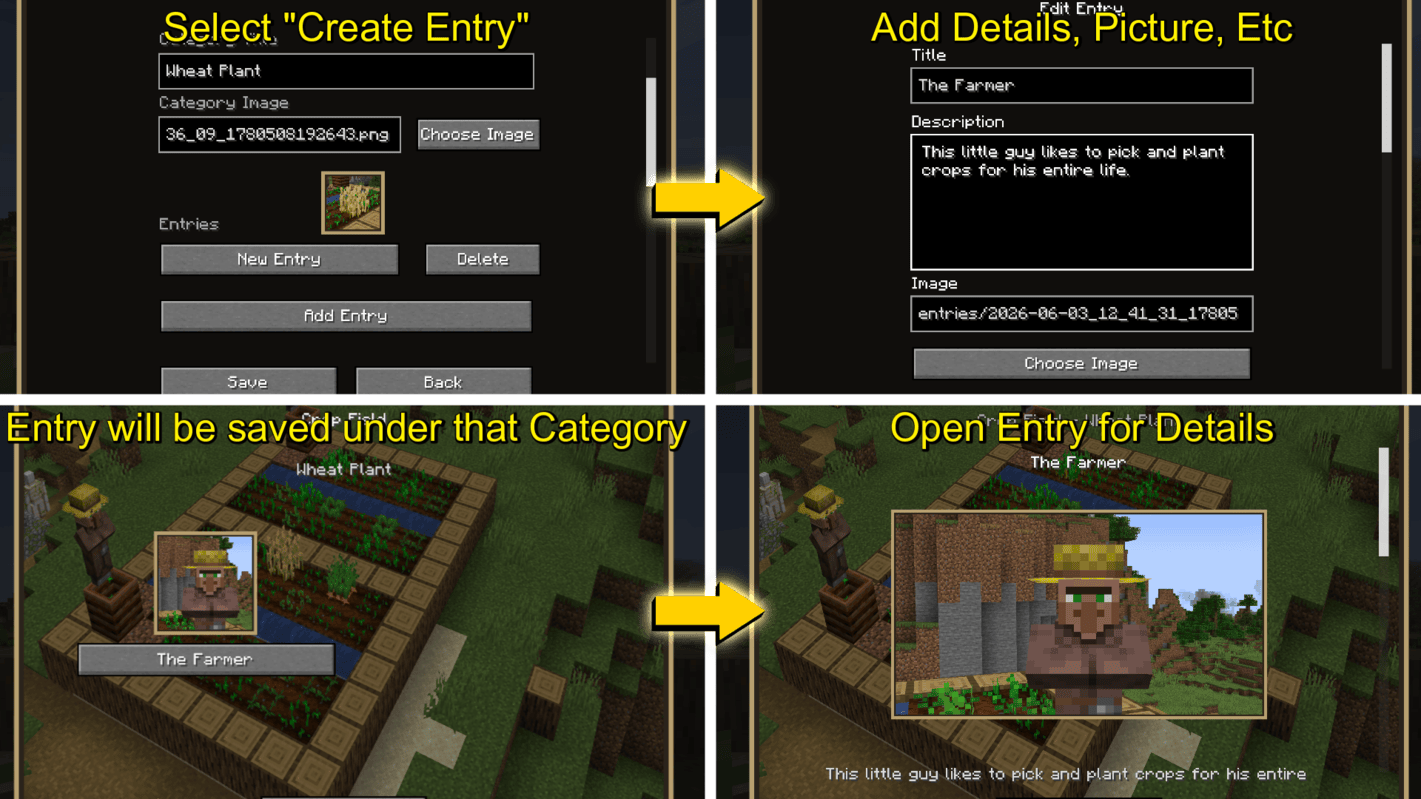
And you're all done! (Full README is in the mod upon download)
Join the Discord if you need assistance or have suggestions:
https://discord.gg/pwyegxC
Art made using Inkarnate
License / Copyright
All Rights Reserved
This mod may not be distributed, modified, ported, or used in any form without explicit written permission from the copyright holder. This includes, but is not limited to, ports to other Minecraft versions, loaders, or platforms, as well as derivative works based on this mod.
Personal, private modifications or ports for use in your own world are tolerated, provided they are not distributed, shared, uploaded, or otherwise made available to anyone else.
Any redistribution, public release, server use, reposting, reuploading, modification, or porting without permission is strictly prohibited.
Available Versions
How to Install Lore Keeper on Your Server
Order Server
Order a Minecraft Java server with at least 3 GB RAM (4 GB recommended).
Set fabric Loader
In the panel under "Egg", select the fabric loader and matching Minecraft version (1.21.1).
Install Mod
Open the mod browser in the dashboard and search for "Lore Keeper". Click "Install" – done! Alternatively, upload the .jar via SFTP to the /mods folder.
Compatibility
Mod Loaders
Minecraft Versions
1.21.1, 1.20.1
Server-side
✓ RequiredRecommended RAM
4 GB(min. 3 GB)Frequently Asked Questions
Lore Keeper server crashes on startup – what to do?
Most common cause: wrong fabric version or insufficient RAM. Check the server log (latest.log) for "OutOfMemoryError" or "Mixin" errors. With Mado Hosting: ensure at least 3 GB RAM is allocated and the loader matches the mod version (1.21.1). You can switch loaders with one click in the panel.
Is Lore Keeper compatible with fabric and forge and neoforge?
Lore Keeper officially supports fabric, forge, neoforge for Minecraft 1.21.1, 1.20.1. Note: Forge and Fabric mods are NOT cross-compatible – pick one loader and stick with it. The Mado dashboard automatically detects incompatible loader combinations.
Server lagging with Lore Keeper – how to optimize performance?
Recommended RAM: 4 GB (per 8 players). Use /spark profiler to check if Lore Keeper consumes the most tick time. Common fixes: reduce server view-distance to 8-10, install "performant" or "starlight" as supplementary mods on Forge. With Mado Hosting, your server runs on NVMe SSDs with dedicated CPU cores for minimal latency.
Similar Mods




Rent Modded Server
Install Lore Keeper with just one click on your server.