
Lostworld.jar
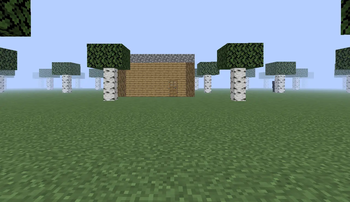
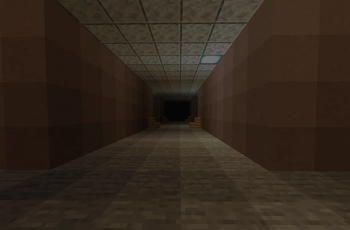
This terrifying mod adds scary entities and other creepy dimensions!
Screenshots
About this Mod
THIS MOD REQUIRES GeckoLib TO WORK!
Want to immerse yourself in a very suspicious world? You'll see the strangest and most terrifying dimensions, and you'll have to escape from them!
Try to avoid entities that want you dead. Try to save your world! Otherwise, you'll lose access to it. This is a psychological meta-horror mod. You don't just survive in the game—the game interacts with you.
- Features:
- Terrifying Dimensions: You will travel through glitched, liminal levels (Level 2 to Level 6) featuring endless mazes, strange libraries, and the creepy "Worldbrick".
Custom Entities: Avoid monsters that hunt you in different ways. You will meet LostSteve, the Skinstealer, the 2D black void called Nothing, and the demon steve (who aggressively breaks blocks to get to you and shows exactly how many blocks away he is on your screen).
Chat Puzzles: You will need to figure out specific passwords and type them into the Minecraft chat to open doors and survive.
⚠️ Warning:
- Be prepared for something to possess your computer. This mod features screamers and loud sounds. But more importantly, here is what the mod will ACTUALLY do to your PC:
- Create .txt files: It will drop text files with clues and binary codes directly onto your real-life Desktop.
- System Pop-ups: It will create custom Windows error pop-ups (dialog windows) outside of the game.
- DELETE YOUR WORLD: If the "brokengod" entity kills you, the mod will crash your connection and permanently delete your world save (level.dat). Do not play this on your main survival world!
Note for Multiplayer: You can play this with friends! To protect servers, the world-deletion feature automatically disables itself in multiplayer. Also, the real-life .txt files will only appear on the Server Host's computer.
This horror mod was inspired by The Broken Script and wonderland.jar so that it too could do something terrible.
Available Versions
How to Install Lostworld.jar on Your Server
Order Server
Order a Minecraft Java server with at least 4 GB RAM (6 GB recommended).
Set forge Loader
In the panel under "Egg", select the forge loader and matching Minecraft version (1.20.1).
Install Mod
Open the mod browser in the dashboard and search for "Lostworld.jar". Click "Install" – done! Alternatively, upload the .jar via SFTP to the /mods folder.
Compatibility
Mod Loaders
Minecraft Versions
1.20.1
Server-side
✓ RequiredRecommended RAM
6 GB(min. 4 GB)Frequently Asked Questions
Lostworld.jar server crashes on startup – what to do?
Most common cause: wrong forge version or insufficient RAM. Check the server log (latest.log) for "OutOfMemoryError" or "Mixin" errors. With Mado Hosting: ensure at least 4 GB RAM is allocated and the loader matches the mod version (1.20.1). You can switch loaders with one click in the panel.
Is Lostworld.jar compatible with forge?
Lostworld.jar officially supports forge for Minecraft 1.20.1. The Mado dashboard automatically detects incompatible loader combinations.
Server lagging with Lostworld.jar – how to optimize performance?
Recommended RAM: 6 GB (per 5 players). Use /spark profiler to check if Lostworld.jar consumes the most tick time. Common fixes: reduce server view-distance to 8-10, install "performant" or "starlight" as supplementary mods on Forge. With Mado Hosting, your server runs on NVMe SSDs with dedicated CPU cores for minimal latency.
Similar Mods




Rent Modded Server
Install Lostworld.jar with just one click on your server.