
LuckyVault
LuckyVault is a server-side lottery mod for NeoForge Minecraft offering a fun lottery experience. Players buy tickets to win diamonds in automated draws with live announcements and a leaderboard.
Screenshots
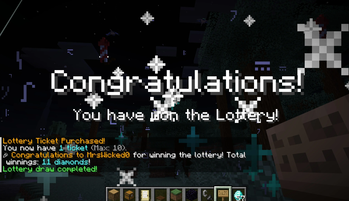
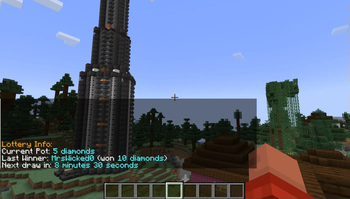
About this Mod
🎟️ LuckyVault – A Fully Configurable Server-Side Lottery System for NeoForge 🎟️
LuckyVault is a powerful, fully server-side lottery system designed for NeoForge-based Minecraft servers.
Give your players a fun, automated way to buy tickets, win prizes, and compete on leaderboards – all while keeping your economy balanced!
🔹 Now Open-Source! – Secure, transparent, and community-driven. Anyone can contribute, customize, and enhance the mod!
✨ Features
✅ Automated Lottery Draws 🎰
- The system automatically selects a winner at scheduled intervals, ensuring randomized and fair results.
✅ Configurable Currency System 💰
- No longer restricted to diamonds! You can now choose any item (diamonds, emeralds, netherite, custom items) as the lottery currency.
- Players buy tickets and receive winnings in your chosen currency.
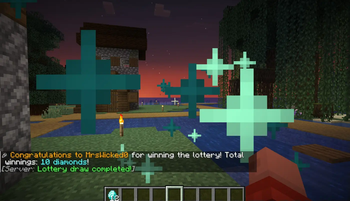
✅ Dynamic Winner Announcements 🎆
- Full-screen title messages + fast-burst fireworks + a celebratory jingle for an exciting winner reveal!
- Fully configurable announcement messages & effects.
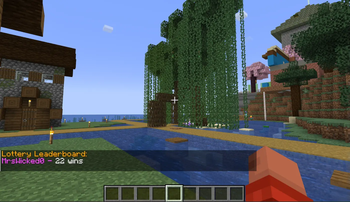
✅ Leaderboard Tracking 🏆
- Displays top winners over time, adding a competitive edge to the game.
✅ Unclaimed Winnings Storage 🎟️
- If a player wins but isn’t online, their winnings are safely stored for them to claim later.
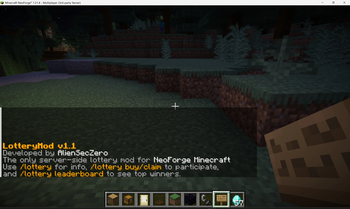
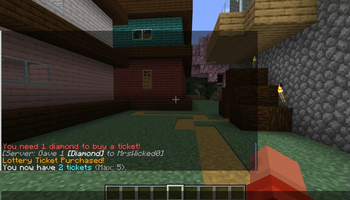
✅ Simple & Intuitive Commands 💻
/lottery– View lottery info, current pot, last winner, and time until next draw./lottery buy– Purchase a ticket for the next draw (subject to limits)./lottery claim– Claim unclaimed winnings if you were offline during a draw./lottery leaderboard– View the top winners on the server./lottery draw– Manually force a draw (admin only)./lottery cleareffects– Remove all active lottery-related effects (admin only).
✅ Fully Server-Side & Performance-Friendly ⚙️
- No client installation required – works seamlessly with vanilla clients.
- Minimal performance impact, making it ideal for economy-based servers and long-term play.
✅ NeoForge Compatibility 🔧
- Specifically built for NeoForge-based Minecraft servers, ensuring smooth integration.
🔮 Future Plans
🔹 Expanded Economy Support – Potential integration with in-game economy mods for virtual currency usage.
🔹 More Customization – Flexible draw intervals, jackpot multipliers, and admin-configurable rewards.
🔹 Enhanced Visual Effects – More celebratory animations & unique winner effects.
📥 Installation & Compatibility
- Requires NeoForge (Latest stable version recommended).
- Server-Side Only – No client installation needed.
- Works with vanilla clients – Players do not need mods to participate.
🎉 Add LuckyVault to your NeoForge server today and let your players win big! 🚀
Available Versions
How to Install LuckyVault on Your Server
Order Server
Order a Minecraft Java server with at least 3 GB RAM (4 GB recommended).
Set neoforge Loader
In the panel under "Egg", select the neoforge loader and matching Minecraft version (1.21.5).
Install Mod
Open the mod browser in the dashboard and search for "LuckyVault". Click "Install" – done! Alternatively, upload the .jar via SFTP to the /mods folder.
Compatibility
Mod Loaders
Minecraft Versions
1.21.5, 1.21.4
Server-side
✓ RequiredRecommended RAM
4 GB(min. 3 GB)Frequently Asked Questions
LuckyVault server crashes on startup – what to do?
Most common cause: wrong neoforge version or insufficient RAM. Check the server log (latest.log) for "OutOfMemoryError" or "Mixin" errors. With Mado Hosting: ensure at least 3 GB RAM is allocated and the loader matches the mod version (1.21.5). You can switch loaders with one click in the panel.
Is LuckyVault compatible with neoforge?
LuckyVault officially supports neoforge for Minecraft 1.21.5, 1.21.4. The Mado dashboard automatically detects incompatible loader combinations.
Server lagging with LuckyVault – how to optimize performance?
Recommended RAM: 4 GB (per 8 players). Use /spark profiler to check if LuckyVault consumes the most tick time. Common fixes: reduce server view-distance to 8-10, install "performant" or "starlight" as supplementary mods on Forge. With Mado Hosting, your server runs on NVMe SSDs with dedicated CPU cores for minimal latency.
Similar Mods



![CobbleDollars [Cobblemon Addon]](https://cdn.modrinth.com/data/s7N7AsqL/684040a264fc1d7f9b856ec5d2da39767398c7ad.png)

Rent Modded Server
Install LuckyVault with just one click on your server.