
LT-Rynek
An amateur mod designed to simplify market operations on various Minecraft servers. It enables fast management of trading profiles, as well as adding and removing items, and browsing available offers.
Screenshots
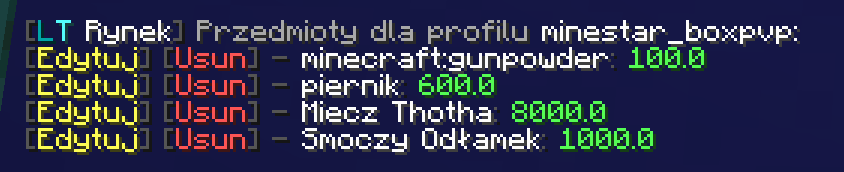


About this Mod
LT-Rynek - Minecraft Mod
📌 Description
LT-Market is an amateur modification that simplifies market operations on various Minecraft servers. It allows for quick management of trading profiles, adding and removing items, and browsing available offers. If you use this mod and would like to show appreciation, share who inspired you! ❤️
✨ Features
- Ability to create and manage market profiles.
- Add items to profiles with a maximum price.
- Remove items from profiles.
- Display a list of items in a given profile.
- Convenient commands to facilitate market operations.
- Automatically generated configuration file for user profiles.
- Ability to create a list that counts market items.
- Analysis of items listed on the market.
- Informing users about the minimum/maximum/average/mediane/Q1/Q1 price and quantity of a given item on the market.
- Sound notifications for offers appearing below a set price.
📜 Commands
/ltr- Displays information about the mod and the active profile./ltr profiles- Shows available profiles./ltr add <maxPrice> <item>- Adds an item to the active profile./ltr remove <item>- Removes an item from the profile./ltr list- Displays items in the active profile./ltr help- Lists available commands./ltr config save- Saves the configuration./ltr config reload- Reloads configuration data.
🛠 Configuration
On the first launch, the mod generates a configuration file:
%appdata%/.minecraft/config/ltrynek-profiles.json
Profiles and their contents can be manually edited in this file.
👥 Authors
- LordTricker - Main mod creator
- Mr. GPT - Technical support 🤖
🎉 Thank you for using LT-Market!
"Bierzcie i korzystajcie z tego wszyscy - to jest bowiem praca moja, która dla was została wykonana" ~LordTricker
Available Versions
How to Install LT-Rynek on Your Server
Order Server
Order a Minecraft Java server with at least 3 GB RAM (4 GB recommended).
Set fabric Loader
In the panel under "Egg", select the fabric loader and matching Minecraft version (1.21.10).
Install Mod
Open the mod browser in the dashboard and search for "LT-Rynek". Click "Install" – done! Alternatively, upload the .jar via SFTP to the /mods folder.
Compatibility
Mod Loaders
Minecraft Versions
1.21.10, 1.21.9, 1.21.8 (+14 more)
Server-side
✗ UnsupportedRecommended RAM
4 GB(min. 3 GB)Frequently Asked Questions
LT-Rynek server crashes on startup – what to do?
Most common cause: wrong fabric version or insufficient RAM. Check the server log (latest.log) for "OutOfMemoryError" or "Mixin" errors. With Mado Hosting: ensure at least 3 GB RAM is allocated and the loader matches the mod version (1.21.10). You can switch loaders with one click in the panel.
Is LT-Rynek compatible with fabric?
LT-Rynek officially supports fabric for Minecraft 1.21.10, 1.21.9, 1.21.8. The Mado dashboard automatically detects incompatible loader combinations.
Server lagging with LT-Rynek – how to optimize performance?
Recommended RAM: 4 GB (per 8 players). Use /spark profiler to check if LT-Rynek consumes the most tick time. Common fixes: reduce server view-distance to 8-10, install "performant" or "starlight" as supplementary mods on Forge. With Mado Hosting, your server runs on NVMe SSDs with dedicated CPU cores for minimal latency.
Similar Mods




![CobbleDollars [Cobblemon Addon]](https://cdn.modrinth.com/data/s7N7AsqL/684040a264fc1d7f9b856ec5d2da39767398c7ad.png)
Rent Modded Server
Install LT-Rynek with just one click on your server.