
LT-SlotLock
Modification for Minecraft that enables easy management of inventory slot locking and item frame locking. With its intuitive graphical user interface and convenient commands, you can quickly adjust the settings to suit your ne
Screenshots
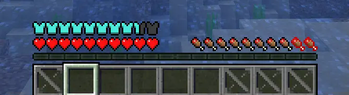
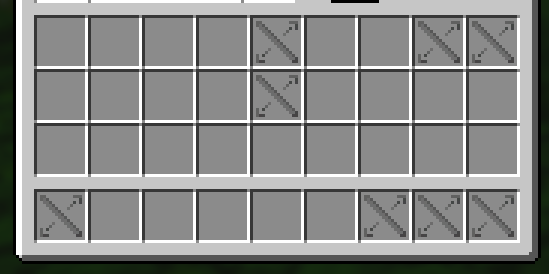
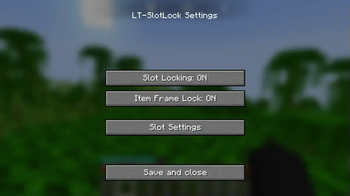
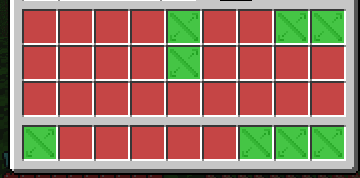
About this Mod
LT-SlotLock - Minecraft Mod
📌 Description
LT-SlotLock is an amateur modification for Minecraft that enables easy management of inventory slot locking and item frame locking. With its intuitive graphical user interface and convenient commands, you can quickly adjust the settings to suit your needs. The mod automatically saves your preferences so that your settings persist between game sessions.
✨ Features
- Slot Locking – Toggle locking of inventory slots.
- Item Frame Lock – Toggle locking of item frames.
- GUI Configuration – A dedicated settings screen allows you to easily modify options.
- Automatic Saving – Settings are saved to a configuration file when the GUI is closed.
- Command Support – Quick access to mod information and options via client-side commands.
🛠️ Available Versions
Available releases:
- 🟢 1.18.2 - Download from GitHub
- 🟢 1.19.2 - Download from GitHub
- 🟢 1.19.4 - Download from GitHub
- 🔷 1.21.1 - Download from GitHub
- 🔷 1.21.3 - Download from GitHub
- 🔷 1.21.4 - Download from GitHub
- 🔴 1.21.5 - Coming soon
🔷 – Latest updates and fixes
📜 Commands
| Command | Description |
|---|---|
/lts |
Displays information about the mod and current settings |
/lts settings |
Opens the mod settings GUI |
/lts pomoc |
Displays a list of available commands |
🔧 Installation
- Download the latest version of the mod from GitHub.
- Place the
.jarfile in themodsfolder in your Minecraft directory. - Launch the game and configure the mod according to your preferences!
🛠 Configuration
After the first launch, the mod generates a configuration file that preserves your settings between sessions:%appdata%/.minecraft/config/ltslotlock-config.json
You can manually edit this file to customize the settings to your needs.
👥 Authors
- LordTricker – Main mod creator
- Mr. GPT – Subject matter support 🤖
🎉 Thank you for using LT-SlotLock!
"Bierzcie i korzystajcie z tego wszyscy - to jest bowiem praca moja, która dla was została wykonana"
~LordTricker
Available Versions
How to Install LT-SlotLock on Your Server
Order Server
Order a Minecraft Java server with at least 3 GB RAM (4 GB recommended).
Set fabric Loader
In the panel under "Egg", select the fabric loader and matching Minecraft version (1.21.10).
Install Mod
Open the mod browser in the dashboard and search for "LT-SlotLock". Click "Install" – done! Alternatively, upload the .jar via SFTP to the /mods folder.
Compatibility
Mod Loaders
Minecraft Versions
1.21.10, 1.21.9, 1.21.8 (+14 more)
Server-side
✗ UnsupportedRecommended RAM
4 GB(min. 3 GB)Frequently Asked Questions
LT-SlotLock server crashes on startup – what to do?
Most common cause: wrong fabric version or insufficient RAM. Check the server log (latest.log) for "OutOfMemoryError" or "Mixin" errors. With Mado Hosting: ensure at least 3 GB RAM is allocated and the loader matches the mod version (1.21.10). You can switch loaders with one click in the panel.
Is LT-SlotLock compatible with fabric?
LT-SlotLock officially supports fabric for Minecraft 1.21.10, 1.21.9, 1.21.8. The Mado dashboard automatically detects incompatible loader combinations.
Server lagging with LT-SlotLock – how to optimize performance?
Recommended RAM: 4 GB (per 8 players). Use /spark profiler to check if LT-SlotLock consumes the most tick time. Common fixes: reduce server view-distance to 8-10, install "performant" or "starlight" as supplementary mods on Forge. With Mado Hosting, your server runs on NVMe SSDs with dedicated CPU cores for minimal latency.
Similar Mods




![[TaCZ] Timeless and Classics Zero](https://cdn.modrinth.com/data/SzzJttH8/fd27766d2bb8390d284696b1dbd358f87e081439_96.webp)

Rent Modded Server
Install LT-SlotLock with just one click on your server.