
Lucidity
All-in-One Minecraft Client Visual Assistance Mod
Screenshots
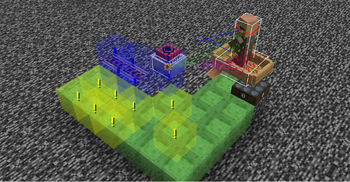
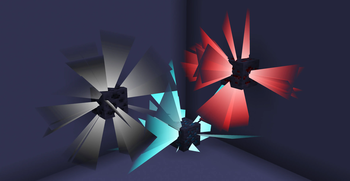
About this Mod
Major Update:
Starting from version 2.0.1, this mod now uses
malilibas its configuration dependency instead ofYet Another Config Lib.And aslo reqiresRyansRenderingKit
The codebase has been almost completely refactored. Some old features, such as Trajectory and ProjectileCamera, have been removed, while several new features have been introduced. You can open the configuration by pressing X + V or via Mod Menu
lucidity
The Ultimate Client-Side Visualization Tool!
What Is This
This mod adds various client-side visual features, such as
- selective block/entiy/particle rendering
- fluid source highlighting
- orientation display
- ore highlighting
- container comparator output display
- ...more!
mob tracking range visualization(v2.0 -)previews for certain commands.(v2.0 -)damage indicator(v2.0 -)projectile trajectory prediction(v2.0 -)
Main Features
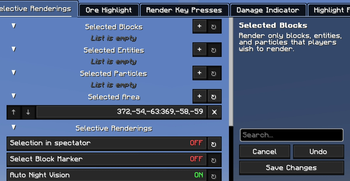
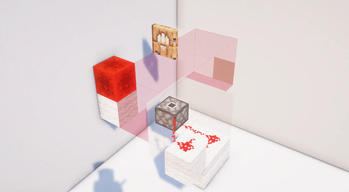
Selective Rendering
This feature offers various selective rendering options ("Specific Content" below refers to the selected blocks/entities/particles by the player).
Block/Entity/Particle Rendering Modes:
Disabled
Render specific content inside the selection area
Render specific content outside the selection area
Do not render specific content inside the selection area
Do not render specific content outside the selection area
Render only specific content
Do not render specific content
Render everything inside the selection area
Render everything outside the selection area
Render everything inside the selection area except specific content
Render everything outside the selection area except specific content
Ore Highlighting
Highlights ores within the detection range (allows adding custom blocks as ores and adjusting highlight colors per ore type).
Key Display
Displays all pressed keys.
Damage Indicator
Indicates the source of damage
Calculates potential damage
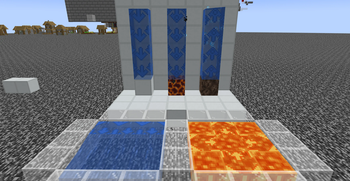
Fluid Highlighting
Applies a special highlight texture to fluid blocks from texture packs.
- Fluid source direction
- Bubble column direction
Projectile Trajectory
Marks the following with lines:
Predicted trajectory of projectiles held by other players
First-person predicted trajectory of held projectiles
Predicted trajectory of projectiles held by mobs/entities
Real-time predicted trajectory of existing projectiles in the world
Explosion Visualization
Explosion Visualization
A powerful tool that simulates and visualizes explosion details in real time, including:
Explosion rays
Blocks that will be destroyed
Explosion center
Estimated damage to nearby entities
Sample points of affected entities
Mob Debug Renderings
- Visualizes areas where entities can detect target.
- Displays spawnable entities on blocks around the player(not alwaysaccurate).
- Displays a line between entity's eye and its target's eye.
- Shows the effective attack range of sonic booms.
Creative Helper
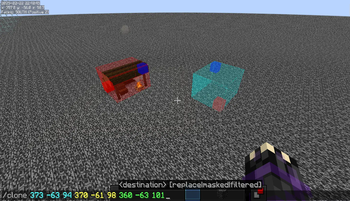
Displays the range of certain commands (/fill, /clone)
Improves the visibility of structure voids
Enhances the appearance of barriers
Forces the rendering of some technical blocks (barriers, structure voids, etc.)
Other Fun Features!
Press Ctrl while firing a projectile to switch your view to the projectile's perspective (press Shift to reset view)
Visualizes surrounding sound events (e.g., footsteps)
Displays surrounding block events (accuracy not guaranteed)
Available Versions
How to Install Lucidity on Your Server
Order Server
Order a Minecraft Java server with at least 3 GB RAM (4 GB recommended).
Set fabric Loader
In the panel under "Egg", select the fabric loader and matching Minecraft version (1.21.10).
Install Mod
Open the mod browser in the dashboard and search for "Lucidity". Click "Install" – done! Alternatively, upload the .jar via SFTP to the /mods folder.
Compatibility
Mod Loaders
Minecraft Versions
1.21.10, 1.21.9, 1.21.8 (+8 more)
Server-side
✗ UnsupportedRecommended RAM
4 GB(min. 3 GB)Frequently Asked Questions
Lucidity server crashes on startup – what to do?
Most common cause: wrong fabric version or insufficient RAM. Check the server log (latest.log) for "OutOfMemoryError" or "Mixin" errors. With Mado Hosting: ensure at least 3 GB RAM is allocated and the loader matches the mod version (1.21.10). You can switch loaders with one click in the panel.
Is Lucidity compatible with fabric?
Lucidity officially supports fabric for Minecraft 1.21.10, 1.21.9, 1.21.8. The Mado dashboard automatically detects incompatible loader combinations.
Server lagging with Lucidity – how to optimize performance?
Recommended RAM: 4 GB (per 8 players). Use /spark profiler to check if Lucidity consumes the most tick time. Common fixes: reduce server view-distance to 8-10, install "performant" or "starlight" as supplementary mods on Forge. With Mado Hosting, your server runs on NVMe SSDs with dedicated CPU cores for minimal latency.
Similar Mods





Rent Modded Server
Install Lucidity with just one click on your server.
Details
- License
- Creative Commons Attribution Non Commercial Share Alike 4.0 International
- Server-side
- Unsupported