
Luigite - Need For Speed
Adds Luigite, an edible gem with speed capabilities, to Minecraft.
Screenshots
About this Mod

Luigite - Need For Speed adds a new gemstone to Minecraft with special speed-enhancing properties. Mine for rare Luigite ore, craft powerful items, and trade with villagers to harness the speed-boosting effects of this mysterious new material.
This lightweight mod integrates seamlessly with vanilla Minecraft, adding new content that feels natural to the game while expanding gameplay options for miners and explorers.
📥 Installation Guide
Luigite - Need For Speed is designed for Fabric 1.21.4. Install Fabric Loader from the Fabric website, then place both the Fabric API and Luigite Mod into your mods folder.
This mod must be installed on both client and server. Since it adds new blocks, items, and world generation, both sides need the mod for proper functionality.
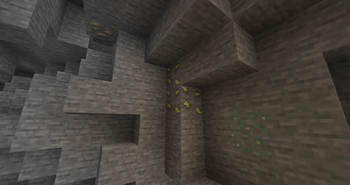
Not sure if you installed the mod correctly? Look for Luigite Ore while mining between Y=-16 and Y=112, with higher concentrations in the middle ranges. You should also find Cleric villagers offering Luigite Gems and Luigite Apples as trades.
⬆️ Important Update
Luigite - Need For Speed is now available for NeoForege 1.21.4! Install NeoForge from the NeoForged website and start playing!
✨ Features
Blocks and Items
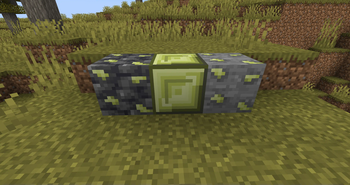
- Luigite Ore - Generates throughout the overworld with similar rarity to copper
- Deepslate Luigite Ore - Find this variant in the deeper parts of your world
- Luigite Gems - The core item of the mod, provides a brief Speed II effect when consumed
- Luigite Block - A beautiful storage block crafted from 9 gems, works as a beacon base!
- Luigite Apple - Grants Speed II effect for 9x longer than the gems, perfect for exploration or escape
- Totem of Speed - Grants Speed II effect if the item is held in the player's offhand
Trading & Villager Integration
- Cleric Trades - Apprentice and Journeyman Clerics offer Luigite items for emeralds
- Balanced Economy - Fair prices that integrate well with vanilla trading systems
🐛 How to Report Issues
Please use the issue tracker on our GitHub repository to report any bugs, crashes, or suggestions. Include information about:
- Your Minecraft and Fabric version
- Other mods you're using
- Any crash reports or logs you have
📝 License
Luigite - Need For Speed is available under the Creative Commons CC0 1.0 Universal License, making it freely available for all to use and modify.
Available Versions
How to Install Luigite - Need For Speed on Your Server
Order Server
Order a Minecraft Java server with at least 3 GB RAM (4 GB recommended).
Set fabric Loader
In the panel under "Egg", select the fabric loader and matching Minecraft version (1.21.4).
Install Mod
Open the mod browser in the dashboard and search for "Luigite - Need For Speed". Click "Install" – done! Alternatively, upload the .jar via SFTP to the /mods folder.
Compatibility
Mod Loaders
Minecraft Versions
1.21.4
Server-side
✓ RequiredRecommended RAM
4 GB(min. 3 GB)Frequently Asked Questions
Luigite - Need For Speed server crashes on startup – what to do?
Most common cause: wrong fabric version or insufficient RAM. Check the server log (latest.log) for "OutOfMemoryError" or "Mixin" errors. With Mado Hosting: ensure at least 3 GB RAM is allocated and the loader matches the mod version (1.21.4). You can switch loaders with one click in the panel.
Is Luigite - Need For Speed compatible with fabric and neoforge?
Luigite - Need For Speed officially supports fabric, neoforge for Minecraft 1.21.4. The Mado dashboard automatically detects incompatible loader combinations.
Server lagging with Luigite - Need For Speed – how to optimize performance?
Recommended RAM: 4 GB (per 8 players). Use /spark profiler to check if Luigite - Need For Speed consumes the most tick time. Common fixes: reduce server view-distance to 8-10, install "performant" or "starlight" as supplementary mods on Forge. With Mado Hosting, your server runs on NVMe SSDs with dedicated CPU cores for minimal latency.
Similar Mods




Rent Modded Server
Install Luigite - Need For Speed with just one click on your server.