Custom Item Highlighter
A Fabric Mod that creates a border overlay over items in your inventory to show you at a glance what items are custom. Designed for LumaMC.
Screenshots
About this Mod
Highlights custom server items in container GUIs with a semi-transparent color overlay, making it easy to spot plugin-created or specially-named items at a glance. This mod was specifically designed for LumaMC, effectiveness may not be guaranteed on other servers.
How it works
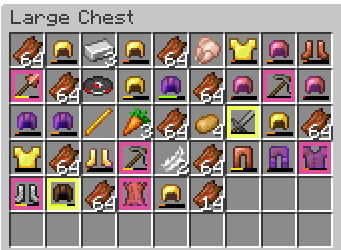
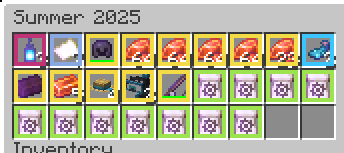
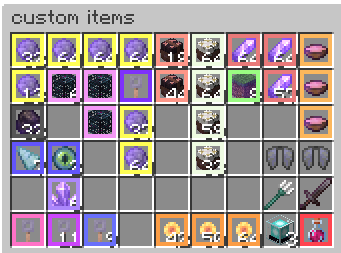
When you open any container (chest, inventory, shop, etc.), Custom Item Highlighter scans each slot and draws a colored overlay on any item that has been modified by a server plugin — either through a custom display name or custom NBT data. No more squinting at item names to figure out what's special.
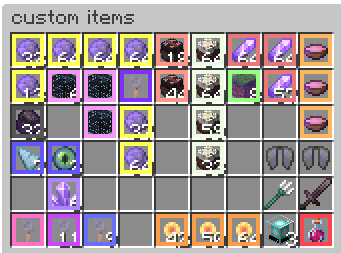
Items with "tier" in the lore get a border the color of the tier, with multi-colored tiers getting a color warp effect that goes through all the colors of that tier.
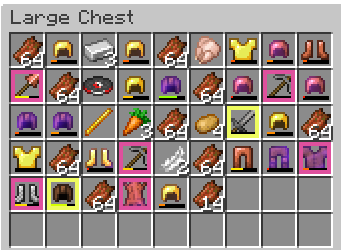
Items without the "tier" keyword use the first color that appears in the item name.
Items with neither default to white.
Features
- Two detection methods:
- Custom name — flags items with a plugin-set display name
- Custom data — flags items with custom NBT attached by a plugin
- Master toggle — disable highlighting entirely without touching other settings
- In-game config — tweak everything live via Mod Menu (optional)
Requirements
- Fabric Loader 0.18.6+
- Fabric API 0.141.3+1.21.11
- Minecraft 1.21.11
- Cloth Config is bundled — no extra install needed. Mod Menu is optional but recommended for in-game settings.
Available Versions
How to Install Custom Item Highlighter on Your Server
Order Server
Order a Minecraft Java server with at least 3 GB RAM (4 GB recommended).
Set fabric Loader
In the panel under "Egg", select the fabric loader and matching Minecraft version (26.1.2).
Install Mod
Open the mod browser in the dashboard and search for "Custom Item Highlighter". Click "Install" – done! Alternatively, upload the .jar via SFTP to the /mods folder.
Compatibility
Mod Loaders
Minecraft Versions
26.1.2, 26.1.1, 26.1 (+1 more)
Server-side
✗ UnsupportedRecommended RAM
4 GB(min. 3 GB)Frequently Asked Questions
Custom Item Highlighter server crashes on startup – what to do?
Most common cause: wrong fabric version or insufficient RAM. Check the server log (latest.log) for "OutOfMemoryError" or "Mixin" errors. With Mado Hosting: ensure at least 3 GB RAM is allocated and the loader matches the mod version (26.1.2). You can switch loaders with one click in the panel.
Is Custom Item Highlighter compatible with fabric?
Custom Item Highlighter officially supports fabric for Minecraft 26.1.2, 26.1.1, 26.1. The Mado dashboard automatically detects incompatible loader combinations.
Server lagging with Custom Item Highlighter – how to optimize performance?
Recommended RAM: 4 GB (per 8 players). Use /spark profiler to check if Custom Item Highlighter consumes the most tick time. Common fixes: reduce server view-distance to 8-10, install "performant" or "starlight" as supplementary mods on Forge. With Mado Hosting, your server runs on NVMe SSDs with dedicated CPU cores for minimal latency.
Similar Mods






Rent Modded Server
Install Custom Item Highlighter with just one click on your server.