
Lunary Mod
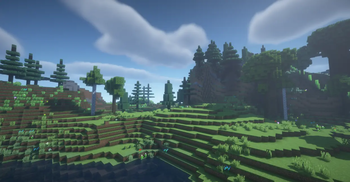
A Minecraft 1.12.2 mod that completely overhauls world generation to create more realistic and diverse landscapes.
Screenshots


About this Mod
Lunar Mod - Enhanced Terrain Generation
A Minecraft 1.12.2 mod that completely overhauls world generation to create more realistic and diverse landscapes.
Features:
Advanced terrain generation with realistic mountains, valleys, and plains
Smart chunk preloading system for smoother world generation
Diverse biome-specific forest generation with multiple tree variants:
- Massive ancient oaks
- Weeping willows
- Custom birch forests
- Tropical palm trees
- Dense jungle trees
- Savanna acacias
Enhanced vegetation system with dynamic grass and flower distribution
Unique structures:
- Ancient temples with enchanting altars
- Mysterious stone circles
- Abandoned villages with ruined houses
- Magical wizard towers
- Hidden underground shrines
Natural terrain features:
- Realistic river systems with vegetation
- Fallen logs and boulders
- Mushroom circles
- Floating islands
- Natural geysers
- Custom cave systems
Improved ore generation and distribution
Enhanced terrain detailing with custom erosion and weathering effects
Requirements:
- Minecraft 1.12.2
- Forge 14.23.5.2859 or higher
Installation:
- Install Minecraft Forge
- Drop the mod file into your 'mods' folder
- Enjoy the new world generation!
Compatible with most other mods. Perfect for adventure and exploration focused modpacks.
GUIDE:
Available Versions
How to Install Lunary Mod on Your Server
Order Server
Order a Minecraft Java server with at least 4 GB RAM (6 GB recommended).
Set forge Loader
In the panel under "Egg", select the forge loader and matching Minecraft version (1.12.2).
Install Mod
Open the mod browser in the dashboard and search for "Lunary Mod". Click "Install" – done! Alternatively, upload the .jar via SFTP to the /mods folder.
Compatibility
Mod Loaders
Minecraft Versions
1.12.2
Server-side
✓ RequiredRecommended RAM
6 GB(min. 4 GB)Frequently Asked Questions
Lunary Mod server crashes on startup – what to do?
Most common cause: wrong forge version or insufficient RAM. Check the server log (latest.log) for "OutOfMemoryError" or "Mixin" errors. With Mado Hosting: ensure at least 4 GB RAM is allocated and the loader matches the mod version (1.12.2). You can switch loaders with one click in the panel.
Is Lunary Mod compatible with forge?
Lunary Mod officially supports forge for Minecraft 1.12.2. The Mado dashboard automatically detects incompatible loader combinations.
Server lagging with Lunary Mod – how to optimize performance?
Recommended RAM: 6 GB (per 5 players). Use /spark profiler to check if Lunary Mod consumes the most tick time. Common fixes: reduce server view-distance to 8-10, install "performant" or "starlight" as supplementary mods on Forge. With Mado Hosting, your server runs on NVMe SSDs with dedicated CPU cores for minimal latency.
Similar Mods




Rent Modded Server
Install Lunary Mod with just one click on your server.