
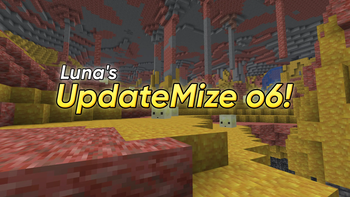
Luna's UpdateMize o6!
The ⚡ recreation ⚡ 1.21.11 mod that adds the Minecraft Live 2026.1 (Chaos Cubed) features early!
Screenshots
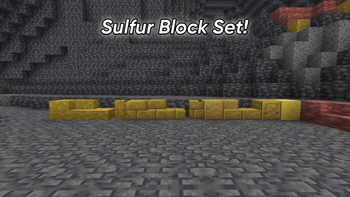
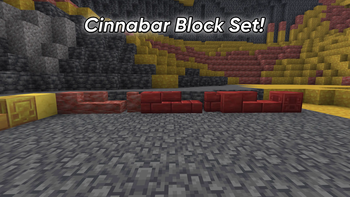
About this Mod
🌙 Luna's UpdateMize o6 🌙
The ⚡ recreation ⚡ NeoForge 1.21.11 Mod that adds the Minecraft Live 2026.1 (Chaos Cubed) features early!
Hello everyone! I am Sushi, or Luna! :3
▶️ Official Video (Click Me!) ▶️
🌟 Welcome to the 6th installment of the UpdateMize series! 🌟
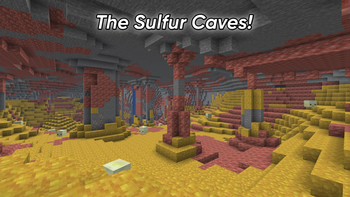
Today I present to you - a mod that recreates the Minecraft Live 2026.1 features from the Chaos Cubed drop - the Sulfur, Cinnabar, Sulfur Caves, and Sulfur Cube!
🎥 Minecraft Live recap! 🎥
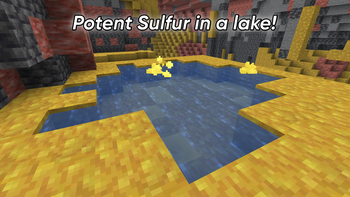
Minecraft Live teased some awesome things! Deep underground, you will find the Sulfur Caves! In the caves, you will find the new Sulfur and Cinnabar blocks! You can build with them, or craft them into slabs, bricks, walls, or chiseled bricks and expand your pallette! You will also find lakes in the caves, which contain Potent Sulfur - but be warned, as it will give the nausea effect if you step into the Noxous Gas they emmit!
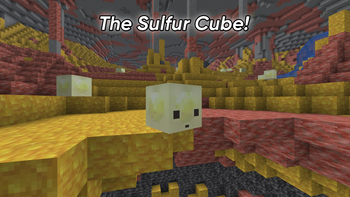
You will also find the Sulfur Cube, the new mob teased! It can absorb blocks into it, and if you hit it, you can kick it like a football! Different blocks also produce different effects!
🔥 Features of UpdateMize o6 🔥
- Sulfur Caves biome!
- Sulfur and Cinnabar generate in the biome!
- Sulfur Slabs/Bricks/Walls and Cinnabar Slabs/Bricks/Walls!
- Sulfur Bricks and Cinnabar Bricks!
- Sulfur Brick Slabs/Bricks/Walls and Cinnabar Slabs/Bricks/Walls!
- Polished Sulfur Bricks and Polished Cinnabar Bricks!
- Polished Sulfur Brick Slabs/Bricks/Walls and Polished Cinnabar Slabs/Bricks/Walls!
- Sulfur Cube mob!
- Right-click the Sulfur Cube with either wood, stone, or wool - and see what happens when you hit it!
- If you right-click with shears, you will be able to take the block back! (Note: Wool will always turn to light gray wool.)
✨ Mod Information! ✨
You can see info about the mod's mechanics in-game by pressing the U key (this can be configured)! This info is below as well:
New Blocks:
- You can now find the Sulfur Caves biome underground!
- Sulfur and Cinnabar blocks can be found in the caves!
- The blocks can be turned into Slabs, Bricks, Walls, and Chiseled Bricks, using a Crafting Table or Stonecutter!
- Potent Sulfur can be found in small lakes, inside the Sulfur Caves!
- Potent Sulfur will generate Noxous Gas when in water, which gives the nausea effect! Be careful!
- All of the above are 100% accessible in Survival Mode!
A few notes about the Sulfur Cube
- You can right-click the Sulfur Cube to make it absorb a block (wood/stone/wool)
- There is no texture change when that happens - but it DOES absorb the block
- If you hit it on the ground, it goes horizontally
- If you hit it in the air, it's more vertical
- There are different knockback values based on the block it absorbs
- Right-click the Sulfur Cube with shears to take back the block
- Splitting the Sulfur Cube has not been implemented.
- The Sulfur Cube isn't able to bounce.
- Using a knockback-enchanted tool will amplify the knockback the Sulfur Cube takes
- All of the above are 100% accessible in Survival Mode!
⚠️ Policies ⚠️
You are more than welcome to review this mod, as long as you link to this CurseForge page in the description of your video or in your post.
Do NOT upload edited versions of this mod to any platform! Only link to my mod through this Modrinth page or a review video that agrees with the policies above.
DO NOT REUPLOAD THIS MOD! I do not allow it - asking me will not change anything. I do not allow reuploads of this mod whatsoever. If you wish to share it, just share this Modrinth page!
💚 Special Thanks to crimson_phoneme 💚
Thanks so much to crimson_phoneme for her contributions to UpdateMize o6 - custom code, Sulfur Cube code, making the Sulfur Lake generator work, and porting the mod to 1.21.11! <3
Check her out on Modrinth! https://modrinth.com/user/crimson_phoneme
✨ Enjoy! ✨
If you want to see more of what I do, why not check out my YouTube?
https://www.youtube.com/@SushiMCPE
https://possum.city/@sushimcpe
You can see me make more silly projects there, with more to come in the future!
If you have any feedback or suggestions, feel free to tell me!
I hope you have an awesome day, peace!
Available Versions
How to Install Luna's UpdateMize o6! on Your Server
Order Server
Order a Minecraft Java server with at least 4 GB RAM (6 GB recommended).
Set neoforge Loader
In the panel under "Egg", select the neoforge loader and matching Minecraft version (1.21.11).
Install Mod
Open the mod browser in the dashboard and search for "Luna's UpdateMize o6!". Click "Install" – done! Alternatively, upload the .jar via SFTP to the /mods folder.
Compatibility
Mod Loaders
Minecraft Versions
1.21.11
Server-side
✓ RequiredRecommended RAM
6 GB(min. 4 GB)Frequently Asked Questions
Luna's UpdateMize o6! server crashes on startup – what to do?
Most common cause: wrong neoforge version or insufficient RAM. Check the server log (latest.log) for "OutOfMemoryError" or "Mixin" errors. With Mado Hosting: ensure at least 4 GB RAM is allocated and the loader matches the mod version (1.21.11). You can switch loaders with one click in the panel.
Is Luna's UpdateMize o6! compatible with neoforge?
Luna's UpdateMize o6! officially supports neoforge for Minecraft 1.21.11. The Mado dashboard automatically detects incompatible loader combinations.
Server lagging with Luna's UpdateMize o6! – how to optimize performance?
Recommended RAM: 6 GB (per 5 players). Use /spark profiler to check if Luna's UpdateMize o6! consumes the most tick time. Common fixes: reduce server view-distance to 8-10, install "performant" or "starlight" as supplementary mods on Forge. With Mado Hosting, your server runs on NVMe SSDs with dedicated CPU cores for minimal latency.
Similar Mods




Rent Modded Server
Install Luna's UpdateMize o6! with just one click on your server.