
MaceBu
A fun, PvP-focused mace combat enhancement inspired by YouTuber Wambuu, featuring custom sounds and target highlighting.
Screenshots
About this Mod
Enhance your Minecraft PvP experience with a simple yet highly satisfying modification designed for fans of the mace! Inspired by the engaging gameplay style of YouTuber Wambuu, this mod brings extra flavor and a tactical advantage to your close-quarters combat.
If you want to make every successful hit feel more impactful and visually clear, this is the perfect addition to your modpack.
✨ Key Features
- Signature "MACE ATTACK" Sound: Experience the thrill of combat! Every time you wind up for a strike, the mod plays the iconic "MACE ATTACK" voice line, making your battles much more energetic and humorous.
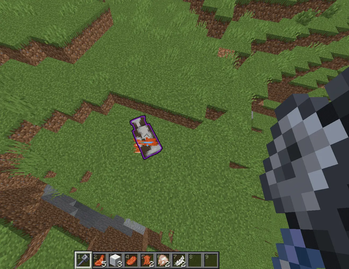
- Tactical Purple Outline: Never miss your target again. When you are perfectly aligned to land a devastating mace blow on an enemy, a distinct purple outline will glow around them. This helps you time your critical hits and smash attacks with perfect precision.
🎯 Why Download This Mod?
Whether you are fighting friends in a dedicated PvP arena or just trying to survive on a chaotic multiplayer server, timing is everything when using the mace. The visual cue takes the guesswork out of your attack range, while the custom sounds add a layer of satisfaction that standard vanilla combat lacks.
Ready to smash your enemies? Download now and bring Wambuu's chaotic mace energy directly into your world!
Available Versions
How to Install MaceBu on Your Server
Order Server
Order a Minecraft Java server with at least 3 GB RAM (4 GB recommended).
Set fabric Loader
In the panel under "Egg", select the fabric loader and matching Minecraft version (1.21.11).
Install Mod
Open the mod browser in the dashboard and search for "MaceBu". Click "Install" – done! Alternatively, upload the .jar via SFTP to the /mods folder.
Compatibility
Mod Loaders
Minecraft Versions
1.21.11, 1.21.10, 1.21.9 (+9 more)
Server-side
✗ UnsupportedRecommended RAM
4 GB(min. 3 GB)Frequently Asked Questions
MaceBu server crashes on startup – what to do?
Most common cause: wrong fabric version or insufficient RAM. Check the server log (latest.log) for "OutOfMemoryError" or "Mixin" errors. With Mado Hosting: ensure at least 3 GB RAM is allocated and the loader matches the mod version (1.21.11). You can switch loaders with one click in the panel.
Is MaceBu compatible with fabric and quilt?
MaceBu officially supports fabric, quilt for Minecraft 1.21.11, 1.21.10, 1.21.9. The Mado dashboard automatically detects incompatible loader combinations.
Server lagging with MaceBu – how to optimize performance?
Recommended RAM: 4 GB (per 8 players). Use /spark profiler to check if MaceBu consumes the most tick time. Common fixes: reduce server view-distance to 8-10, install "performant" or "starlight" as supplementary mods on Forge. With Mado Hosting, your server runs on NVMe SSDs with dedicated CPU cores for minimal latency.
Similar Mods



![[TaCZ] Timeless and Classics Zero](https://cdn.modrinth.com/data/SzzJttH8/fd27766d2bb8390d284696b1dbd358f87e081439_96.webp)


Rent Modded Server
Install MaceBu with just one click on your server.