
MacroKeyBind
MacroKeyBind — a clean, simple mod to bind commands and chat messages to any key or combination. Easy pause menu UI, mouse button support, no limits.
Screenshots
About this Mod
🇷🇺
MacroKeyBind — макросы для Minecraft 1.20.1
Привязывайте команды и сообщения к любым клавишам. Работает прямо из меню паузы.
✨ Особенности:
- 🎹 Любые клавиши и комбинации:
Ctrl+K,Alt+1,Shift+F3 - 🖱 Поддержка кнопок мыши
- ⚡ Команды (
/spawn) и сообщения в чат (привет,gg) - ♾️ Без лимита макросов
- 🔘 Включение/выключение без удаления
- ✏️ Редактирование в любой момент
- 💾 Автосохранение в
config/keybinds.json - 🌍 Полная поддержка кириллицы и английского
🚀 Использование:
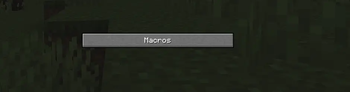
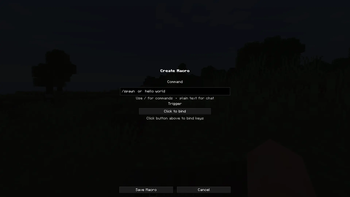
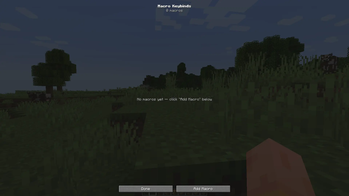
ESC→ кнопка "Macros"- "Add Macro" → введите текст
- "Click to bind" → нажмите клавиши
- "Save" — готово!
eng
MacroKeyBind — Macros for Minecraft 1.20.1
Bind commands and chat messages to any key. Works right from the pause menu.
✨ Features:
- 🎹 Any keys & combos:
Ctrl+K,Alt+1,Shift+F3 - 🖱 Mouse button support
- ⚡ Commands (
/spawn) and chat messages (hello,gg) - ♾️ Unlimited macros
- 🔘 Toggle on/off without deleting
- ✏️ Edit anytime
- 💾 Auto-save to
config/keybinds.json - 🌍 Full Cyrillic & English support
🚀 How to use:
ESC→ "Macros" button- "Add Macro" → type your text
- "Click to bind" → press keys
- "Save" — done!
📋 КОРОТКОЕ ОПИСАНИЕ
RU:
MacroKeyBind — биндите команды и сообщения на любые клавиши. Меню в паузе, мышь, комбинации, без лимитов. Поддержка русского и английского.
**EN: **
MacroKeyBind — bind commands and messages to any key. Pause menu UI, mouse support, combos, no limits. Full Cyrillic/English support.
Available Versions
How to Install MacroKeyBind on Your Server
Order Server
Order a Minecraft Java server with at least 3 GB RAM (4 GB recommended).
Set forge Loader
In the panel under "Egg", select the forge loader and matching Minecraft version (1.20.1).
Install Mod
Open the mod browser in the dashboard and search for "MacroKeyBind". Click "Install" – done! Alternatively, upload the .jar via SFTP to the /mods folder.
Compatibility
Mod Loaders
Minecraft Versions
1.20.1
Server-side
✗ UnsupportedRecommended RAM
4 GB(min. 3 GB)Frequently Asked Questions
MacroKeyBind server crashes on startup – what to do?
Most common cause: wrong forge version or insufficient RAM. Check the server log (latest.log) for "OutOfMemoryError" or "Mixin" errors. With Mado Hosting: ensure at least 3 GB RAM is allocated and the loader matches the mod version (1.20.1). You can switch loaders with one click in the panel.
Is MacroKeyBind compatible with forge?
MacroKeyBind officially supports forge for Minecraft 1.20.1. The Mado dashboard automatically detects incompatible loader combinations.
Server lagging with MacroKeyBind – how to optimize performance?
Recommended RAM: 4 GB (per 8 players). Use /spark profiler to check if MacroKeyBind consumes the most tick time. Common fixes: reduce server view-distance to 8-10, install "performant" or "starlight" as supplementary mods on Forge. With Mado Hosting, your server runs on NVMe SSDs with dedicated CPU cores for minimal latency.
Similar Mods






Rent Modded Server
Install MacroKeyBind with just one click on your server.