
Magic Storage
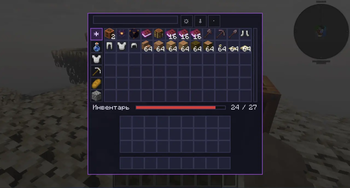
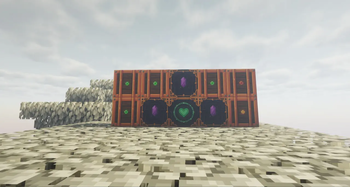
Link any number of Storage Cells into one searchable, sortable inventory, ruled by a single enchanted Heart altar. Expand it, quick-dump into it, protect slots, and uncover the lore of the archmage Reigall.
Screenshots

About this Mod
Magic Storage
One heartbeat. Endless storage.
Tired of walls of chests? Magic Storage links any number of Storage Cells
into a single searchable inventory, governed by one enchanted Heart altar.
Features
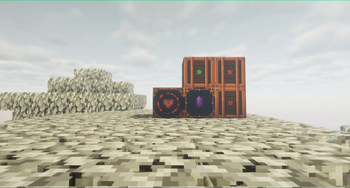
- 🫀 Heart altar — awaken it with a Magic Heart; it binds nearby Storage
Cells into one big inventory. - 🔍 Powerful GUI — search, sort (name / count / mod), category filters,
autocomplete, scrolling grid. - 💎 Crystal Expanders — snap them to the altar's faces to grow the network.
- ⚡ Quick Dump — one hotkey dumps your inventory into storage. Protect the
slots you want to keep. - 🎨 Live fill indicators — cells and the altar glow green → yellow → red.
- 🎵 Reigall's Tuning Fork — re-tune the
- 📖 Lore-driven — the story of archmage Reigall and princess Liza, told
through the Liber Reigallus books. Recipes included. - 🧙 Villager trades — the Magic Heart aians.
Getting started
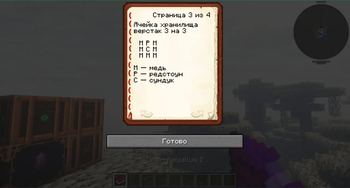
Craft a Storage Cell and a Heart Storage altar (recipes are in the
crafting recipe book and the starter book you get on first join). Buy a
Magic Heart from any librarian, insert it, place cells around it — done.
Requires
- Minecraft 1.21.11, Forge 61+
Available Versions
How to Install Magic Storage on Your Server
Order Server
Order a Minecraft Java server with at least 3 GB RAM (4 GB recommended).
Set forge Loader
In the panel under "Egg", select the forge loader and matching Minecraft version (1.21.11).
Install Mod
Open the mod browser in the dashboard and search for "Magic Storage". Click "Install" – done! Alternatively, upload the .jar via SFTP to the /mods folder.
Compatibility
Mod Loaders
Minecraft Versions
1.21.11
Server-side
✓ RequiredRecommended RAM
4 GB(min. 3 GB)Frequently Asked Questions
Magic Storage server crashes on startup – what to do?
Most common cause: wrong forge version or insufficient RAM. Check the server log (latest.log) for "OutOfMemoryError" or "Mixin" errors. With Mado Hosting: ensure at least 3 GB RAM is allocated and the loader matches the mod version (1.21.11). You can switch loaders with one click in the panel.
Is Magic Storage compatible with forge?
Magic Storage officially supports forge for Minecraft 1.21.11. The Mado dashboard automatically detects incompatible loader combinations.
Server lagging with Magic Storage – how to optimize performance?
Recommended RAM: 4 GB (per 8 players). Use /spark profiler to check if Magic Storage consumes the most tick time. Common fixes: reduce server view-distance to 8-10, install "performant" or "starlight" as supplementary mods on Forge. With Mado Hosting, your server runs on NVMe SSDs with dedicated CPU cores for minimal latency.
Similar Mods






Rent Modded Server
Install Magic Storage with just one click on your server.