
Magnet Blocks
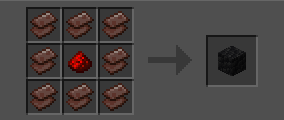
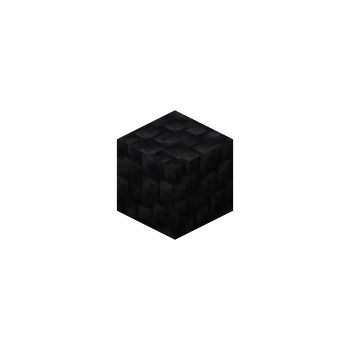
Minecraft mod that adds blocks of magnets as on the mineshild 4 server
Screenshots
About this Mod
English
Magnet Blocks is a mod that adds magnet mechanics from the "Mineshield 4" Minecraft server (a Russian-language YouTube server).
Mod Mechanics
- Dual Polarity: Each magnet has two modes: Attraction and Repulsion.
- Redstone Control: Apply a redstone signal to the magnet to completely disable it.
- Polarity Switching: To change a magnet's polarity, simply right-click it with an Iron Axe. (Yes, it's not the same as on MSh4, but the problem is that implementing the mechanic of changing polarity via lightning strike on a lightning rod is difficult).
- Specific Target Attraction: The magnet does not affect everything randomly. It chooses specific targets:
- Players: Only if they are wearing magnetic armor (Iron, Netherite) and/or are holding a magnetic item in their main or off-hand.
- Other Entities: Attracts Ender Pearls, Iron Golems, Anvils (in the form of falling blocks), and mobs with equipped armor (iron/netherite) and/or attractable items
- Magnet Network: The true power is revealed when magnets are combined. If magnet blocks are placed next to each other, they form a single network.
- Unified Control: Any action applied to one magnet in the network (disabling with redstone or changing polarity) is instantly propagated to all connected magnets.
- Magnetic Storms: Occasionally, magnetic storms will occur in the world. They affect the polarity, strength, and radius of magnets. After the storm ends, all magnets return to their previous state.
- Storm Management: You can turn off, create, and remove storms.
- The /magnet Command: Using this command, you can manage "phantom" magnets. Create, delete, modify, etc. You can also manage storms.
- Whitelist: You can whitelist the player's nickname and he will always be attracted to the magnet.
- Temperature: depending on the temperature of the magnet (the lower the temperature, the stronger the magnet), the strength of the magnet varies
- The hum: magnets emit a hum indicating the work and strength of the magnet
Русский
Magnet Blocks - это мод добавляющий механику магнитов с майнкрафт сервера ютуберов "Майншилд 4" (сервер русскоязычный)
Механики мода
- Двойная полярность: Каждый магнит имеет два режима: Притяжение и Отталкивание.
- Управление редстоуном: Подайте на магнит редстоун-сигнал, чтобы полностью отключить его.
- Смена полярности: Чтобы изменить полярность магнита, просто нажмите по нему ПКМ с Железным топором. (да, не как на мш4, но проблема в том что реализовать механику при попадании в магнит молнии через громоотвод сложно)
- Притяжение определённых целей: Магнит воздействует не на все подряд. Он выбирает конкретные цели
- Игроки: Только если на них надета магнитная броня (железная, незеритовая) и/или в основной или второй руке находится магнитный предмет
- Другие сущности: Притягивает Эндер-жемчуг, Железных големов, наковален (в виде падающих блоков) и мобов с экиперованой броней (железо/незерит) и/или притягивающимися предметами
- Сеть магнитов: Истинная сила раскрывается при объединении магнитов. Если поставить блоки магнитов рядом, они образуют единую сеть.
- Единое управление: Любое действие, примененное к одному магниту в сети (отключение редстоуном или смена полярности), мгновенно распространяется на все соединенные магниты.
- Магнитные штормы: Иногда в мире будут магнитные штормы, они влияют на полярность, силу и радиус магнита, после завершения шторма все магниты вернутся в прежний вид
- Управление штормами: вы можете выключать, создовать и убирать штормы
- Команда /magnet: с помощью этой команды вы можете управлять "фантомными" магнитами. Создавать, удалять, изменять и тд. Также можно управлять штормами
- Белый список: вы можете вписать в белый список ник игрока и он будет приятгиватся к магниту всегда
- Температура: в зависимости от температуры магнита (чем меньше - тем сильнее магнит) сила магнита меняется
- Гул: магниты издают гул обозначающий работу и силу магнита
Available Versions
How to Install Magnet Blocks on Your Server
Order Server
Order a Minecraft Java server with at least 3 GB RAM (4 GB recommended).
Set fabric Loader
In the panel under "Egg", select the fabric loader and matching Minecraft version (1.20.1).
Install Mod
Open the mod browser in the dashboard and search for "Magnet Blocks". Click "Install" – done! Alternatively, upload the .jar via SFTP to the /mods folder.
Compatibility
Mod Loaders
Minecraft Versions
1.20.1
Server-side
✓ RequiredRecommended RAM
4 GB(min. 3 GB)Frequently Asked Questions
Magnet Blocks server crashes on startup – what to do?
Most common cause: wrong fabric version or insufficient RAM. Check the server log (latest.log) for "OutOfMemoryError" or "Mixin" errors. With Mado Hosting: ensure at least 3 GB RAM is allocated and the loader matches the mod version (1.20.1). You can switch loaders with one click in the panel.
Is Magnet Blocks compatible with fabric?
Magnet Blocks officially supports fabric for Minecraft 1.20.1. The Mado dashboard automatically detects incompatible loader combinations.
Server lagging with Magnet Blocks – how to optimize performance?
Recommended RAM: 4 GB (per 8 players). Use /spark profiler to check if Magnet Blocks consumes the most tick time. Common fixes: reduce server view-distance to 8-10, install "performant" or "starlight" as supplementary mods on Forge. With Mado Hosting, your server runs on NVMe SSDs with dedicated CPU cores for minimal latency.
Similar Mods





Rent Modded Server
Install Magnet Blocks with just one click on your server.