
magnet-hopper
A hopper variant that pulls dropped items in a 3D radius before depositing them into the container below. Solves the universal "items despawn around my mob farm" pain in one dedicated block.
Screenshots
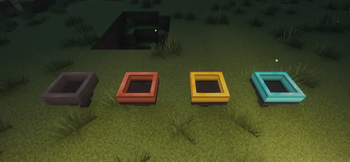
About this Mod

Magnet Hopper
A hopper variant that pulls dropped items in a 3D radius before depositing them into the container below. Solves the universal "items despawn around my mob farm" pain in one dedicated block.
Features
- Magnet pull — ItemEntities in the tier's 3D radius get vacuumed into the internal 5-slot storage and flow down into the container below.
- Vanilla hopper behavior always active — strict superset of a regular hopper: pulls from any container above, pushes to any container below at the standard 8-tick cadence.
- Magnet on/off toggle — UI button to disable just the magnet pull (block keeps acting as a normal hopper).
- 5-slot whitelist/blacklist filter — click a filter slot with an item to ghost-set (the item isn't consumed); empty-hand click to clear; toggle whitelist/blacklist in the UI.
- Redstone-disable — applying a redstone signal pauses everything (matches vanilla hopper convention).
- Placement preview — hold a magnet hopper in either hand and the affected radius draws as a cyan-mint wireframe over your cursor target, with a warm-green surface contour that follows terrain so the floor coverage is always legible.
- Pipe compatibility — exposes the 5-slot storage via Fabric
ItemStorage.SIDEDand the NeoForge item-handler capability. Filter slots are config, not exposed.
Compatibility
- Minecraft: 26.1.x
- Fabric: Loader 0.18.4+ with Fabric API
- NeoForge: 26.1+
- Java: 25
Known limitations
- Items in internal storage spill when the block is broken (the drops are still pickup-able). NBT carry-over planned for v0.2.
- Filter configuration is lost on break. Planned for v0.2.
- All magnet hoppers face down only; side-facing variant planned later.
License
CC0-1.0 (public domain). Use freely in modpacks and derivative works.
Links
Available Versions
How to Install magnet-hopper on Your Server
Order Server
Order a Minecraft Java server with at least 3 GB RAM (4 GB recommended).
Set fabric Loader
In the panel under "Egg", select the fabric loader and matching Minecraft version (26.1.2).
Install Mod
Open the mod browser in the dashboard and search for "magnet-hopper". Click "Install" – done! Alternatively, upload the .jar via SFTP to the /mods folder.
Compatibility
Mod Loaders
Minecraft Versions
26.1.2, 26.1.1, 26.1
Server-side
✓ RequiredRecommended RAM
4 GB(min. 3 GB)Frequently Asked Questions
magnet-hopper server crashes on startup – what to do?
Most common cause: wrong fabric version or insufficient RAM. Check the server log (latest.log) for "OutOfMemoryError" or "Mixin" errors. With Mado Hosting: ensure at least 3 GB RAM is allocated and the loader matches the mod version (26.1.2). You can switch loaders with one click in the panel.
Is magnet-hopper compatible with fabric and neoforge?
magnet-hopper officially supports fabric, neoforge for Minecraft 26.1.2, 26.1.1, 26.1. The Mado dashboard automatically detects incompatible loader combinations.
Server lagging with magnet-hopper – how to optimize performance?
Recommended RAM: 4 GB (per 8 players). Use /spark profiler to check if magnet-hopper consumes the most tick time. Common fixes: reduce server view-distance to 8-10, install "performant" or "starlight" as supplementary mods on Forge. With Mado Hosting, your server runs on NVMe SSDs with dedicated CPU cores for minimal latency.
Similar Mods





Rent Modded Server
Install magnet-hopper with just one click on your server.