
MakeLag
Ever wanted to feel that one friends lag? Wait no more.
Screenshots
About this Mod
MakeLag
Ever wanted to feel that one friends lag? Wait no more.
With MakeLag you can artificially create lag!
Simply just run this one command on a hosted server, an Essential Mod world, or an e4mc world and enjoy yourself some lag: /makelag start.
The lag will increase gradually, if you ever feel like the need to speed it up a little, use the /makelag progression skip <ticks> command and set the ticks value to something like 12000 for 10 minutes of gameplay passed, 24000 for 20 minutes passed, etc.
By default, the client-side ping display is disabled. Toggle it whenever you want using /makelag togglePingDisplay. This will toggle it for all players.
Features
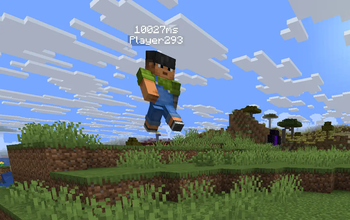
- Client-side ping display - displays ping above player's display name.
- Server-side artificial lag - delay, random teleports, dropped packets and surprises without needing client mods.
- Progression system - create "lag over time" effects instead of settings values manually.
- Lightweight and server-only - only needed on the server, optional client install adds ping display only.
Commands
/makelag start- Starts making lag using the currently loaded progression./makelag togglePingDisplay- Toggle the above nameplate ping display for all clients with this mod./makelag progression pause- Pauses the currently loaded progression, removes the lag until resumed./makelag progression resume- Resumes the currently loaded progression./makelag progression load <id>- Loads the progression with the passed in id./makelag progression tick <tick>- Sets the tick of the progression to the passed in tick./makelag progression skip <ticks>- Skips the progression tick by the specified ticks amount./makelag progression tickRate <rate>- Sets the tick rate, this means that every normal tick, the progression tick will be incremented by the tick rate./makelag state <player> <module> <key> <value>- Sets the passed in key of the specified module to the passed in value for the specified player./makelag config <key> <value>- Sets the specified key to the passed in value for all players.
Configuration
See CONFIGURATION.md
Notes
- This mod probably won't be ported to any other version/loader unless somebody decides to spend their time to contribute to this project.

FAQ
Does this lag my entire computer?
no
How much sanity have you lost while making this mod?
Available Versions
How to Install MakeLag on Your Server
Order Server
Order a Minecraft Java server with at least 3 GB RAM (4 GB recommended).
Set fabric Loader
In the panel under "Egg", select the fabric loader and matching Minecraft version (1.21.11).
Install Mod
Open the mod browser in the dashboard and search for "MakeLag". Click "Install" – done! Alternatively, upload the .jar via SFTP to the /mods folder.
Compatibility
Mod Loaders
Minecraft Versions
1.21.11, 1.21.10, 1.21.8
Server-side
✓ RequiredRecommended RAM
4 GB(min. 3 GB)Frequently Asked Questions
MakeLag server crashes on startup – what to do?
Most common cause: wrong fabric version or insufficient RAM. Check the server log (latest.log) for "OutOfMemoryError" or "Mixin" errors. With Mado Hosting: ensure at least 3 GB RAM is allocated and the loader matches the mod version (1.21.11). You can switch loaders with one click in the panel.
Is MakeLag compatible with fabric?
MakeLag officially supports fabric for Minecraft 1.21.11, 1.21.10, 1.21.8. The Mado dashboard automatically detects incompatible loader combinations.
Server lagging with MakeLag – how to optimize performance?
Recommended RAM: 4 GB (per 8 players). Use /spark profiler to check if MakeLag consumes the most tick time. Common fixes: reduce server view-distance to 8-10, install "performant" or "starlight" as supplementary mods on Forge. With Mado Hosting, your server runs on NVMe SSDs with dedicated CPU cores for minimal latency.
Similar Mods





Rent Modded Server
Install MakeLag with just one click on your server.