
MakeYourCrafts (MYC)
MakeYourCrafts is a mod that allows you to create custom crafting recipes right in the game! No more limitations - you decide which items should be crafted from which materials.
Screenshots
About this Mod
MakeYourCrafts - Create Your Own Crafts!
MakeYourCrafts is a mod that allows you to create custom crafting recipes right in the game! No more limitations - you decide which items should be crafted from which materials. Now with support for Crafting Table, Furnace, Smoker, Blast Furnace, Stonecutter, Anvil, and Brewing Stand!
Features:
Create your own crafts through an intuitive graphical interface
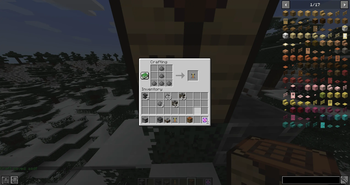
Visual recipe editing in a 3×3 grid, just like a crafting table
Select any items from your inventory for both recipe and result (mod items are supported)
Save crafts to the world folder - all recipes persist between restarts
Edit and delete existing crafts
Automatic recipe detection when using any crafting station
How to use:
For Crafting Table recipes:
Enable cheats (OP) in your world
Type command: /myc createcraft
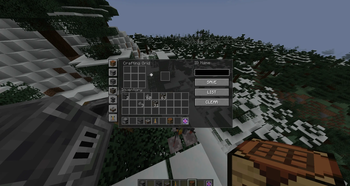
In the GUI that opens:
Select a station type from the dropdown menu
Select an item from your inventory (click on it)
Place items in the crafting grid (Left Click)
Set the crafting result (click on the result slot)
Enter a craft name
Click SAVE to save
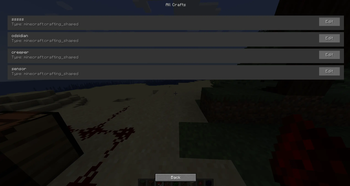
To view all crafts, click ALL CRAFTS
For Furnace/Smoker/Blast Furnace recipes:
Use the same command /myc createcraft
Select the furnace type from dropdown menu
Set the input item (what goes into the furnace)
Set the output item (what comes out)
Save your recipe!
For Stonecutter recipes:
Use /myc createcraft and select "Stonecutter"
Set the input block (stone, cobblestone, etc.)
Set the output block (stairs, slabs, etc.)
Save your recipe!
For Anvil recipes:
Use /myc createcraft and select "Anvil"
Set the base item (item to be repaired/upgraded)
Set the material item (ingot, gem, etc.)
Set the result item
Save your recipe!
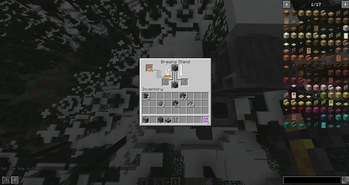
For Brewing Stand recipes:
Use /myc createcraft and select "Brewing Stand"
Set the base potion (water bottle, awkward potion, etc.)
Set the ingredient (nether wart, glowstone dust, etc.)
Set the resulting potion
Save your recipe!
Commands:
/myc createcraft - opens GUI for creating/editing crafts (requires OP permissions)
Data Storage:
All created crafts are saved in the world folder: /world/makeyourcrafts_data/ in .cfg format
New features will be added to the mod in the future, stay tuned!
Available Versions
How to Install MakeYourCrafts (MYC) on Your Server
Order Server
Order a Minecraft Java server with at least 3 GB RAM (4 GB recommended).
Set neoforge Loader
In the panel under "Egg", select the neoforge loader and matching Minecraft version (1.21.5).
Install Mod
Open the mod browser in the dashboard and search for "MakeYourCrafts (MYC)". Click "Install" – done! Alternatively, upload the .jar via SFTP to the /mods folder.
Compatibility
Mod Loaders
Minecraft Versions
1.21.5, 1.21.4, 1.21.3 (+2 more)
Server-side
✓ RequiredRecommended RAM
4 GB(min. 3 GB)Frequently Asked Questions
MakeYourCrafts (MYC) server crashes on startup – what to do?
Most common cause: wrong neoforge version or insufficient RAM. Check the server log (latest.log) for "OutOfMemoryError" or "Mixin" errors. With Mado Hosting: ensure at least 3 GB RAM is allocated and the loader matches the mod version (1.21.5). You can switch loaders with one click in the panel.
Is MakeYourCrafts (MYC) compatible with neoforge?
MakeYourCrafts (MYC) officially supports neoforge for Minecraft 1.21.5, 1.21.4, 1.21.3. The Mado dashboard automatically detects incompatible loader combinations.
Server lagging with MakeYourCrafts (MYC) – how to optimize performance?
Recommended RAM: 4 GB (per 8 players). Use /spark profiler to check if MakeYourCrafts (MYC) consumes the most tick time. Common fixes: reduce server view-distance to 8-10, install "performant" or "starlight" as supplementary mods on Forge. With Mado Hosting, your server runs on NVMe SSDs with dedicated CPU cores for minimal latency.
Rent Modded Server
Install MakeYourCrafts (MYC) with just one click on your server.