
maze mod
An advanced Minecraft maze generator with themes, life rooms, timed resets, exits control, and deep gameplay customization.
Screenshots


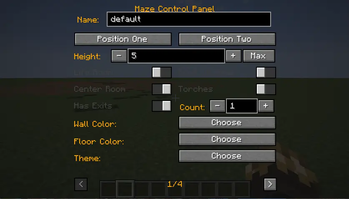
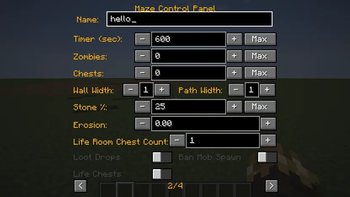
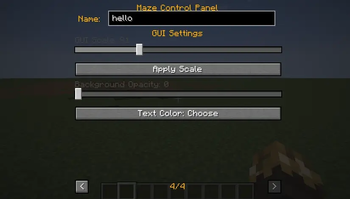
About this Mod
Maze Mod
A Minecraft mod that generates random mazes with configurable settings, including life rooms, chests, and difficulty parameters. This version features a comprehensive GUI for maze management and customization.
Features
- Maze Generation: Creates random mazes with adjustable dimensions and complexity.
- GUI Control Panel: A tabbed interface to manage maze settings without using commands.
- Multi-Version Support: Compatible with Minecraft 1.16.5, 1.18.2, 1.19.4, and 1.20.1.
- Network Sync: Real-time synchronization of maze states between client and server.
- HUD Integration: In-game hints for maze controls and status.
Installation
- Download the mod JAR file.
- Place it in your Minecraft
modsfolder. - Launch Minecraft with Forge for the corresponding version.
Usage
Controls
- Press M to open the Maze Control Panel.
- Use the <** and **> arrows to navigate between the 4 tabs.
Tabs
Maze Setup:
- Set Position 1 & 2 using in-game buttons.
- Adjust Height, Wall Width, and Path Width.
- Configure Life Room, Roof, Center Room, Torches, and Exits.
- Choose Wall Color and Floor Color.
- Select a Theme.
Advanced Settings:
- Set Timer, Zombie Count, and Chest Count.
- Adjust Stone Chance and Erosion.
- Configure Life Room Chest Count (LRCC).
- Toggle Loot Drops, Mob Spawning, and Life Chests.
Actions:
- Create, Rebuild, Refresh, or Delete Mazes.
- Start, Stop, or Reset the Timer.
- Reset Wins and Clear Positions.
- List Mazes and Positions.
- Apply Settings (Timer, Zombie Count, Chest Count).
GUI Customization:
- Adjust GUI Scale (50%–150%).
- Modify Background Opacity.
- Change Text Color.
Commands
While the GUI is the primary control method, the following commands are available:
/maze - Press M: Opens the Maze Control Panel./maze - List Mazes: Lists all created mazes./maze - List Positions: Lists all saved positions./maze - Clear Positions: Clears all saved positions./maze - Reset Wins: Resets the win counter./maze - Delete <name>: Deletes a maze by name./maze - Rebuild <name>: Rebuilds a maze by name./maze - Refresh <name>: Refreshes a maze by name./maze - Start <name>: Starts a maze by name./maze - Stop <name>: Stops a maze by name./maze - Reset <name>: Resets a maze by name./maze - Apply <name> <timer> <zombie_count> <chest_count>: Applies settings to a maze.
API Compatibility
| Version | Button API | Render API | Component API | Send Command |
|---|---|---|---|---|
| 1.20.1 | Button.builder().build() |
GuiGraphics |
Component.literal() |
connection.sendCommand() |
| 1.19.4 | Button.builder().bounds().build() |
PoseStack |
Component.literal() |
connection.sendCommand() |
| 1.18.2 | new Button(x,y,w,h,text,onPress) |
PoseStack |
new TextComponent() |
player.chat("/cmd") |
| 1.16.5 | new Button(x,y,w,h,text,IPressable) |
MatrixStack |
new StringTextComponent() |
player.chat("/cmd") |
License
MIT License
Available Versions
How to Install maze mod on Your Server
Order Server
Order a Minecraft Java server with at least 3 GB RAM (4 GB recommended).
Set forge Loader
In the panel under "Egg", select the forge loader and matching Minecraft version (1.20.6).
Install Mod
Open the mod browser in the dashboard and search for "maze mod". Click "Install" – done! Alternatively, upload the .jar via SFTP to the /mods folder.
Compatibility
Mod Loaders
Minecraft Versions
1.20.6, 1.20.5, 1.20.4 (+6 more)
Server-side
✓ RequiredRecommended RAM
4 GB(min. 3 GB)Frequently Asked Questions
maze mod server crashes on startup – what to do?
Most common cause: wrong forge version or insufficient RAM. Check the server log (latest.log) for "OutOfMemoryError" or "Mixin" errors. With Mado Hosting: ensure at least 3 GB RAM is allocated and the loader matches the mod version (1.20.6). You can switch loaders with one click in the panel.
Is maze mod compatible with forge?
maze mod officially supports forge for Minecraft 1.20.6, 1.20.5, 1.20.4. The Mado dashboard automatically detects incompatible loader combinations.
Server lagging with maze mod – how to optimize performance?
Recommended RAM: 4 GB (per 8 players). Use /spark profiler to check if maze mod consumes the most tick time. Common fixes: reduce server view-distance to 8-10, install "performant" or "starlight" as supplementary mods on Forge. With Mado Hosting, your server runs on NVMe SSDs with dedicated CPU cores for minimal latency.
Similar Mods





Rent Modded Server
Install maze mod with just one click on your server.