
MCCI Utils
A utility mod for the minecraft server MCC Island (Discontinued)
Screenshots

About this Mod
MCCI Utils has been discontinued
After having realized that working on MCCI Utils made playing on MCC Island less fun, I've decided that I will be discontinuing the mod. All source code is available if you wish to fork it and continue updating it with new things.
I personally want to be able to enjoy the server without having to constantly think about new things to add to the mod as well as debugging and updating for new versions. Thank you everyone who downloaded the mod and helped with bugs, feature requests and translations. You guys are all amazing.
What is MCCI Utils?
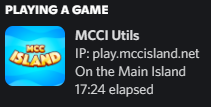
MCCI Utils is a mod that provides players with features to make their time on MCC Island more immersive and enjoyable. It adds multiple different features like chat mentions and Discord status, and many more. I'm constantly taking suggestions for features to add as well as adding hidden Easter Eggs which relate to events that have happened on the server.
Currently the mod contains the following features:
- Discord Status
- Friend Join Notifications (With Custom Sounds)
- Chat Mentions (With Custom Sound)
- Quest and Achievement notifications
- Custom Toasts
- Stacking duplicate messages
- Secret Easter Eggs
- And more (Check the change logs)
If you wish to suggest features or help contribute to the project, check out the GitHub

Optional dependencies:
Mod Menu and Cloth Config allow you to change mod settings within the game but are not required for it to work.
Does this mod add music?
This mod does not add music due to it being added to the server as a option at a later time. I also didn't want to steal an idea from a mod that has already been released "Island Utils"
Available Versions
How to Install MCCI Utils on Your Server
Order Server
Order a Minecraft Java server with at least 3 GB RAM (4 GB recommended).
Set fabric Loader
In the panel under "Egg", select the fabric loader and matching Minecraft version (1.19.4).
Install Mod
Open the mod browser in the dashboard and search for "MCCI Utils". Click "Install" – done! Alternatively, upload the .jar via SFTP to the /mods folder.
Compatibility
Mod Loaders
Minecraft Versions
1.19.4, 1.19.3, 1.19.2
Server-side
✗ UnsupportedRecommended RAM
4 GB(min. 3 GB)Frequently Asked Questions
MCCI Utils server crashes on startup – what to do?
Most common cause: wrong fabric version or insufficient RAM. Check the server log (latest.log) for "OutOfMemoryError" or "Mixin" errors. With Mado Hosting: ensure at least 3 GB RAM is allocated and the loader matches the mod version (1.19.4). You can switch loaders with one click in the panel.
Is MCCI Utils compatible with fabric?
MCCI Utils officially supports fabric for Minecraft 1.19.4, 1.19.3, 1.19.2. The Mado dashboard automatically detects incompatible loader combinations.
Server lagging with MCCI Utils – how to optimize performance?
Recommended RAM: 4 GB (per 8 players). Use /spark profiler to check if MCCI Utils consumes the most tick time. Common fixes: reduce server view-distance to 8-10, install "performant" or "starlight" as supplementary mods on Forge. With Mado Hosting, your server runs on NVMe SSDs with dedicated CPU cores for minimal latency.
Rent Modded Server
Install MCCI Utils with just one click on your server.