McDiscordWebhook
McDiscordWebhook integrates your discord server into your minecraft server without using a bot!
Screenshots
About this Mod
What This Mod Does
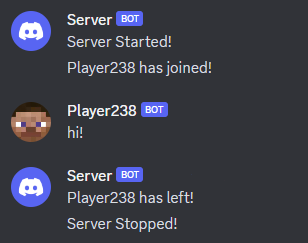
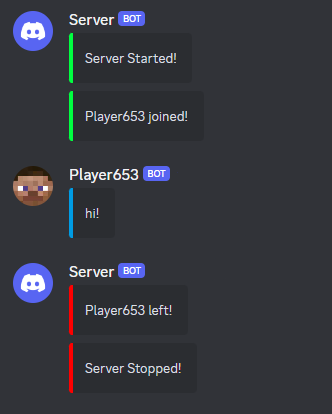
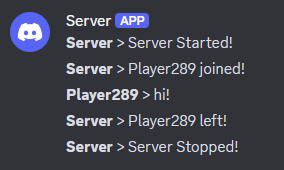
McDiscordWebhook intergrates your discord server with your minecraft server using a discord webhook. This mod sends configurable information including player join/leave messages, server start/stop messages and in game messages. This mod is meant for smaller servers that don't need all the features from a mod that uses a discord bot would provide. As it doesn't use a discord bot, it makes it a more lightweight alternative. There is currently 2 modes to choose from, default and embed.
Disclaimer
Messages sent in the channel where the webhook was created or other channels will not be sent in game. This is because this mod doesn't use a discord bot and purely relies on discord webhooks to function. This makes it impossible to read any message sent in any discord server. For this feature you will have to find a mod that makes use of a discord bot.
Setting up the mod
- View this discord support article for information about creating a webhook
- After creating the webhook make sure the game has already been run with the mod so it can generate the config
- Copy the webhook url and paste it after the
webhook-uri=in themcdiscwbhk.propertiesfile - Adjust any other config settings you want and run the game, messages should be sent in the channel where the webhook was created
Not Working?
Verify that the webhook url is correct. The log file will output Invalid Webhook url after world load if it isn't. The log will also contain Webhook Url: ... which outputs the webhook url specified in the config. If this doesn't match what's in the config then you have done something wrong and it is best to delete the config and refollow instructions begginning at the 2nd one.Available Versions
How to Install McDiscordWebhook on Your Server
Order Server
Order a Minecraft Java server with at least 3 GB RAM (4 GB recommended).
Set fabric Loader
In the panel under "Egg", select the fabric loader and matching Minecraft version (1.21.1).
Install Mod
Open the mod browser in the dashboard and search for "McDiscordWebhook". Click "Install" – done! Alternatively, upload the .jar via SFTP to the /mods folder.
Compatibility
Mod Loaders
Minecraft Versions
1.21.1, 1.21, 1.20.4 (+10 more)
Server-side
✓ RequiredRecommended RAM
4 GB(min. 3 GB)Frequently Asked Questions
McDiscordWebhook server crashes on startup – what to do?
Most common cause: wrong fabric version or insufficient RAM. Check the server log (latest.log) for "OutOfMemoryError" or "Mixin" errors. With Mado Hosting: ensure at least 3 GB RAM is allocated and the loader matches the mod version (1.21.1). You can switch loaders with one click in the panel.
Is McDiscordWebhook compatible with fabric and neoforge?
McDiscordWebhook officially supports fabric, neoforge for Minecraft 1.21.1, 1.21, 1.20.4. The Mado dashboard automatically detects incompatible loader combinations.
Server lagging with McDiscordWebhook – how to optimize performance?
Recommended RAM: 4 GB (per 8 players). Use /spark profiler to check if McDiscordWebhook consumes the most tick time. Common fixes: reduce server view-distance to 8-10, install "performant" or "starlight" as supplementary mods on Forge. With Mado Hosting, your server runs on NVMe SSDs with dedicated CPU cores for minimal latency.
Similar Mods






Rent Modded Server
Install McDiscordWebhook with just one click on your server.