
MCF: EntityMap
Function library for fast and familiar per-entity data storage
Screenshots
About this Mod
MCF (Minecraft Collections Framework): EntityMap
JCF-style per-entity mapping for Minecraft datapacks
MCF: EntityMap is a datapack library for incredibly fast and easy per-entity data storage. Inspired by Java's HashMap API, EntityMap allows for storing attributes and other relevant data on entities without having to handle UUIDs and enables high-level interaction.
Thanks to CJDev for UUID conversion!
Map or EntityMap?
These libraries are similar, but specialized for different purposes. MCF: Map is superior for general data management as it is not tied to in-game objects such as entities, making it a better choice if your datapack relies on non-entity-based storage. MCF: EntityMap stores data on a per-entity basis with automatic UUID handling (MCF: Map does not do this). It becomes a better choice if your datapack is heavily entity-based.
Features
- Per-entity storage - supports multiple instances of the same entity under different paths. Data is not synchronized.
- Functions to mirror nearly all
HashMapmethods - familiar, simple, and intuitive functionality! - Automatic UUID resolution and handling - don't worry about doing anything with UUIDs, as it's all handled under the hood.
- No direct storage manipulation required - other than outputs from getters, storage locations are all accessed and modified internally.
- Debug tools - easy printing and error catching to make life easier.
- Documented and commented code - all top-level functions include a brief description and parameter list.
Usage
All functions intended to be used are at the top level or under settings. Calling any functions in internal directly is strongly discouraged as the result will more than likely not be as intended and may potentially cause issues.
Example
function mcfentitymap:new {path: "entities"}
function mcfentitymap:put {path: "entities", key: "class", value: "mage"}
The example above shows how an entity would be registered to the storage path mcfentitymap:maps entities, then have the attribute class: mage added. These values can be modified or accessed in largely the same way they could be in JCF maps using the provided functions.
Note: it may be helpful to change the namespace for this datapack to match that of your project. The simplest way to achieve this in VSCode is by replacing all instances of mcfentitymap with mynamespace in the search tab.
What is the "path", and how do I know what parameters to use?
All provided functions require a path to be passed in. As Minecraft functions cannot be overloaded, storage paths cannot be inferred by the datapack or disregarded by the user.
The path is used to store a given entity at the user's choice of storage location under mcfentitymap:maps. For instance, as stated above, the provided example stores the added entity at mcfentitymap:maps entities. To be exact, the path parameter refers to a list in which entity entries are stored.
Again, feel free to configure namespaces and storage locations as you see fit.
Debugging
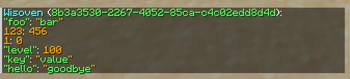
There are multiple debugging tools at your disposal. For example, to easily view an entity's entry, simply run the function mcfentitymap:print_entity as the entity whom you wish to view. This will print their mappings line-by-line in chat.
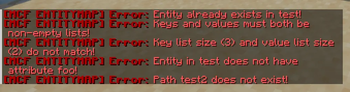
Additionally, this datapack will catch errors and stop execution when they occur. These errors can include, but are not limited to:
- Invalid parameters
- Attempting to access a path that doesn't exist
- Attempting to modify an entry that doesn't exist
By default, these are not shown in chat, but running the function mcfentitymap:settings/show_errors or simply setting your score mcfem.show_errors to 1 will allow you to see in chat when these errors are caught.
If you wish, you can disable error catching entirely by running the function mcfentitymap:settings/disable_errors, but this strongly discouraged and only recommended if error catching poses an actual problem to your project.
To get in contact for any reason, message wisoven on Discord!
MIT licensed.
Available Versions
How to Install MCF: EntityMap on Your Server
Order Server
Order a Minecraft Java server with at least 3 GB RAM (4 GB recommended).
Set datapack Loader
In the panel under "Egg", select the datapack loader and matching Minecraft version (26.1.2).
Install Mod
Open the mod browser in the dashboard and search for "MCF: EntityMap". Click "Install" – done! Alternatively, upload the .jar via SFTP to the /mods folder.
Compatibility
Mod Loaders
Minecraft Versions
26.1.2, 26.1.1, 26.1
Server-side
✓ RequiredRecommended RAM
4 GB(min. 3 GB)Frequently Asked Questions
MCF: EntityMap server crashes on startup – what to do?
Most common cause: wrong datapack version or insufficient RAM. Check the server log (latest.log) for "OutOfMemoryError" or "Mixin" errors. With Mado Hosting: ensure at least 3 GB RAM is allocated and the loader matches the mod version (26.1.2). You can switch loaders with one click in the panel.
Is MCF: EntityMap compatible with datapack and fabric and forge and neoforge and quilt?
MCF: EntityMap officially supports datapack, fabric, forge, neoforge, quilt for Minecraft 26.1.2, 26.1.1, 26.1. Note: Forge and Fabric mods are NOT cross-compatible – pick one loader and stick with it. The Mado dashboard automatically detects incompatible loader combinations.
Server lagging with MCF: EntityMap – how to optimize performance?
Recommended RAM: 4 GB (per 8 players). Use /spark profiler to check if MCF: EntityMap consumes the most tick time. Common fixes: reduce server view-distance to 8-10, install "performant" or "starlight" as supplementary mods on Forge. With Mado Hosting, your server runs on NVMe SSDs with dedicated CPU cores for minimal latency.
Similar Mods



Rent Modded Server
Install MCF: EntityMap with just one click on your server.