
Screenshots
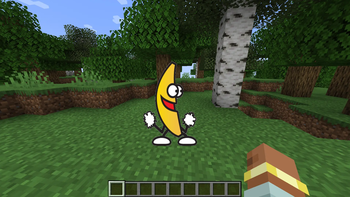
About this Mod
Minecraft mod that renders animated GIFs directly in the overlay. Includes an in-game screen to download GIFs by pasting a URL, with no external tools required, and displays/updates them in real time on the UI (you don't even need to save the world when exiting Minecraft). Keep in mind that the GIF renders above almost any other overlay
- Press G to open the download screen
- Paste a URL and download
- That's it, if your URL is correct, the GIF should download and render almost instantly
Usages
- Drag GIFs in your screen
- Right Click to hide/show, remove or rename the GIF
- Resize by holding a corner and dragging
Saves
The GIFs and the .json save file are located in the MCGifs folder inside the .minecraft directory
Warning
Normally, copying a GIF link from a web page does not give a direct downloadable file. The link usually points to a web page that returns HTML or redirects, not the actual GIF file, so if your GIF is not downloading, that's the reason. To fix it:
- Open the GIF on the page (Google Images, Tenor, Giphy, etc).
- Right-click the GIF.
- Click “Open image in new tab”.
- Copy the new tab URL.
- If it contains "media/images/etc" in the URL, it’s the real link.
A FEW GIFs may render/play way faster than the one you saw in Internet, I don't know fully why, but it's probably because of how it was uploaded to the internet (it's not a bug)
Available Versions
How to Install MCGifs on Your Server
Order Server
Order a Minecraft Java server with at least 3 GB RAM (4 GB recommended).
Set forge Loader
In the panel under "Egg", select the forge loader and matching Minecraft version (1.20.1).
Install Mod
Open the mod browser in the dashboard and search for "MCGifs". Click "Install" – done! Alternatively, upload the .jar via SFTP to the /mods folder.
Compatibility
Mod Loaders
Minecraft Versions
1.20.1
Server-side
✗ UnsupportedRecommended RAM
4 GB(min. 3 GB)Frequently Asked Questions
MCGifs server crashes on startup – what to do?
Most common cause: wrong forge version or insufficient RAM. Check the server log (latest.log) for "OutOfMemoryError" or "Mixin" errors. With Mado Hosting: ensure at least 3 GB RAM is allocated and the loader matches the mod version (1.20.1). You can switch loaders with one click in the panel.
Is MCGifs compatible with forge?
MCGifs officially supports forge for Minecraft 1.20.1. The Mado dashboard automatically detects incompatible loader combinations.
Server lagging with MCGifs – how to optimize performance?
Recommended RAM: 4 GB (per 8 players). Use /spark profiler to check if MCGifs consumes the most tick time. Common fixes: reduce server view-distance to 8-10, install "performant" or "starlight" as supplementary mods on Forge. With Mado Hosting, your server runs on NVMe SSDs with dedicated CPU cores for minimal latency.
Rent Modded Server
Install MCGifs with just one click on your server.