
MCmisidechat-仿米塔风格字幕
A subtitle mod suitable for map making
Screenshots

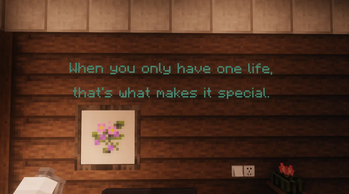
About this Mod
Overview
MCmisidechat is a creates subtitles in miside style
Great for cutscenes, command maps, stream events, and server announcements.
Key Features
- Per-character pop-in reveal animation
- Staggered character drop sequence
- Ground behavior: flat landing + shrink/fade out
- Styling support: You can use hexadecimal colors
- Player-view spawn: generate subtitle 2 blocks in front of a target player
Commands
/msc [x] [y] [z] [rot1] [rot2] [text] [holdSeconds]
/mscplayer [player] [text] [holdSeconds]
Notes:
holdSecondsis optional and controls how long text stays before dropping/mscplayeruses the target player's current yaw/pitch and eye direction
Inline Styling Tags
<66ccff> or <#66ccff>   Set hex color
<size:10>               Set glyph size (10 = baseline)
<bold>                  Enable bold
<br>                    Line break
Examples:
/msc ~ ~2 ~ 0 0 <66ccff><size:10><bold>Hello World 2.5
/mscplayer Steve <ff5555><size:12>Warning! 3
Compatibility
- Minecraft:
1.20.1 - Forge:
47.2.0+ - Java:
17 - Installation side: recommended on both client and server
Changelog (v1.0.0)
- Added
/mscplayercommand - Improved drop animation smoothness
Known Issues
- Very long text may cause minor frame drops on low-end machines
- Some rare font combinations can still show slight offsets at extreme camera angles
简介
MCmisidechat 是一个沉浸式字幕动画模组,仿造米塔风格字幕制作
适合:剧情演出、指令地图、直播整活、服务器活动提示。
核心特性
- 逐字弹出:每个字符依次出现并带有轻微放大动画
- 逐字掉落:字符按顺序分批掉落到地面
- 地面表现:落地后平躺并逐渐缩小消失
- 样式支持:兼容十六进制颜色代码
- 视角生成:支持在目标玩家当前视角前方 2 格生成字幕
指令
/msc [x] [y] [z] [rot1] [rot2] [text] [holdSeconds]
/mscplayer [player] [text] [holdSeconds]
参数说明:
holdSeconds可选,控制字幕掉落前停留时间(秒)/mscplayer会使用目标玩家的当前朝向,并在其视角前方约 2 格生成字幕
文本样式标签
<66ccff> 或 <#66ccff>  设置颜色
<size:10>               设置字号(10 为基准)
<bold>                  粗体
<br>                    换行
示例:
/msc ~ ~2 ~ 0 0 <66ccff><size:10><bold>你好世界 2.5
/mscplayer Steve <ff5555><size:12>警告! 3
兼容信息
- Minecraft:
1.20.1 - Forge:
47.2.0+ - Java:
17 - 安装:建议客户端与服务端都安装
本版本更新(v1.0.0)
- 新增
/mscplayer指令 - 优化掉落动画流畅度
已知问题
- 极长文本在低性能环境下可能有轻微掉帧
- 特殊字体组合在极端视角下可能出现少量偏移
Available Versions
How to Install MCmisidechat-仿米塔风格字幕 on Your Server
Order Server
Order a Minecraft Java server with at least 3 GB RAM (4 GB recommended).
Set forge Loader
In the panel under "Egg", select the forge loader and matching Minecraft version (1.20.1).
Install Mod
Open the mod browser in the dashboard and search for "MCmisidechat-仿米塔风格字幕". Click "Install" – done! Alternatively, upload the .jar via SFTP to the /mods folder.
Compatibility
Mod Loaders
Minecraft Versions
1.20.1
Server-side
✓ RequiredRecommended RAM
4 GB(min. 3 GB)Frequently Asked Questions
MCmisidechat-仿米塔风格字幕 server crashes on startup – what to do?
Most common cause: wrong forge version or insufficient RAM. Check the server log (latest.log) for "OutOfMemoryError" or "Mixin" errors. With Mado Hosting: ensure at least 3 GB RAM is allocated and the loader matches the mod version (1.20.1). You can switch loaders with one click in the panel.
Is MCmisidechat-仿米塔风格字幕 compatible with forge?
MCmisidechat-仿米塔风格字幕 officially supports forge for Minecraft 1.20.1. The Mado dashboard automatically detects incompatible loader combinations.
Server lagging with MCmisidechat-仿米塔风格字幕 – how to optimize performance?
Recommended RAM: 4 GB (per 8 players). Use /spark profiler to check if MCmisidechat-仿米塔风格字幕 consumes the most tick time. Common fixes: reduce server view-distance to 8-10, install "performant" or "starlight" as supplementary mods on Forge. With Mado Hosting, your server runs on NVMe SSDs with dedicated CPU cores for minimal latency.
Rent Modded Server
Install MCmisidechat-仿米塔风格字幕 with just one click on your server.