
MCOverlay
A Minecraft mod designed to give the feel of Steam overlay in Minecraft.
Screenshots
About this Mod
What is Minecraft Overlay?
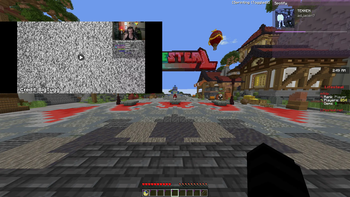
Minecraft Overlay is a modern in-game overlay for Minecraft that lets you browse, multitask, and access useful tools without leaving the game.
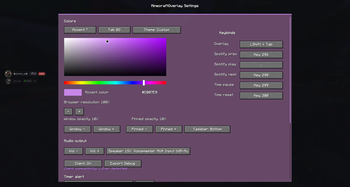
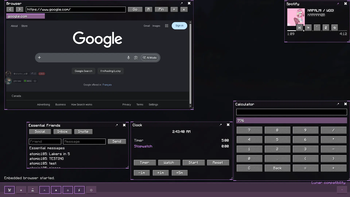
The mod adds a clean desktop-style interface with draggable windows, widgets, notes, calculators, timers, themes, and an optional embedded browser system.
Designed to feel lightweight and modern, Minecraft Overlay focuses on convenience, customization, and usability while staying integrated directly into Minecraft.
Features
Here is a basic rundown of what this mod does.
- Desktop-Style Overlay Interface
- Draggable & Resizable Windows
- Optional Embedded Browser
- Multi-Tab Browser Support
- Notes Widget
- Calculator Widget
- Timers & Productivity Tools
- Spotify Controls
- Custom Themes & UI Styling
- Smooth Modern Design
- Lightweight Overlay System
Browser Support
The embedded browser feature uses MCEF Modern.
The mod itself works without MCEF installed. However, certain clients such as Feather Client have old version of CEF, so the browser functionality may be worse than others.
Modpack Permissions
This is a free project; you may include it in modpacks as long as proper credit and a link to the original project page are provided.
Common Questions
Does this work on Fabric?
Yes, the mod is built for Fabric.Do I need MCEF installed?
No, the mod already has MCEF built-in for the browser.Can I use this without the browser?
Yes. All non-browser overlay features still work normally.Can I re-upload this mod?
Please link to the official Modrinth or GitHub page instead of re-uploading.Will more widgets/features be added?
Yes. More customization, widgets, and overlay tools are planned.
Support the Project
Minecraft Overlay is developed in my free time and will continue receiving updates, improvements, and new features over time.
If you enjoy the mod and want to support development, you can support the project here:
Support helps with:
- Continued development
- New features and widgets
- Bug fixes and compatibility updates
- Improving browser and overlay performance
Thank you for supporting the project ❤️
Available Versions
How to Install MCOverlay on Your Server
Order Server
Order a Minecraft Java server with at least 3 GB RAM (4 GB recommended).
Set fabric Loader
In the panel under "Egg", select the fabric loader and matching Minecraft version (1.21.11).
Install Mod
Open the mod browser in the dashboard and search for "MCOverlay". Click "Install" – done! Alternatively, upload the .jar via SFTP to the /mods folder.
Compatibility
Mod Loaders
Minecraft Versions
1.21.11
Server-side
✗ UnsupportedRecommended RAM
4 GB(min. 3 GB)Frequently Asked Questions
MCOverlay server crashes on startup – what to do?
Most common cause: wrong fabric version or insufficient RAM. Check the server log (latest.log) for "OutOfMemoryError" or "Mixin" errors. With Mado Hosting: ensure at least 3 GB RAM is allocated and the loader matches the mod version (1.21.11). You can switch loaders with one click in the panel.
Is MCOverlay compatible with fabric?
MCOverlay officially supports fabric for Minecraft 1.21.11. The Mado dashboard automatically detects incompatible loader combinations.
Server lagging with MCOverlay – how to optimize performance?
Recommended RAM: 4 GB (per 8 players). Use /spark profiler to check if MCOverlay consumes the most tick time. Common fixes: reduce server view-distance to 8-10, install "performant" or "starlight" as supplementary mods on Forge. With Mado Hosting, your server runs on NVMe SSDs with dedicated CPU cores for minimal latency.
Similar Mods






Rent Modded Server
Install MCOverlay with just one click on your server.