
Mediaworks
Mediaworks is a Hex Casting addon that adds new and exciting utilities!
Screenshots
About this Mod
Mediaworks is a Hex Casting addon that adds exciting new utilities.
Please note. Development for this addon has been halted indefinitely. However, you have my permission to create forks of this addon if you wish. Keep an eye out on the Hex Casting discord as there is at least one person already working on porting this mod to 1.20.1 under a different name.
We may return to get Mediaworks WORK-ing again, heh. If we do, you can be sure it will be on the most up to date version of Minecraft supported by Hex Casting.
Some noteworthy things to look forward to...
Astral Projection
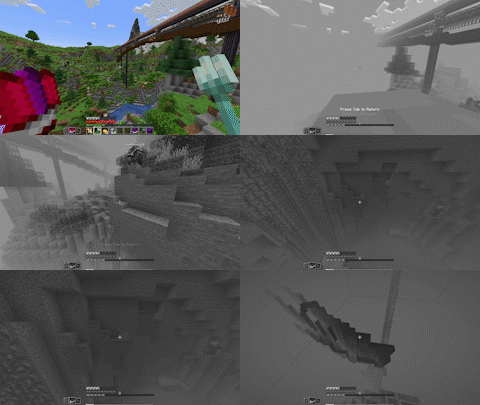
A new great spell capable of separating the mind from the body. Your immaterial projection can pass through solids, but cannot interact with blocks. But clever mages may find other ways to affect the environment...
Macula Etching
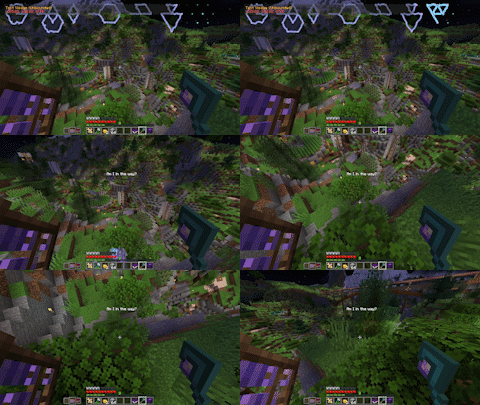
The beginnings of a rudimentary display can be etched into your eyes. Display any iotas anywhere on the screen. Set their duration or leave them etched into your eyes permanently. Installing MoreIotas will allow you to add custom text to your Macula and also allow you to color text.
Featherweave Cloak
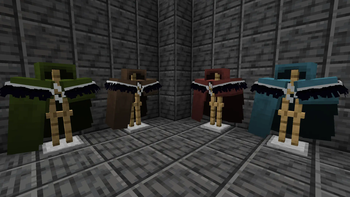
A powerful new garment hidden deep underground. This cloak's threads have the power to hold information, allowing you to read and write iotas to their cloth. But that's not all, new vanilla enchantments can be applied to a cloak to absorb damage, increase your ambit, and even trigger the stored iota upon taking damage. Cloaks are also dyeable in the same way leather armor is. The possibilities are endless!
Some new tweaks and other miscellaneous features!
- A pattern which returns the amount of media available to the cast.
- Changes to media withdrawal logic for casts.
- Wearing a scrying lens on the head or in a Trinket or Curios slot now grants a bigger casting grid.
Available Versions
How to Install Mediaworks on Your Server
Order Server
Order a Minecraft Java server with at least 3 GB RAM (4 GB recommended).
Set fabric Loader
In the panel under "Egg", select the fabric loader and matching Minecraft version (1.19.2).
Install Mod
Open the mod browser in the dashboard and search for "Mediaworks". Click "Install" – done! Alternatively, upload the .jar via SFTP to the /mods folder.
Compatibility
Mod Loaders
Minecraft Versions
1.19.2
Server-side
✓ RequiredRecommended RAM
4 GB(min. 3 GB)Frequently Asked Questions
Mediaworks server crashes on startup – what to do?
Most common cause: wrong fabric version or insufficient RAM. Check the server log (latest.log) for "OutOfMemoryError" or "Mixin" errors. With Mado Hosting: ensure at least 3 GB RAM is allocated and the loader matches the mod version (1.19.2). You can switch loaders with one click in the panel.
Is Mediaworks compatible with fabric and forge?
Mediaworks officially supports fabric, forge for Minecraft 1.19.2. Note: Forge and Fabric mods are NOT cross-compatible – pick one loader and stick with it. The Mado dashboard automatically detects incompatible loader combinations.
Server lagging with Mediaworks – how to optimize performance?
Recommended RAM: 4 GB (per 8 players). Use /spark profiler to check if Mediaworks consumes the most tick time. Common fixes: reduce server view-distance to 8-10, install "performant" or "starlight" as supplementary mods on Forge. With Mado Hosting, your server runs on NVMe SSDs with dedicated CPU cores for minimal latency.
Similar Mods




Rent Modded Server
Install Mediaworks with just one click on your server.