
Megastructure block
A structure block that breaks the constraints of regular structure blocks and stores chunk-sized parts of the desired area in different consecutive NBT files that can also be loaded back by the same block
Screenshots
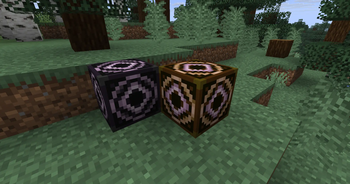
About this Mod
The megastructure block is similar to a regular structure block but it breaks the size limit of the vanilla one.
This mod is a compulsory dependency for worldgen systems that use megastructures in their generation logic.
This block works similar to vanilla, but with two major changes:
- Firstly, it serializes structures differently:
- This block captures the whole chunk-sized area (width and length) of any block inside the structure area. The height encompasses the regular height of the structure (from the megastructure block to the set height).
- Each chunk is serialized as a different regular encoded structure. This technically means one can load individual structure chunks through a regular structure block
- The serialization also includes a "master nbt file", that includes the header data necessary to reassemble all the chunks of the overall megastructure correctly into the world.
- This means, secondly, there is no theoretical structure limit other than what your PC is capable of. I have managed to serialize and deserialize a 100 x 100 block (7x7 chunks) correctly as well as other bigger tests no problem
Instructions
The megastructure block is only obtainable via the /give command
SAVE
Works as a regular structureblock with the size of the area to save and the offset to move said area around.
There is a "DETECT" that doesn't work because the megastructure block does not have a proper corner detection capabilities. (The "delimiter mode" does nothing at the moment)
There is a button to toggle wether special blocks like air and entities are saved on the megastructure.
The block automatically prepends any inputed structure name with the minecraft namespace followed by the "mgst_" prefix and the name you inputed.
- For example, if the name of your structure is "bigcastle", the header file of the megastructure will be identified as "minecraft:mgst_bigcastle"
You can use your own namespace instead.
- For example, if you are making the "bigcastle" megastructure for the "bigworld" namespace, you can write the name as "bigworld:bigcastle" and it will be saved as "bigworld:mgst_bigcastle"
ATTENTION!
For now the blocks saves all the width and length of all the chunks that contains part of the stabilished area, meaning that that "buffer area" will also be placed on a LOAD opperation.
LOAD
Also works as a regular structure load with the name of the megastructure to load (including the "mgst_" prefix) and the offset
ATTENTION!
For now, the offset and the block position are ignored and the megastructure starts to load on the corner of the chunk closest in orientation to the origin of coordinates
For developers
This mod can be downloaded as a packaged dependency for a mod and also includes the classes and registries needed to spawn megastructures in the world programatically. If people are interested, a doc will be created in the future
Available Versions
How to Install Megastructure block on Your Server
Order Server
Order a Minecraft Java server with at least 4 GB RAM (6 GB recommended).
Set neoforge Loader
In the panel under "Egg", select the neoforge loader and matching Minecraft version (1.21.11).
Install Mod
Open the mod browser in the dashboard and search for "Megastructure block". Click "Install" – done! Alternatively, upload the .jar via SFTP to the /mods folder.
Compatibility
Mod Loaders
Minecraft Versions
1.21.11, 1.21.10, 1.21.9 (+1 more)
Server-side
~ OptionalRecommended RAM
6 GB(min. 4 GB)Frequently Asked Questions
Megastructure block server crashes on startup – what to do?
Most common cause: wrong neoforge version or insufficient RAM. Check the server log (latest.log) for "OutOfMemoryError" or "Mixin" errors. With Mado Hosting: ensure at least 4 GB RAM is allocated and the loader matches the mod version (1.21.11). You can switch loaders with one click in the panel.
Is Megastructure block compatible with neoforge?
Megastructure block officially supports neoforge for Minecraft 1.21.11, 1.21.10, 1.21.9. The Mado dashboard automatically detects incompatible loader combinations.
Server lagging with Megastructure block – how to optimize performance?
Recommended RAM: 6 GB (per 5 players). Use /spark profiler to check if Megastructure block consumes the most tick time. Common fixes: reduce server view-distance to 8-10, install "performant" or "starlight" as supplementary mods on Forge. With Mado Hosting, your server runs on NVMe SSDs with dedicated CPU cores for minimal latency.
Rent Modded Server
Install Megastructure block with just one click on your server.