
Meloquill
A mod that intends to make music disc mods more interesting!
Screenshots
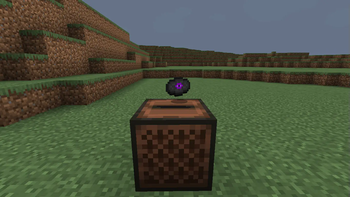
About this Mod
Meloquill aims to make modding for music discs more interesting in Minecraft. Adding a couple new items such as the new Azure Ore and Disc Smithing Template, Meloquill would be a perfect addition to any mod with music discs!
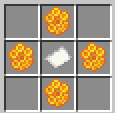
The process is simple!
You go and get one Paper and four Honeycomb and put it in a Crafting Table as such:
Grab a Brush and find a Cold Ocean Ruin and start sweeping for a chance to find the Disc Smithing Template.
After you have done those, you can now use the Smithing Template and the Empty Music Disc to make new Music Discs. Meloquill has only one default disc. Written and created by everyones favorite Minecraft artist C418, the music disc Dog has made it back in the game by using Purple Dye as the last ingredient in the Smithing Table.
You can duplicate the new Smithing Template by using Azure instead of Diamonds with a Coal Block as the block.
For Modders Interested In Using This Pack With Their Mod;
If you are wondering how to implement your mod to go along with Meloquill, this is how, it is actually really simple.
You have to use this code in the recipes section in your mod:
{
  "type": "minecraft:smithing_transform",
  "addition": {
    "item": "INGREDIENT"
  },
  "base": {
    "item": "melo:empty_music_disc"
  },
  "result": {
    "item": "RESULT"
  },
  "template": {
    "item": "melo:disc_smithing_template"
  }
}
Replace 'INGREDIENT' with the item you want to use to make your music disc with and then replace 'RESULT' with the Music Disc you want the player to get afterwards. I hope this helps, if you have any fither questions, you can message me on Discord.
Discord Server: https://discord.gg/SHN5SVfN6V
Available Versions
How to Install Meloquill on Your Server
Order Server
Order a Minecraft Java server with at least 4 GB RAM (6 GB recommended).
Set fabric Loader
In the panel under "Egg", select the fabric loader and matching Minecraft version (1.20.4).
Install Mod
Open the mod browser in the dashboard and search for "Meloquill". Click "Install" – done! Alternatively, upload the .jar via SFTP to the /mods folder.
Compatibility
Mod Loaders
Minecraft Versions
1.20.4, 1.20.3, 1.20.2 (+2 more)
Server-side
~ OptionalRecommended RAM
6 GB(min. 4 GB)Frequently Asked Questions
Meloquill server crashes on startup – what to do?
Most common cause: wrong fabric version or insufficient RAM. Check the server log (latest.log) for "OutOfMemoryError" or "Mixin" errors. With Mado Hosting: ensure at least 4 GB RAM is allocated and the loader matches the mod version (1.20.4). You can switch loaders with one click in the panel.
Is Meloquill compatible with fabric?
Meloquill officially supports fabric for Minecraft 1.20.4, 1.20.3, 1.20.2. The Mado dashboard automatically detects incompatible loader combinations.
Server lagging with Meloquill – how to optimize performance?
Recommended RAM: 6 GB (per 5 players). Use /spark profiler to check if Meloquill consumes the most tick time. Common fixes: reduce server view-distance to 8-10, install "performant" or "starlight" as supplementary mods on Forge. With Mado Hosting, your server runs on NVMe SSDs with dedicated CPU cores for minimal latency.
Similar Mods




Rent Modded Server
Install Meloquill with just one click on your server.