
Mentalitys | World Web Map
1.20.1 mod: live 2D world map in browser with player markers & auto-render on chunk load.
Screenshots
About this Mod
World Web Map - Minecraft 1.20.1 Server Web Map Mod
Server-side Minecraft 1.20.1 web map mod for Forge and Fabric.
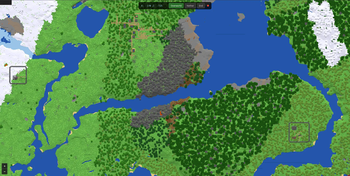
World Web Map renders a 2D top-down map of your Minecraft world and serves it in a browser:
http://server-ip:8123
No client mods are required. Players only need a browser.
Versions and Requirements
| Loader | Version | Minecraft | Loader version | Extra dependency | Java | Jar |
|---|---|---|---|---|---|---|
| Forge | 0.2.1 | 1.20.1 | Forge 47.x, tested on 47.2.0 | none | 17 | forgewebmap-0.2.1.jar |
| Fabric | 0.2.1 | 1.20.1 | Fabric Loader 0.15.11+ | Fabric API 0.92.2+1.20.1 | 17 | fabricwebmap-0.2.1.jar |
Features
- 2D top-down map with height shading.
- Live player markers with names, updated every 2 seconds.
- Biome name shown under the cursor or mobile center point.
- Dimension switcher for Overworld, Nether, and The End.
- Auto-render as players explore, with chunk-load debounce.
- Robust compositing so previously rendered pixels survive re-renders.
- PNG tile writes are atomic and skipped when unchanged.
- Leaflet 1.9.4 browser UI with zoom, pan, dark styling, and mobile controls.
Commands
All commands require operator level 2. Syntax is the same for Forge and Fabric.
| Command | Description |
|---|---|
/webmap status |
Show web server status, queue size, worker count, and rendered tile count |
/webmap render <tileX> <tileZ> |
Render one Overworld tile; tile coords are floor(blockCoord / 256) |
/webmap render-area <minX> <minZ> <maxX> <maxZ> |
Queue a rectangular Overworld area, max 10,000 tiles |
/webmap fullrender <radius> |
Render a square around spawn, radius in tiles |
/webmap stoprender |
Clear the render queue |
/webmap reload |
Reload config and restart the web server if bind or port changed |
Tile coordinates:
tileX = floor(blockX / 256)
tileZ = floor(blockZ / 256)
Example:
/webmap render 0 0
This renders blocks 0..255 x 0..255.
Config and Storage
| Aspect | Forge | Fabric |
|---|---|---|
| Config file | config/forgewebmap-common.properties |
config/fabricwebmap-common.properties |
| Tile path | world/forgewebmap/tiles/ |
world/fabricwebmap/tiles/ |
| Static web files | packaged under /web/ in the mod jar |
packaged under /web/ in the mod jar |
Config is created automatically on first run.
| Key | Default | Description |
|---|---|---|
enabled |
true |
Enable the mod |
bindAddress |
0.0.0.0 |
HTTP bind address; use 127.0.0.1 for local-only access |
port |
8123 |
HTTP port |
tileSize |
256 |
Tile size in blocks and pixels |
renderThreads |
1 |
Background PNG render worker threads |
maxTilesPerTick |
1 |
Max tiles sampled per render interval |
ticksBetweenRenders |
20 |
Server ticks between queue processing steps |
enablePlayerMarkers |
true |
Show players on the map |
enableAutoRender |
true |
Queue tile renders when chunks load |
chunkRenderDebounceMs |
5000 |
Delay after the last chunk-load event before rendering that tile |
renderRadiusAroundPlayers |
4 |
Reserved for player-radius rendering behavior |
saveTilesInsideWorldFolder |
true |
Store tiles under the world folder |
tilesDirectory |
loader-specific | Relative tile output directory |
logRenderProgress |
true |
Log every 50 rendered tiles |
Tile layout:
world/<loader-webmap>/tiles/
├── overworld/
│   └── 0/
│       ├── 0_0.png
│       └── ...
├── the_nether/
│   └── 0/
└── the_end/
    └── 0/
API Endpoints
| Method | Path | Description |
|---|---|---|
GET |
/ |
Web map frontend |
GET |
/app.js |
Frontend JavaScript |
GET |
/style.css |
Frontend CSS |
GET |
/tiles/{dim}/{zoom}/{x}/{z}.png |
PNG map tile |
GET |
/api/status |
Mod status, queue size, worker count, rendered tile count |
GET |
/api/players |
Online players with name, dimension, coordinates, and yaw |
GET |
/api/config |
Tile size, zoom range, and available dimensions |
GET |
/api/biome?dim=overworld&x=100&z=200 |
Biome display name and registry ID |
Loader Differences
| Aspect | Forge | Fabric |
|---|---|---|
| Mod entrypoint | @Mod class |
ModInitializer.onInitialize() |
| Lifecycle hooks | Forge server events | ServerLifecycleEvents |
| Tick hook | TickEvent.ServerTickEvent |
ServerTickEvents.END_SERVER_TICK |
| Chunk-load hook | ChunkEvent.Load |
ServerChunkEvents.CHUNK_LOAD |
| Command hook | RegisterCommandsEvent |
CommandRegistrationCallback.EVENT |
| Logging | Forge LogUtils |
SLF4J LoggerFactory |
Behavior is intended to be identical across both loaders.
Known Limitations
- 2D only: no 3D, isometric, or cave map yet.
- Simple block-color palette: no resource pack textures or biome tinting yet.
- Render commands currently target Overworld only, although tile storage supports all three vanilla dimensions.
fullrenderrenders a square around spawn, not every existing region file.- Unloaded or ungenerated chunks stay transparent until rendered/generated; previously rendered pixels are preserved during re-renders.
- No authentication and no HTTPS; anyone with network access to port 8123 can view the map.
- Only zoom level
0is rendered natively; Leaflet scales it visually for other zoom levels.
Available Versions
How to Install Mentalitys | World Web Map on Your Server
Order Server
Order a Minecraft Java server with at least 3 GB RAM (4 GB recommended).
Set fabric Loader
In the panel under "Egg", select the fabric loader and matching Minecraft version (1.20.1).
Install Mod
Open the mod browser in the dashboard and search for "Mentalitys | World Web Map". Click "Install" – done! Alternatively, upload the .jar via SFTP to the /mods folder.
Compatibility
Mod Loaders
Minecraft Versions
1.20.1
Server-side
✓ RequiredRecommended RAM
4 GB(min. 3 GB)Frequently Asked Questions
Mentalitys | World Web Map server crashes on startup – what to do?
Most common cause: wrong fabric version or insufficient RAM. Check the server log (latest.log) for "OutOfMemoryError" or "Mixin" errors. With Mado Hosting: ensure at least 3 GB RAM is allocated and the loader matches the mod version (1.20.1). You can switch loaders with one click in the panel.
Is Mentalitys | World Web Map compatible with fabric and forge?
Mentalitys | World Web Map officially supports fabric, forge for Minecraft 1.20.1. Note: Forge and Fabric mods are NOT cross-compatible – pick one loader and stick with it. The Mado dashboard automatically detects incompatible loader combinations.
Server lagging with Mentalitys | World Web Map – how to optimize performance?
Recommended RAM: 4 GB (per 8 players). Use /spark profiler to check if Mentalitys | World Web Map consumes the most tick time. Common fixes: reduce server view-distance to 8-10, install "performant" or "starlight" as supplementary mods on Forge. With Mado Hosting, your server runs on NVMe SSDs with dedicated CPU cores for minimal latency.
Similar Mods






Rent Modded Server
Install Mentalitys | World Web Map with just one click on your server.