
Merchant Markers
Adds custom markers above villagers based on their professions!
Screenshots
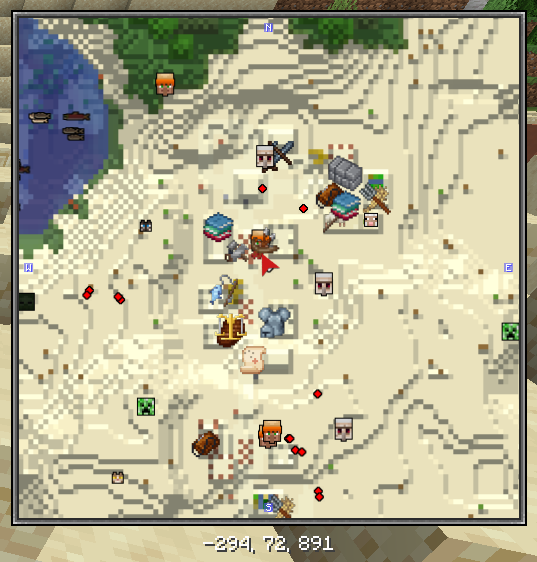
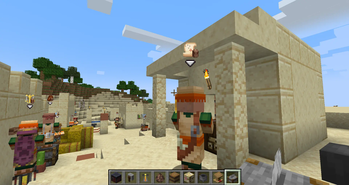
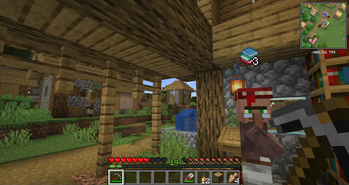
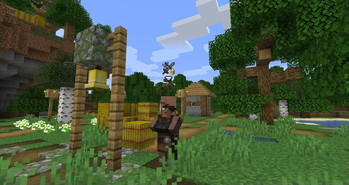
About this Mod
Have you ever forgotten what different villager professions look like? Ever wanted to be able to quickly find specific merchants in your home village?
Merchant Markers makes it easier than ever.

This mod will add custom markers above villagers to make them stand out and be easier to find than ever. There are several customization options, and the mod is built with modpacks in mind. Modded villagers are fully supported, and it even integrates with Xaero minimap, FTB Chunks, or JourneyMap for a much more cohesive experience!
This mod requires Iceberg, you can download it here. The fabric version also requires Forge Config API Port, you can download it here.
Client / Server
This mod is fully client-side.
Configuration
The configuration file for the mod includes lots of different options for getting the markers to display just how you like. There are options for whether markers should show through walls, if an arrow icon should show under the markers, and the maximum distance away from villagers that markers should be visible. There are also four different options for the types of icons to display:
- Custom - The default hand-drawn custom icons for each profession. (New ones for modded professions can be added via resource packs)
- Items - Uses an item icon for an item associated with the profession. For example, shows an iron chestplate for armorers, etc. The associated items can also be reconfigured.
- Jobs - Shows the texture of the job block used for the profession. These can't be changed but should automatically support modded professions.
- Generic - Shows the same generic "merchant" icon for all villagers with a profession. (This icon can be changed via resource packs.)
There is also a profession blacklist, which contains "none" and "nitwit" by default so that only villagers with trades have markers. Finally, there are five different options for the icon "overlay", which is a smaller icon that is shown in the lower right corner of the marker: Backpack, emerald, coin stack, bag, or none.
Compatibility
This mod should fully support modded villager professions, including custom icons when provided with resource packs. It also supports displaying markers on Xaero's Minimap, FTB Chunks, or JourneyMap in place of standard villager head icons.
You are free to use this mod in modpacks.

Problems, feature request, something else? Join us on Discord!
Available Versions
How to Install Merchant Markers on Your Server
Order Server
Order a Minecraft Java server with at least 3 GB RAM (4 GB recommended).
Set fabric Loader
In the panel under "Egg", select the fabric loader and matching Minecraft version (1.21.4).
Install Mod
Open the mod browser in the dashboard and search for "Merchant Markers". Click "Install" – done! Alternatively, upload the .jar via SFTP to the /mods folder.
Compatibility
Mod Loaders
Minecraft Versions
1.21.4, 1.21.3, 1.21.1 (+13 more)
Server-side
✗ UnsupportedRecommended RAM
4 GB(min. 3 GB)Frequently Asked Questions
Merchant Markers server crashes on startup – what to do?
Most common cause: wrong fabric version or insufficient RAM. Check the server log (latest.log) for "OutOfMemoryError" or "Mixin" errors. With Mado Hosting: ensure at least 3 GB RAM is allocated and the loader matches the mod version (1.21.4). You can switch loaders with one click in the panel.
Is Merchant Markers compatible with fabric and forge and neoforge?
Merchant Markers officially supports fabric, forge, neoforge for Minecraft 1.21.4, 1.21.3, 1.21.1. Note: Forge and Fabric mods are NOT cross-compatible – pick one loader and stick with it. The Mado dashboard automatically detects incompatible loader combinations.
Server lagging with Merchant Markers – how to optimize performance?
Recommended RAM: 4 GB (per 8 players). Use /spark profiler to check if Merchant Markers consumes the most tick time. Common fixes: reduce server view-distance to 8-10, install "performant" or "starlight" as supplementary mods on Forge. With Mado Hosting, your server runs on NVMe SSDs with dedicated CPU cores for minimal latency.
Similar Mods




Rent Modded Server
Install Merchant Markers with just one click on your server.
Details
- License
- Creative Commons Attribution Non Commercial No Derivatives 4.0 International
- Server-side
- Unsupported