
messed up settings
cause total chaos to yours (or your friends') minecraft settings
Screenshots
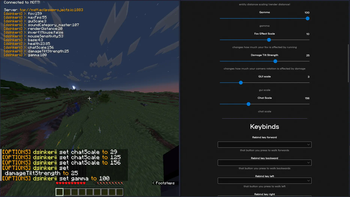
About this Mod
source code and (app) downloads are hosted on github!
‼️ READ BEFORE INSTALLING ‼️
🔴 IF you are the one who is going to edit the settings, make sure to follow these steps:
- install dotnet (if u haven't already)
- download an executable file according to your os (direct downloads from github btw!)
- paste in your password and change your nickname if you want to, and enjoy!
🔴 IF you are the one running the mod, allowing to change your settings, follow these steps:
- make sure you have 1.21 fabric installed.
- install pehkui (additionally slyde and libjf to remove limits from options)
- after launching the mod, you can now copy the password (in the main menu) needed for your friends that will be editing your settings!
every time you reboot your game, your password changes, so in case it gets leaked or lost, you can just close the game to reset your password.
if you have any issues with this mod or following any of the steps, feel free to open an issue.
(in case its an emergency (something like a security exploit) feel free to DM me in discord: @dsinkerii (dms always open!))
❓ it doesn't work/crashes!!
if your game doesn't launch, please try:
- launching the game using a different launcher (prism launcher or the default launcher work the best)
- checking if you have pehkui installed, it's important
- setting the game's version to be on 1.21
if you can't connect to the server (both in-game and in-app), try:
- setting the server to be different:
in minecraft, set the server to be eithertcp://broker.hivemq.com:1883ortcp://eclipseprojects.io:1883and hit refresh (others work too)
in the app, set the server according to the one picked in minecraft, but withouttcp://and:1883(e.g.broker.hivemq.com,eclipseprojects.io) - checking your firewall, you most likely have ports 1883/8883 blocked
if you can't send requests to the mod through the app (or the other way around), try:
- checking if you have the same server/password set
- check if you're on the same version, latest is 1.4
if all fails, shoot me a dm on discord at @dsinkerii, and attach the logs from the app (found by clicking on the clipboard next to the title), and from minecraft (found at .minecraft/logs/latest.log)
Available Versions
How to Install messed up settings on Your Server
Order Server
Order a Minecraft Java server with at least 3 GB RAM (4 GB recommended).
Set fabric Loader
In the panel under "Egg", select the fabric loader and matching Minecraft version (1.21.6).
Install Mod
Open the mod browser in the dashboard and search for "messed up settings". Click "Install" – done! Alternatively, upload the .jar via SFTP to the /mods folder.
Compatibility
Mod Loaders
Minecraft Versions
1.21.6, 1.21.5, 1.21.4 (+11 more)
Server-side
✗ UnsupportedRecommended RAM
4 GB(min. 3 GB)Frequently Asked Questions
messed up settings server crashes on startup – what to do?
Most common cause: wrong fabric version or insufficient RAM. Check the server log (latest.log) for "OutOfMemoryError" or "Mixin" errors. With Mado Hosting: ensure at least 3 GB RAM is allocated and the loader matches the mod version (1.21.6). You can switch loaders with one click in the panel.
Is messed up settings compatible with fabric?
messed up settings officially supports fabric for Minecraft 1.21.6, 1.21.5, 1.21.4. The Mado dashboard automatically detects incompatible loader combinations.
Server lagging with messed up settings – how to optimize performance?
Recommended RAM: 4 GB (per 8 players). Use /spark profiler to check if messed up settings consumes the most tick time. Common fixes: reduce server view-distance to 8-10, install "performant" or "starlight" as supplementary mods on Forge. With Mado Hosting, your server runs on NVMe SSDs with dedicated CPU cores for minimal latency.
Similar Mods





Rent Modded Server
Install messed up settings with just one click on your server.