
Metro Madrid Mod
A mod that adds Metro Madrid items, menus, a web panel, lights and remote redstone blocks
Screenshots
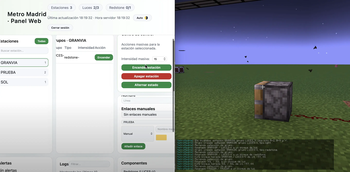
About this Mod
Metro Madrid Mod is a Fabric mod for 1.20.1 that replicates (and expands) the Madrid Metro control system within Minecraft. It allows you to manage lighting and redstone networks by stations and groups, with a modern web panel designed for operators.
Main features
Secure web panel: login by username/password, detection of expired sessions, and blocking when the server has no world loaded.
Blocks: Lights and redstone blocks that can be configured and switched with panel, button blocks and more...
Station and group management: mass on/off, individual intensity, quick actions, and maintenance control (you can remove a station from the system with one click).
Timers and automations: schedule recurring actions by station, group, or the entire network, with manual test execution and hourly summary.
Network diagnostics: dedicated card with incidents (disabled groups, stations without metadata, orphaned links) and summary of lights/redstone on.
HUD and in-game utilities: the “Metro Customizer” configurator assigns blocks to stations/groups and displays info on screen.
Alert system: reports problems from commands or from the panel (resolution and notes on who is taking action).
Internal API: persistence in JSON per world (metro_madrid.json, panel_credentials.json, panel_layout.json) so you can version the network or move it from server to server.
Available Versions
How to Install Metro Madrid Mod on Your Server
Order Server
Order a Minecraft Java server with at least 3 GB RAM (4 GB recommended).
Set fabric Loader
In the panel under "Egg", select the fabric loader and matching Minecraft version (1.20.1).
Install Mod
Open the mod browser in the dashboard and search for "Metro Madrid Mod". Click "Install" – done! Alternatively, upload the .jar via SFTP to the /mods folder.
Compatibility
Mod Loaders
Minecraft Versions
1.20.1
Server-side
✓ RequiredRecommended RAM
4 GB(min. 3 GB)Frequently Asked Questions
Metro Madrid Mod server crashes on startup – what to do?
Most common cause: wrong fabric version or insufficient RAM. Check the server log (latest.log) for "OutOfMemoryError" or "Mixin" errors. With Mado Hosting: ensure at least 3 GB RAM is allocated and the loader matches the mod version (1.20.1). You can switch loaders with one click in the panel.
Is Metro Madrid Mod compatible with fabric?
Metro Madrid Mod officially supports fabric for Minecraft 1.20.1. The Mado dashboard automatically detects incompatible loader combinations.
Server lagging with Metro Madrid Mod – how to optimize performance?
Recommended RAM: 4 GB (per 8 players). Use /spark profiler to check if Metro Madrid Mod consumes the most tick time. Common fixes: reduce server view-distance to 8-10, install "performant" or "starlight" as supplementary mods on Forge. With Mado Hosting, your server runs on NVMe SSDs with dedicated CPU cores for minimal latency.
Similar Mods






Rent Modded Server
Install Metro Madrid Mod with just one click on your server.