
Metropolize AI - Talos
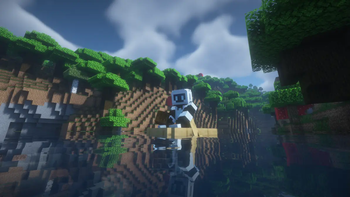
A preview of Metropolize Companions, a mod incorporating AI-generated agents into Minecraft. This mod introduces Talos, an automated bot that behaves like a player.
Screenshots
About this Mod
An AI-Powered Companion
This mod enables you to add an NPC player named Talos to your game. Talos is able to explore, mine, and craft independently from you. A number of chat commands are also available to control Talos' behavior.
This mod is still under active development. In the coming months, we plan to continue adding new capabilities, behaviors, and even new companions with varying personalities.
Please read the documentation below for information on how to use this mod.
https://metropolize.gitbook.io/metropolize-companions-mod
If you have questions or suggestions for features, please join our Discord!
[Closed Beta] ✨ Live Chat ✨
Live chat is currently closed-beta feature. To apply for the closed beta, please see our Discord.
About live chat
This feature allows you to interact with Talos directly through the Minecraft chat in real-time. Talos will have access to in-game information, so you can ask them where they are, what they're doing, or just chat about life!
In addition, Talos is can respond to certain requests made in the chat! The set of supported behaviors is very limited at the moment, but Talos is currently able to perform the following actions based on natural language instructions:
- Tethering to a location or nearby entity (including yourself!)
- Returning home (i.e. to the player, bed, or global spawn point)
- Adding items to gather and beginning exploration.
For clarity and debugging, a system message (in gray) will be logged whenever a chat message triggers Talos to perform an action. This way, you'll know if Talos is really listening to your instructions, and you can correct mistakes if a request is misinterpreted.
Available Versions
How to Install Metropolize AI - Talos on Your Server
Order Server
Order a Minecraft Java server with at least 3 GB RAM (4 GB recommended).
Set forge Loader
In the panel under "Egg", select the forge loader and matching Minecraft version (1.20.1).
Install Mod
Open the mod browser in the dashboard and search for "Metropolize AI - Talos". Click "Install" – done! Alternatively, upload the .jar via SFTP to the /mods folder.
Compatibility
Mod Loaders
Minecraft Versions
1.20.1
Server-side
✓ RequiredRecommended RAM
4 GB(min. 3 GB)Frequently Asked Questions
Metropolize AI - Talos server crashes on startup – what to do?
Most common cause: wrong forge version or insufficient RAM. Check the server log (latest.log) for "OutOfMemoryError" or "Mixin" errors. With Mado Hosting: ensure at least 3 GB RAM is allocated and the loader matches the mod version (1.20.1). You can switch loaders with one click in the panel.
Is Metropolize AI - Talos compatible with forge?
Metropolize AI - Talos officially supports forge for Minecraft 1.20.1. The Mado dashboard automatically detects incompatible loader combinations.
Server lagging with Metropolize AI - Talos – how to optimize performance?
Recommended RAM: 4 GB (per 8 players). Use /spark profiler to check if Metropolize AI - Talos consumes the most tick time. Common fixes: reduce server view-distance to 8-10, install "performant" or "starlight" as supplementary mods on Forge. With Mado Hosting, your server runs on NVMe SSDs with dedicated CPU cores for minimal latency.
Similar Mods




Rent Modded Server
Install Metropolize AI - Talos with just one click on your server.