
Micro Redstone Components
Compact redstone automation blocks for Forge 1.16.5
Screenshots
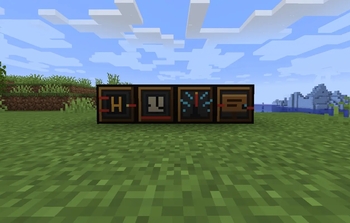
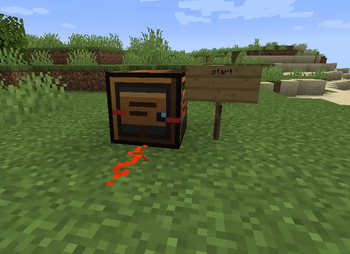
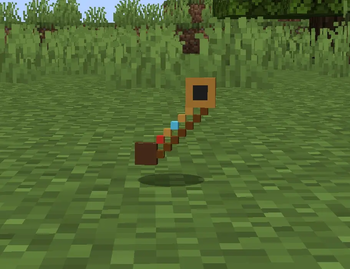
About this Mod
A small tool for copying block settings between identical blocks.
| Action | How |
|---|---|
| Copy | Hold tuner → Shift + Right-click a micro block |
| Paste | Right-click another block of the same type |
Copied settings appear in the item tooltip. After paste, a chat message confirms what was applied.
Recipe: redstone + iron + stick
Configuring blocks
Right-click any micro block (without Shift) to open the config menu.
You can type a value or use preset buttons, then press Save.
| Block | Valid values |
|---|---|
| Micro Logic Gate | AND, OR, NOT |
| Micro Timer | 2 – 40 (ticks) |
| Wireless Redstone | 0 – 15 (channel) |
| Sign Reader | any word, e.g. door, start, factory |
Example setups
1. Sign-triggered machine stop
[Sign: "stop"] → Sign Reader → Redstone Dust → Create Clutch → Motor
When the sign says stop, the reader powers the clutch and stops the motor.
2. Wireless factory alarm
Button → Wireless (ch. 3)     ...anywhere...
Wireless (ch. 3) → Lamp / Note Block
3. Copy timer delay across machines
Timer (delay 20) → Shift+RClick with Tuner → RClick other Timers
Compatibility
| Minecraft | 1.16.5 |
| Loader | Forge 36.1.0+ |
| Java | 8 |
| Create | Works alongside Create 1.16.5 (v0.3.2+) — not a Create addon, no Create API dependency |
| JEI | Recipes show automatically |
This mod does not require Create. It is tested to run next to Create in modpacks.
Localization
- English (
en_us) - Russian (
ru_ru)
License
MIT — free to use in modpacks. Credit appreciated but not required.
Русский / Russian
Micro Redstone Components — компактные редстоун-блоки для Forge 1.16.5.
Блоки
- Микро-логический элемент — AND / OR / NOT
- Микро-таймер — задержка 2–40 тиков
- Беспроводной редстоун — 16 каналов (0–15)
- Считыватель табличек — читает текст с соседних табличек
- Микро-настройщик — копирует/вставляет настройки
Настройка
- ПКМ по блоку — меню настроек
- Shift + ПКМ с настройщиком — копировать
- ПКМ с настройщиком — вставить (тот же тип блока)
После вставки в чат пишется: [Micro Tuner] Applied settings: ...
Совместимость
Forge 1.16.5, Java 8. Работает рядом с Create, но не зависит от него.
Issues & feedback: open an issue on the project repository or leave a comment on Modrinth.
Available Versions
How to Install Micro Redstone Components on Your Server
Order Server
Order a Minecraft Java server with at least 3 GB RAM (4 GB recommended).
Set forge Loader
In the panel under "Egg", select the forge loader and matching Minecraft version (1.16.5).
Install Mod
Open the mod browser in the dashboard and search for "Micro Redstone Components". Click "Install" – done! Alternatively, upload the .jar via SFTP to the /mods folder.
Compatibility
Mod Loaders
Minecraft Versions
1.16.5
Server-side
✓ RequiredRecommended RAM
4 GB(min. 3 GB)Frequently Asked Questions
Micro Redstone Components server crashes on startup – what to do?
Most common cause: wrong forge version or insufficient RAM. Check the server log (latest.log) for "OutOfMemoryError" or "Mixin" errors. With Mado Hosting: ensure at least 3 GB RAM is allocated and the loader matches the mod version (1.16.5). You can switch loaders with one click in the panel.
Is Micro Redstone Components compatible with forge?
Micro Redstone Components officially supports forge for Minecraft 1.16.5. The Mado dashboard automatically detects incompatible loader combinations.
Server lagging with Micro Redstone Components – how to optimize performance?
Recommended RAM: 4 GB (per 8 players). Use /spark profiler to check if Micro Redstone Components consumes the most tick time. Common fixes: reduce server view-distance to 8-10, install "performant" or "starlight" as supplementary mods on Forge. With Mado Hosting, your server runs on NVMe SSDs with dedicated CPU cores for minimal latency.
Similar Mods






Rent Modded Server
Install Micro Redstone Components with just one click on your server.