
Mine N' Dine
A really bad cooking mod that ALSO allows you to make delectable tools and weapons! This mod is unfinished.
Screenshots
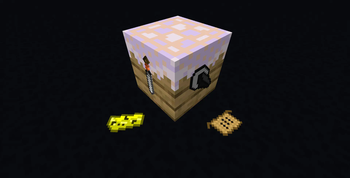
About this Mod
A really bad cooking mod that ALSO allows you to make delectable tools and weapons! Start a bakery that doubles as an armory, and bake all the instruments of warfare your heart desires! (Or, you know, just regular old food.)
Features
This mod currently adds the Prep Table, a knife, a mold, cheese, a recipe for pizza (this is an item, NOT a crafting recipe), a new villager type, a new damage type, and did I mention we added cheese?
Prep Table
The Prep Table is a block crafted with two planks of any kind and two pieces of the same kind of fabric. (Any item or block that has consistency of fabric: wool, leather, or rabbit hide.)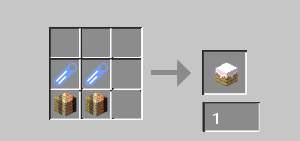
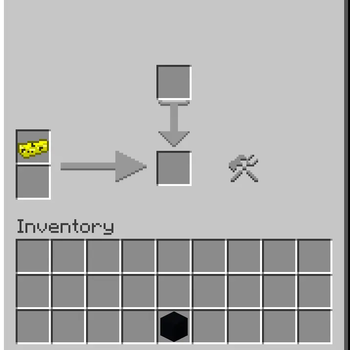
It can also be found inside the creative menu in the "functional blocks" tab. Once crafted, you can place it down and right click it to open up a GUI that allows you to prepare various* ingredients. Simply place a tool (Currently only the mold is used in a recipe, but the knife is also a tool.) in the slot above the down arrow, and put the proper ingredients in the proper order in the slots to the left. The attached world download includes a library of books that will help you learn this. Pressing the button in the menu prepares the ingredient or food item. The only recipe currently added is the cheese recipe, which requires a mold as the tool and a bucket of milk in the top slot on the left.
*there is only one recipe for the Prep Table as of the latest alpha build.
Knife & Mold
The knife and mold are newly added "Prep Tools," which are tools that can be used in the tool slot of the Prep Table to prepare ingredients.
The Knife
The knife can be found in the Creative inventory in the "Tools & Utilities" tab, or can be crafted with one stick, one piece of fabric, and one iron ingot in a crafting table.
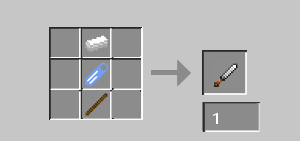
It can be used to attack enemies, dealing two hearts of damage as opposed to the iron sword's three. It can also be used to slice certain ingredients within a Prep Table, but this has not been implemented. You can also cut yourself with it if you aren't careful by holding use, which deals one heart of damage each time and can give you a new death message. (See Self-Damage/Sharp)
The Mold
The mold can be found in the Creative inventory in the "Mine N' Dine" tab, or can be crafted with four clay and one magma cream.
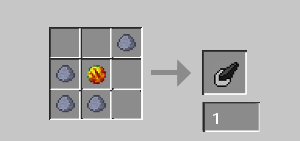
It can only be used usefully in a Prep Table as a tool, and it can be used to make certain ingredients that have a specific shape.
Cheese
This food item can be made with one milk bucket in slot 1 of the Prep Table, so long as the tool is the mold. It can be eaten to restore two hunger bars and clear all potion effects. It will be used in the recipe for pizza.
Recipes
The chef villager (see the Chef section) can trade you the pizza recipe for 7 cheese, and this item currently does nothing. In the future, it and other recipes will bring up a screen where you can view the steps neccesary in order to cook meals, and this one will show the steps to make a pizza. Due to inexperience, this feature is currently unimplemented. In the future, you will also be able to press I (Configurable Keybind) to view all collected recipes, and the item will become consumable. Upon using the item, it will disappear and the recipe will show up in the menu. Clicking it will show the recipe. Again, this feature is unimplemented, and currently pressing I will bring up a message that says as much.
Chef
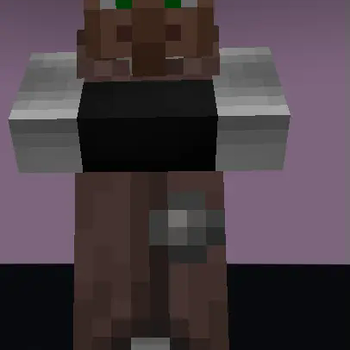
The chef villager is a villager that has the Prep Table as its assigned workstation. It will trade ingredients for recipes, and emeralds for ingredients, but as of right now all chef villagers trade the pizza recipe for 7 cheese.
Self-Damage
There are planned to be multiple new damage types that are only inflicted by yourself, and these are dubbed "self-damage". Currently, only one damage type has been added.
Sharp
Self-Damage/Sharp is inflicted upon you whenever you use the knife for too long. It will never cause exhaustion, and does not scale with difficulty. It plays the sound of damage caused by the thorns enchantment. On death, the death message reads "<player> sliced their own arm off." There is a death message for when the player is killed by a mob or another player with this damage type, as well as a death message for dying to this damage type while a mob or player assisted, but these should be unobtainable. Nevertheless, you can get them with commands, so you are encouraged to find them yourself.
Installation
Install this mod like any other mod for Forge. Make sure to use the proper version for Forge and Minecraft!
The versions listed as "SURVIVAL SPAWN" are Minecraft Worlds, and are optional downloads that include a tutorial on the mod.
Help
If you have questions about the mod or wish to help develop it, please email [email protected] over gmail with your message.
TL;DR
No, read it.
Available Versions
How to Install Mine N' Dine on Your Server
Order Server
Order a Minecraft Java server with at least 3 GB RAM (4 GB recommended).
Set forge Loader
In the panel under "Egg", select the forge loader and matching Minecraft version (1.20.1).
Install Mod
Open the mod browser in the dashboard and search for "Mine N' Dine". Click "Install" – done! Alternatively, upload the .jar via SFTP to the /mods folder.
Compatibility
Mod Loaders
Minecraft Versions
1.20.1
Server-side
✓ RequiredRecommended RAM
4 GB(min. 3 GB)Frequently Asked Questions
Mine N' Dine server crashes on startup – what to do?
Most common cause: wrong forge version or insufficient RAM. Check the server log (latest.log) for "OutOfMemoryError" or "Mixin" errors. With Mado Hosting: ensure at least 3 GB RAM is allocated and the loader matches the mod version (1.20.1). You can switch loaders with one click in the panel.
Is Mine N' Dine compatible with forge?
Mine N' Dine officially supports forge for Minecraft 1.20.1. The Mado dashboard automatically detects incompatible loader combinations.
Server lagging with Mine N' Dine – how to optimize performance?
Recommended RAM: 4 GB (per 8 players). Use /spark profiler to check if Mine N' Dine consumes the most tick time. Common fixes: reduce server view-distance to 8-10, install "performant" or "starlight" as supplementary mods on Forge. With Mado Hosting, your server runs on NVMe SSDs with dedicated CPU cores for minimal latency.
Similar Mods



![[TaCZ] Timeless and Classics Zero](https://cdn.modrinth.com/data/SzzJttH8/fd27766d2bb8390d284696b1dbd358f87e081439_96.webp)


Rent Modded Server
Install Mine N' Dine with just one click on your server.