
MineTracer
Logs and rolls back block, container, sign, and kill actions. Powerful lookup, rollback, and inspector commands for server admins. Filter by user, time, range, action, or item for precise control.
Screenshots

About this Mod
MineTracer
MineTracer is a powerful and lightweight block, container, sign, and kill logging mod for Minecraft servers designed to help server administrators monitor, investigate, and roll back player actions with ease. Built for Fabric, MineTracer provides advanced logging and rollback capabilities while remaining simple to use.
This mod is still under developement so don't expect everything to work flawlessly. Please write an issue report on GitHub if you find a bug, I am happy to recieve feedback!

Advanced Query System
Search logs using flexible filters such as player name, time range, radius, action type, and specific item or block IDs. Combine multiple filters for precise lookups.Rollback Functionality
Instantly undo player actions within a specified area, time frame, or by specific users. Rollbacks are safe and only affect the filtered actions, minimizing risk of unwanted changes.Inspector Mode
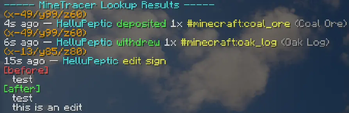
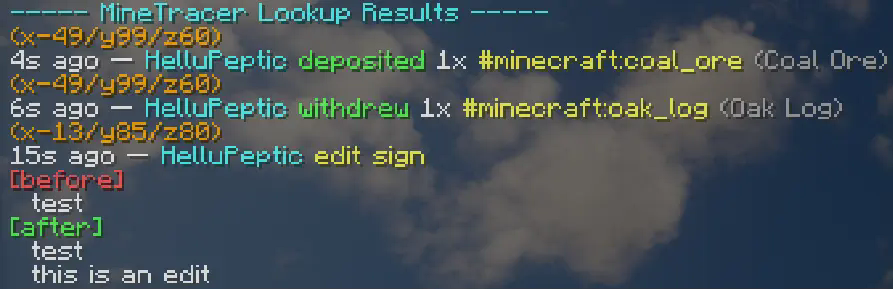
Toggle inspector mode to view block history in real time. Right-click or break blocks to see a detailed log of recent actions at that location.

/minetracer lookup <filters>
Search through logs using any combination of filters.
/minetracer rollback <filters>
Roll back player actions matching the specified filters.
/minetracer page <number>
Navigate through paginated lookup results.
/minetracer inspector
Toggle inspector mode for real-time block history.
/minetracer save
Force save all log data to disk
Filters
user:<player>– Filter by player nametime:<duration>– Filter by time (e.g.,1h,30m,2d)range:<blocks>– Filter by radius in blocks from your current positionaction:<type>– Filter by action type (broke,placed,withdrew,deposited,kill)include:<item>– Filter by specific item or block ID
Permissions
minetracer.command.lookup– Access to lookup commandminetracer.command.rollback– Access to rollback commandminetracer.command.inspector– Access to inspector modeminetracer.command.page– Access to pagination
Images

Available Versions
How to Install MineTracer on Your Server
Order Server
Order a Minecraft Java server with at least 3 GB RAM (4 GB recommended).
Set fabric Loader
In the panel under "Egg", select the fabric loader and matching Minecraft version (1.21.11).
Install Mod
Open the mod browser in the dashboard and search for "MineTracer". Click "Install" – done! Alternatively, upload the .jar via SFTP to the /mods folder.
Compatibility
Mod Loaders
Minecraft Versions
1.21.11, 1.21.1, 1.20.1
Server-side
✓ RequiredRecommended RAM
4 GB(min. 3 GB)Frequently Asked Questions
MineTracer server crashes on startup – what to do?
Most common cause: wrong fabric version or insufficient RAM. Check the server log (latest.log) for "OutOfMemoryError" or "Mixin" errors. With Mado Hosting: ensure at least 3 GB RAM is allocated and the loader matches the mod version (1.21.11). You can switch loaders with one click in the panel.
Is MineTracer compatible with fabric?
MineTracer officially supports fabric for Minecraft 1.21.11, 1.21.1, 1.20.1. The Mado dashboard automatically detects incompatible loader combinations.
Server lagging with MineTracer – how to optimize performance?
Recommended RAM: 4 GB (per 8 players). Use /spark profiler to check if MineTracer consumes the most tick time. Common fixes: reduce server view-distance to 8-10, install "performant" or "starlight" as supplementary mods on Forge. With Mado Hosting, your server runs on NVMe SSDs with dedicated CPU cores for minimal latency.
Similar Mods






Rent Modded Server
Install MineTracer with just one click on your server.