
Mine Trading Cards Open Source Edition
Mine Trading Cards is a mod about collecting trading cards
Screenshots
About this Mod
Mine Trading Cards is a mod about collecting trading cards.
Mobs will occasionally drop Cards Packs, Edition Packs, or packs of a given rarity. These packs contain Common, Uncommon, Rare, Ancient and Legendary cards.
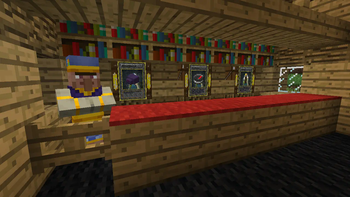
You can also meet various villagers who specialize in selling or trading cards.
Cards are loaded in "editions" (sets or groups) from files separate from the mod. New cards and even new editions can be created by adding new files to the mtc folder.
Installation
Installing the mod works just like any other forge mod—put the .jar file in your mods folder.
Mine Trading Cards has extra files that must be downloaded and installed separately to load the default card sets.
Earlier versions
Before 3.1 Download the "mtc" folder [here](https://github.com/Powerthegreat/Mine-Trading-Cards-Mod) (both branches have the same mtc folder) and extract it to a folder in your Minecraft directory. Alternatively, create an "mtc" folder in your Minecraft directory and extract any of the content packs found [here](https://mega.nz/folder/Ssdl2YqI#XPktl7Ioj7s3j512T6Q1_Q) or in the discord server's #content-packs channel into that folder.After installation, you should have a structure like the following, with \assets, \cards and \editions inside your \mtc folder:
.minecraft
      ---->mtc
            ---->assets
            ---->cards
            ---->editions
            ---->packs (optional—see "Custom Packs" section below)
As of update 3.1, MTC loads content packs from resource packs to save memory
Extract any of the content packs found here or in the discord server's #content-packs channel into that resource pack
There are template resource packs in the mega link
This new structure should look like this:
<resource pack folder or zip>
      ---->assets
            ---->is_mtc
                  ---->mtc
                        ---->assets
                        ---->cards
                        ---->editions
                        ---->packs (optional—see "Custom Packs" section below)
Edition Packs:
Various pack editions are specified in the /editions folder, like so:
{
    "id": "my_edition",
    "name": "My Edition Pack",
    "color": "#55ff00" (optional—see below)
}
You do not need to specify a "color" field. If you don't, MTC will procedurally generate a color for the pack icon based on the id.
Custom Packs:
You can create custom packs, with amounts of cards based on categories and rarities!
Example:
{
    "id": "test_pack",
    "name": "Test Custom Pack",
    "categories": [
        "Minecraft Mob:2:common",
        "World Item:3:common"
    ],
    "color": "#ff0088"  (optional—see below)
}
Place this .json file into the /mtc/packs/ folder.
You do not need to specify a "color" field. If you don't, MTC will procedurally generate a color for the pack icon based on the id.
This pack would contain two common cards with the "Minecraft Mob" category, and three common cards with the "World Item" category.
All .json files in /mtc/packs will be loaded as custom packs.
Discord Server:
If you want to post a content pack, put a link in the discord server!
https://discord.gg/TWDcAaX
I (Powerthegreat) WILL NOT BE ACTIVE ON DISCORD FOR THE FORESEEABLE FUTURE. Please be respectful of the moderators there.
Forum thread:
https://www.minecraftforum.net/forums/mapping-and-modding-java-edition/minecraft-mods/2913625-mine-trading-cards-open-source-updated-by
This mod was originally developed by Tradeworld (Minecraft Forums username, AKA nogier (github) or R4p3lay (on curseforge)), then made open source.
Source code for 1.7.10 - https://github.com/Powerthegreat/Mine-Trading-Cards-Source
Source code for 1.12.2 - https://github.com/Powerthegreat/Mine-Trading-Cards-Source-1.12.2
Available Versions
How to Install Mine Trading Cards Open Source Edition on Your Server
Order Server
Order a Minecraft Java server with at least 3 GB RAM (4 GB recommended).
Set forge Loader
In the panel under "Egg", select the forge loader and matching Minecraft version (1.16.5).
Install Mod
Open the mod browser in the dashboard and search for "Mine Trading Cards Open Source Edition". Click "Install" – done! Alternatively, upload the .jar via SFTP to the /mods folder.
Compatibility
Mod Loaders
Minecraft Versions
1.16.5, 1.12.2, 1.7.10
Server-side
✓ RequiredRecommended RAM
4 GB(min. 3 GB)Frequently Asked Questions
Mine Trading Cards Open Source Edition server crashes on startup – what to do?
Most common cause: wrong forge version or insufficient RAM. Check the server log (latest.log) for "OutOfMemoryError" or "Mixin" errors. With Mado Hosting: ensure at least 3 GB RAM is allocated and the loader matches the mod version (1.16.5). You can switch loaders with one click in the panel.
Is Mine Trading Cards Open Source Edition compatible with forge?
Mine Trading Cards Open Source Edition officially supports forge for Minecraft 1.16.5, 1.12.2, 1.7.10. The Mado dashboard automatically detects incompatible loader combinations.
Server lagging with Mine Trading Cards Open Source Edition – how to optimize performance?
Recommended RAM: 4 GB (per 8 players). Use /spark profiler to check if Mine Trading Cards Open Source Edition consumes the most tick time. Common fixes: reduce server view-distance to 8-10, install "performant" or "starlight" as supplementary mods on Forge. With Mado Hosting, your server runs on NVMe SSDs with dedicated CPU cores for minimal latency.
Similar Mods






Rent Modded Server
Install Mine Trading Cards Open Source Edition with just one click on your server.