
Mineable Spawner
Mine spawners with a pickaxe (spawn eggs drop too!) Configurable
About this Mod






Features
1. Mined spawners drop when mined with a pickaxe (default: enabled)
2. Setting so it only drops with a silktouch pickaxe (default: disabled)
3. Setting so XP drops or not (default: disabled)
4. Setting so the spawn egg drops too or not (default: enabled)
Config
For 1.21.5+ you can run:
/trigger mineable_spawner.config
If that for some reason doesn't work, use this
value = 0 = off, value = 1 = on
/scoreboard players set &break_spawner_pickaxe config.mineablespawner value
/scoreboard players set &break_spawner_silktouch config.mineablespawner value
/scoreboard players set &spawn_egg_drop config.mineablespawner value
/scoreboard players set &xp_drop config.mineablespawner value
Config pre 1.21.5
/scoreboard players set <player> break_spawner.mineablespawner value
value = 0 = With any pickaxe
value = 1 = With any pickaxe that has silk touch --> default
value = 2 = Doesn't drop
To change if XP from spawners drops or not
/scoreboard players set &xp_drop config.mineablespawner value
value = 0 = XP drops
value = 1 = No XP drops --> default
To change if the spawn egg should drop too (1.21+)
/scoreboard players set &spawn_egg_drop config.mineablespawner value
value = 0 = Spawn egg drops --> default
value = 1 = Spawn egg doesn't drop
To make the spawners you've mined more useful, you can add my Craft Spawn Eggs datapack/mod
Guides

If something doesn't work, feel free to join the discord server
How to Install a Datapack in Singleplayer
At the Creation of a World
How to install a datapack in singleplayer
Open Minecraft
Launch the game.Create a New World
Navigate to "More" and click on "Data Packs".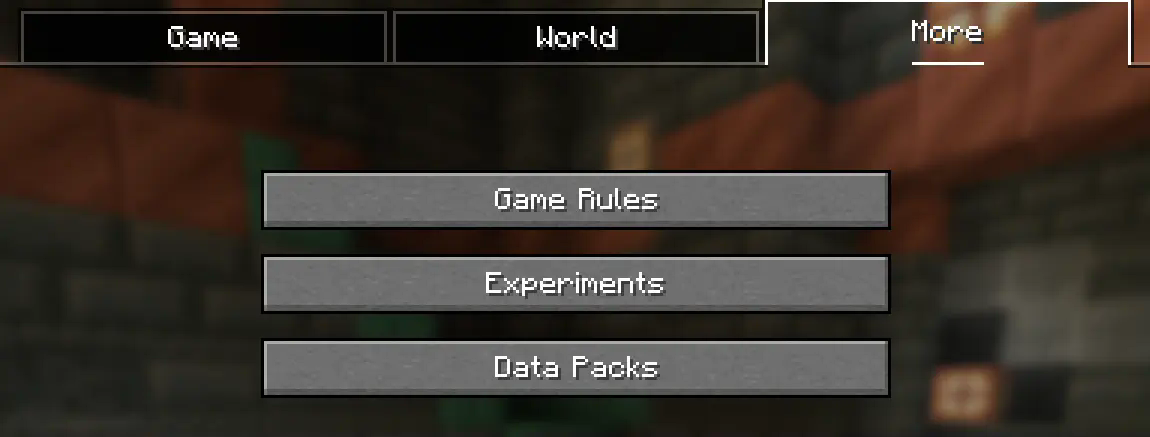
Add the Datapack
Drag the datapack (a.zipfile or directory) into the Minecraft window.- A confirmation screen will appear. Click "Yes".
Activate the Datapack
Move the datapack to the right-hand side of the screen by clicking the triangle on its icon (visible when hovering over it).
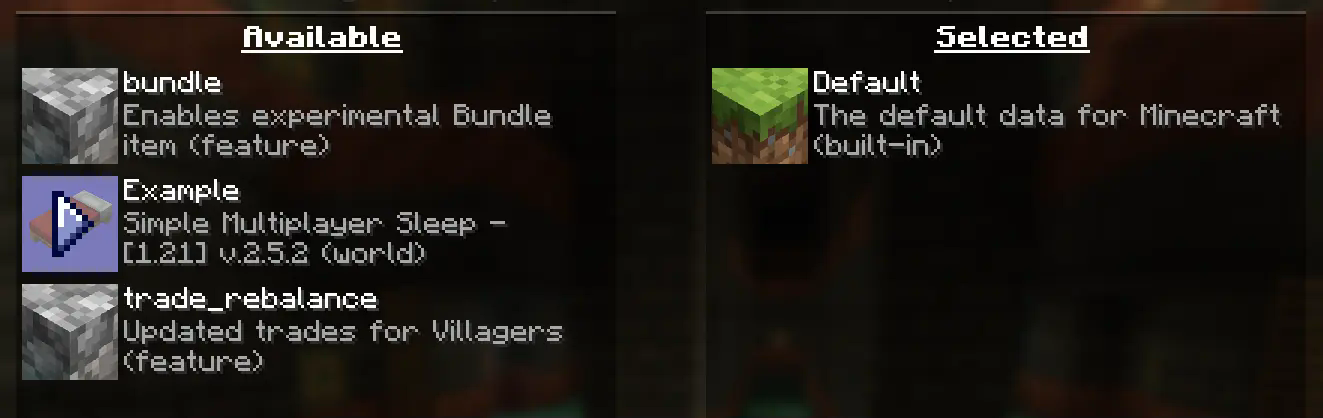
- Complete World Creation
- Click "Done" at the bottom of the screen.
- Continue creating your world and click "Create New World".
⚠️ IMPORTANT ⚠️
The datapack only works if cheats are enabled.
You can verify the datapack is active by typing:/datapack list enabled
This command should list an entry named [file/<your datapack file/directory name>].
In an Existing World
How to Install a Datapack in an Existing Singleplayer World
Open Minecraft
Launch the game.Select Your World
- Choose the world you want to install the datapack for.
- Click "Edit", then "Open World Folder".
Add the Datapack
- Open the folder named
datapacks. - Place the datapack into this folder. It should be a
.zipfile or a directory.
- Open the folder named
Reload the World
- If you are in the world during installation, type
/reloadin the chat or press F3 + T to reload resources.
(Make sure cheats are enabled.)
- If you are in the world during installation, type
⚠️ IMPORTANT ⚠️
The datapack only works if cheats are enabled.
You can verify the datapack is active by typing:/datapack list enabled
How to Enable Cheats Permanently After World Creation
If you encounter this issue, here is a step by step guide on how to enable Cheats/Admincommands permanently after you have already created a Minecraft world.
⚠️ Before you begin, you should save and backup your world in case something goes wrong.
(I will not take any responsibility for any corrupt worlds. Do this at your own risk!)
But don't worry this works without any problems.
If you don't want to change this permanently check out this guide.
1. You need NBTExplorer
NBTExplorer is an open-source NBT editor for all common sources of NBT data. It's mainly intended for editing Minecraft game data.
2. Open NBTExplorer and open your Minecraft world, where you want to enable Cheats/Admincommands.

3. Navigate to:
<Your Minecraft World>level.datDataallowCommands

4. Click on "Edit Tag Value"

5. Change the Value from 0 to 1 and click "OK"

6. Now click on "Save All Modified Tags"

That's it. You are done. You can now join your world and check if you have permission to change your gamemode, for example.
How to Enable Cheats Temporarily After World Creation
Enabling Cheats Temporarily After World Creation
If you encounter this issue, here is a step-by-step guide on how to enable Cheats/Admin commands temporarily after you have already created a Minecraft world.
Join Your World
Open your single-player world and press "Escape".Open to LAN
Click on "Open to LAN".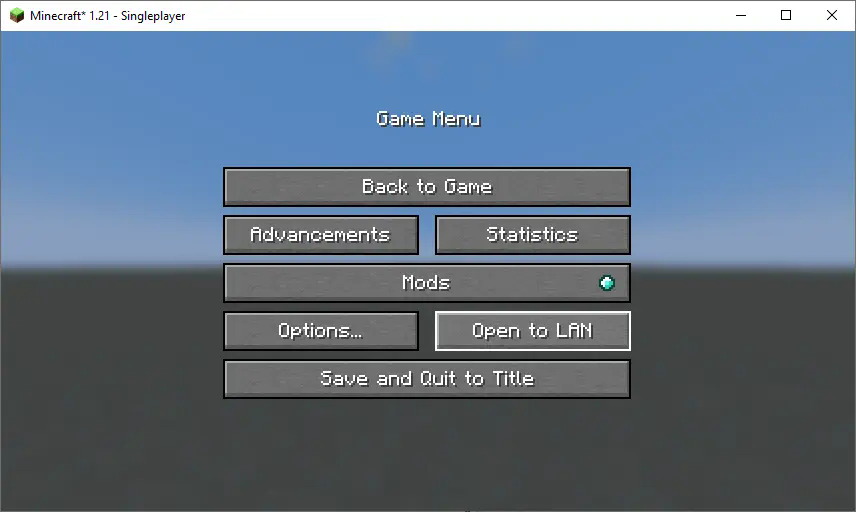
Allow Commands
Set "Allow Commands" to ON.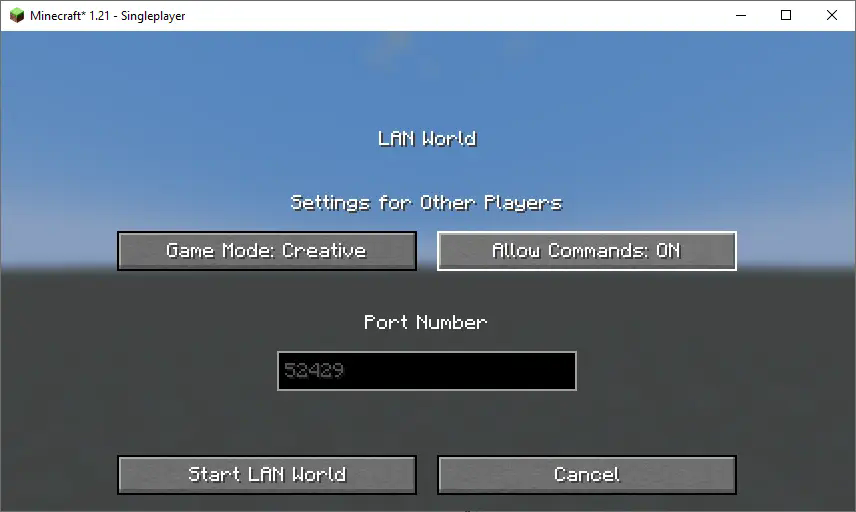
Start LAN World
Click "Start LAN World" to apply the changes.
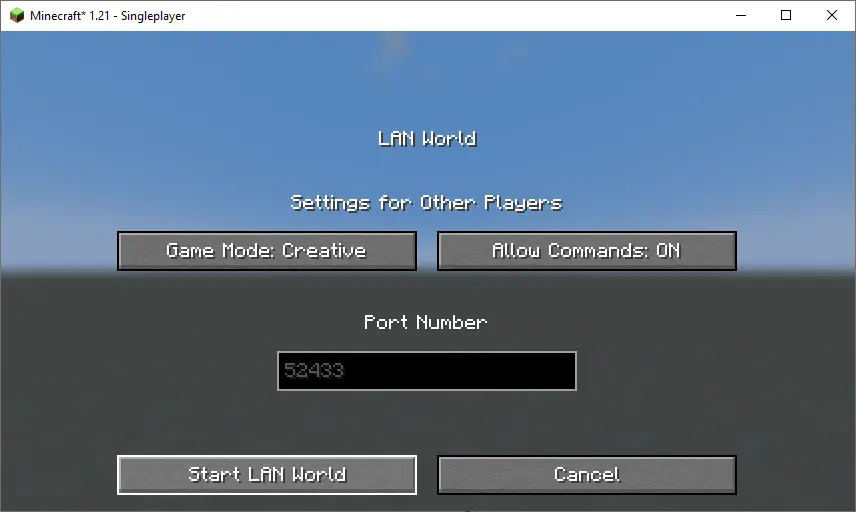
Now, you should be able to use commands like changing your gamemode. Keep in mind that this is only temporary and will need to be done every time you join the world.
How to Install a Datapack in Multiplayer
How to Install a Datapack in Multiplayer
Open Your Server Folder
Navigate to your server folder, then open the folder for the world you wish to install the datapack in (default:world).Add the Datapack
- The datapack should be a
.zipfile. - Place the datapack into a folder named
datapacksinside the world folder.
- The datapack should be a
Reload the Server
- Type
/reloadfrom the console or as a level 3 operator if the server was running during the installation.
- Type
How to Uninstall a Datapack
How to Uninstall a Datapack from Your Singleplayer World or Server
Run the Uninstall Command
For my datapacks, run the command:/function datapack_name:uninstallDelete the Datapack
- Delete the datapack from the folder you placed it in.
- Alternatively, you can run:
/datapack disable [file/your data pack file/directory name]
Reload the World or Server
After deleting or disabling the datapack, run:/reload
How to Install a Mod on a Minecraft Server
Step-by-Step Guide to Installing a Mod on a Minecraft Server
Download the Mod
- Make sure to download the correct version of the Mod that matches your server's Minecraft version.
- Important: The mod file should be a
.jarfile.
Ensure No Datapacks or Other Mods Conflict
- Do not have both a datapack and a mod installed at the same time, as they may conflict.
- Only install one or the other, depending on your server's setup.
Locate the Mods Folder
- Open your server's root directory.
- Inside this directory, find the folder named
mods. - If the
modsfolder doesn't exist, create one.
Install the Mod
- Paste the downloaded
.jarfile for the Mod into themodsfolder.
- Paste the downloaded
Restart the Server
- After adding the Mod to the
modsfolder, restart your Minecraft server for the mod to be activated.
- After adding the Mod to the
Verify Mod Installation
- Once the server has restarted, join the server and check if the Mod is working.
- You can use
/modsor a similar command (depending on the mod) to see if the Mod has been successfully loaded.
Additional Tips
- Backup Your Server: Always create a backup before installing the Mod to avoid data loss in case something goes wrong.
- Ensure Mod Compatibility: Check that the Mod is compatible with your Minecraft server version and any other mods you have installed.
Available Versions
How to Install Mineable Spawner on Your Server
Order Server
Order a Minecraft Java server with at least 3 GB RAM (4 GB recommended).
Set datapack Loader
In the panel under "Egg", select the datapack loader and matching Minecraft version (26.1.2).
Install Mod
Open the mod browser in the dashboard and search for "Mineable Spawner". Click "Install" – done! Alternatively, upload the .jar via SFTP to the /mods folder.
Compatibility
Mod Loaders
Minecraft Versions
26.1.2, 26.1.1, 26.1 (+15 more)
Server-side
✓ RequiredRecommended RAM
4 GB(min. 3 GB)Frequently Asked Questions
Mineable Spawner server crashes on startup – what to do?
Most common cause: wrong datapack version or insufficient RAM. Check the server log (latest.log) for "OutOfMemoryError" or "Mixin" errors. With Mado Hosting: ensure at least 3 GB RAM is allocated and the loader matches the mod version (26.1.2). You can switch loaders with one click in the panel.
Is Mineable Spawner compatible with datapack and fabric and forge and neoforge and quilt?
Mineable Spawner officially supports datapack, fabric, forge, neoforge, quilt for Minecraft 26.1.2, 26.1.1, 26.1. Note: Forge and Fabric mods are NOT cross-compatible – pick one loader and stick with it. The Mado dashboard automatically detects incompatible loader combinations.
Server lagging with Mineable Spawner – how to optimize performance?
Recommended RAM: 4 GB (per 8 players). Use /spark profiler to check if Mineable Spawner consumes the most tick time. Common fixes: reduce server view-distance to 8-10, install "performant" or "starlight" as supplementary mods on Forge. With Mado Hosting, your server runs on NVMe SSDs with dedicated CPU cores for minimal latency.
Similar Mods




Rent Modded Server
Install Mineable Spawner with just one click on your server.