
Minecart Chain
Minecart Chain lets you connect minecarts together using iron chains and build simple vanilla-style trains. A furnace minecart can act as the engine, while an automatic brake lever appears on top of it when it is linked to another cart.
Screenshots
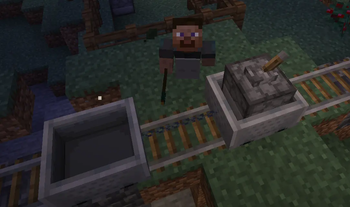
About this Mod
Minecart Chain Train
Turn ordinary Minecraft minecarts into fully controllable steam trains.
Minecart Chain lets you connect carts into real train formations, convert furnace minecarts into controllable steam locomotives, and manage your train with simple lever-based controls.
Build freight trains, passenger trains, industrial railways, station yards, and steam-powered transport systems using familiar Minecraft mechanics expanded with more realistic train behavior.
Features
Connect Minecarts with Iron Chains
Use Iron Chains to link minecarts together.
Connected minecarts move as one train, allowing you to create longer and more useful rail formations.
Steam Locomotive Conversion
Place a furnace minecart at the front of your connected train to turn it into a controllable steam locomotive.
The locomotive can pull connected wagons and reacts to throttle, brake, direction, fuel, water, and signal controls.
Fuel and Water System
Locomotives now require both fuel and water to drive.
Supported fuel includes all vanilla furnace fuels, such as:
- Coal
- Charcoal
- Logs
- Planks
- Sticks
- Wooden tools
- Lava buckets
- Other standard furnace fuels
- Water can be added using water buckets.
Fuel is consumed only while the locomotive is driving.
Fuel and water usage scale with the number of connected minecarts in the train, so larger trains require more resources.
Locomotive Screen
Furnace minecart locomotives now have a locomotive screen inspired by the vanilla furnace minecart.
The screen shows:
Current fuel reserves
Current water reserves
This makes it easier to manage long-distance railway travel.
Train Controls
- Red Lever - Brake
Control the train’s braking force.
Use it to slow down, stop safely at stations, or manage movement near junctions. - Navy Lever - Direction
Choose the direction of travel.
Available modes:
Forward
Reverse
This is useful for switching yards, backing trains into position, and managing compact railway systems. - Black Lever - Throttle
Control locomotive power.
Available modes:
1/3 Throttle
Full Throttle
Use lower throttle for slow movement and precise control.
Use full throttle when you need more speed or pulling power.
Signal Rail
Signal Rail is a powered-rail-looking track that sends a redstone-driven control signal to a connected train.
Right-clicking Signal Rail cycles its mode between:
Throttle
Brake
Reverse
When powered by redstone, Signal Rail toggles the selected locomotive lever once when any cart in the connected train passes over it.
Signal Rail works through the whole chained train.
This means a passenger cart or cargo cart can trigger the locomotive controls, not only the locomotive itself.
Signal Rail can be used for:
- Automatic braking zones
- Direction switching
- Station control systems
- Yard automation
- Redstone-based railway logic
Signal Rail Recipe
Signal Rail uses a shapeless recipe:
Powered Rail
Redstone Torch
Lever
Lean Out of the Wagon
Improve visibility while riding inside a minecart.
Controls:
Press A to lean left
Press D to lean right
Use this to look around corners, watch your train, check nearby wagons, and enjoy a more immersive railway experience.
What You Can Build
With Minecart Chain, you can create:
Steam-powered freight trains
Passenger services
Industrial minecart systems
Automated redstone railways
Switching yards
Station control systems
Long-distance railway routes
More realistic Minecraft train networks
Available Versions
How to Install Minecart Chain on Your Server
Order Server
Order a Minecraft Java server with at least 3 GB RAM (4 GB recommended).
Set fabric Loader
In the panel under "Egg", select the fabric loader and matching Minecraft version (26.2).
Install Mod
Open the mod browser in the dashboard and search for "Minecart Chain". Click "Install" – done! Alternatively, upload the .jar via SFTP to the /mods folder.
Compatibility
Mod Loaders
Minecraft Versions
26.2, 26.1.2
Server-side
✓ RequiredRecommended RAM
4 GB(min. 3 GB)Frequently Asked Questions
Minecart Chain server crashes on startup – what to do?
Most common cause: wrong fabric version or insufficient RAM. Check the server log (latest.log) for "OutOfMemoryError" or "Mixin" errors. With Mado Hosting: ensure at least 3 GB RAM is allocated and the loader matches the mod version (26.2). You can switch loaders with one click in the panel.
Is Minecart Chain compatible with fabric and neoforge?
Minecart Chain officially supports fabric, neoforge for Minecraft 26.2, 26.1.2. The Mado dashboard automatically detects incompatible loader combinations.
Server lagging with Minecart Chain – how to optimize performance?
Recommended RAM: 4 GB (per 8 players). Use /spark profiler to check if Minecart Chain consumes the most tick time. Common fixes: reduce server view-distance to 8-10, install "performant" or "starlight" as supplementary mods on Forge. With Mado Hosting, your server runs on NVMe SSDs with dedicated CPU cores for minimal latency.
Similar Mods



![[TaCZ] Timeless and Classics Zero](https://cdn.modrinth.com/data/SzzJttH8/fd27766d2bb8390d284696b1dbd358f87e081439_96.webp)


Rent Modded Server
Install Minecart Chain with just one click on your server.