
Minecord (for Discord)
Bring your Minecraft world into your Discord guild
Screenshots
About this Mod

Minecord
Bring your Minecraft world into your Discord guild




Minecord is a Minecraft mod that brings your Minecraft world into your
Discord guild.
It is a server-side only mod, uses JDA to interface with Discord, is
built on the Fabric mod loader, and is available for modern versions
of Minecraft Java Edition.
💡 You only need to add the one mod jar to your server, e.g.
minecord-2.0.3+1.20.6.jar.
Integrations
- TextPlaceholderAPI by Patbox — for text
placeholders - TydiumCraft Skin API by Tydium — for embed avatars
Features
💬 Chat
Chat is responsible for bridging chat-related events
between Minecraft and Discord.
- Multi-channel support
- Filter events to Minecraft dimensions
- Translate unicode emojis, e.g. 😃 ->
:smiley: - Show player avatars in embeds where appropriate
- Discord events relayed to Minecraft
- A user sent a message
- A user sent a message in reply to another
- A user edited their recently sent message
- A user reacted to a recent message
- A user removed their reaction from a recent message
- A user sent a message that contained stickers
- A user sent a message that contained attachments
- Minecraft events relayed to Discord
- A player sent an in-game chat message
- A player sent an in-game message via the
/mecommand - An admin broadcast an in-game message via the
/saycommand - An admin broadcast an in-game message to all players via the
/tellraw @a
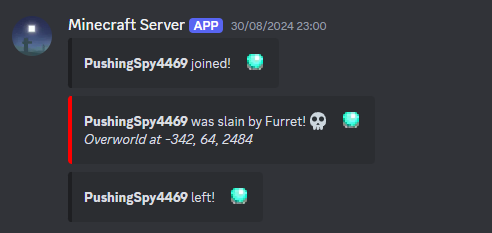
command - A player had died
- A named animal/monster (with name tag) had died
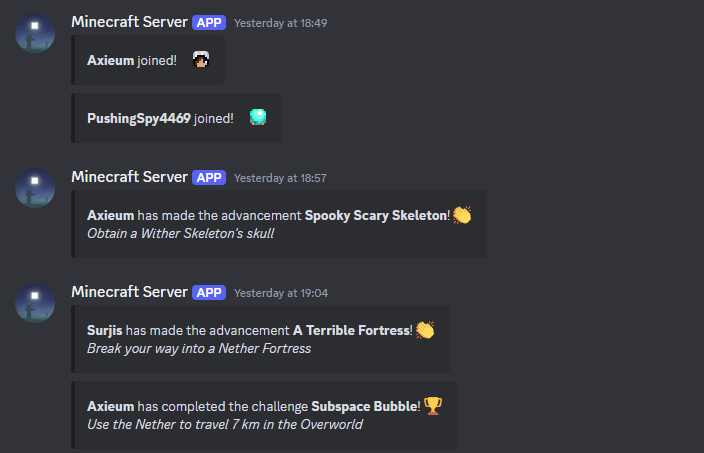
- A player unlocked an advancement task
- A player reached an advancement goal
- A player completed an advancement challenge
- A player teleported to another dimension
- A player joined the game
- A player left the game
- The server began to start
- The server started and is accepting connections
- The server began to stop
- The server stopped and is offline
- The server stopped unexpectedly and is inaccessible
- Optionally attach the crash report if available
🪄 Commands
Commands is responsible for providing various commands to interact with your Minecraft server from Discord.
- Built-in commands ready to use
/uptime— shows for how long the server has been online/tps— displays the Minecraft server's current ticks-per-second
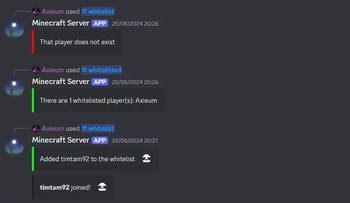
- Configure your own slash commands to run Minecraft commands
- For example, you could manage your server's whitelist via
/whitelist
- For example, you could manage your server's whitelist via
- Ability to apply cooldowns to commands
- This can be configured on a per user, channel or guild basis
- Detects players in commands and places their avatar in the response
- Mod developers can register their own slash commands
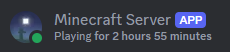
😇 Presence
Presence is responsible for updating the bot presence in Discord to show more detailed statuses.
- Built-in presence categories ready to use
starting— used when the Minecraft server is startingrunning— used when the Minecraft server is runningstopping— used when the Minecraft server is stopping
- Configure your own presences
- Type of activity, i.e. competing, listening, playing, streaming, or watching
- Name of activity (supports placeholder values)
- Mod developers can register and trigger their own presence categories
📦 API
API is a gateway into the Minecord mod. It equips
developers with the tools necessary to integrate their mods with Discord.
Sponsors
We would like to extend our thanks to the following sponsors for supporting
Minecord development.
Contributing
Thank you for considering contributing to Minecord! Please see the
Contribution Guidelines.
Security Vulnerabilities
Please review the Security Policy on how to report security
vulnerabilities.
Licence
Minecord is open-sourced software licenced under the MIT licence.
Available Versions
How to Install Minecord (for Discord) on Your Server
Order Server
Order a Minecraft Java server with at least 3 GB RAM (4 GB recommended).
Set fabric Loader
In the panel under "Egg", select the fabric loader and matching Minecraft version (1.21.11).
Install Mod
Open the mod browser in the dashboard and search for "Minecord (for Discord)". Click "Install" – done! Alternatively, upload the .jar via SFTP to the /mods folder.
Compatibility
Mod Loaders
Minecraft Versions
1.21.11, 1.21.10, 1.21.9 (+16 more)
Server-side
✓ RequiredRecommended RAM
4 GB(min. 3 GB)Frequently Asked Questions
Minecord (for Discord) server crashes on startup – what to do?
Most common cause: wrong fabric version or insufficient RAM. Check the server log (latest.log) for "OutOfMemoryError" or "Mixin" errors. With Mado Hosting: ensure at least 3 GB RAM is allocated and the loader matches the mod version (1.21.11). You can switch loaders with one click in the panel.
Is Minecord (for Discord) compatible with fabric?
Minecord (for Discord) officially supports fabric for Minecraft 1.21.11, 1.21.10, 1.21.9. The Mado dashboard automatically detects incompatible loader combinations.
Server lagging with Minecord (for Discord) – how to optimize performance?
Recommended RAM: 4 GB (per 8 players). Use /spark profiler to check if Minecord (for Discord) consumes the most tick time. Common fixes: reduce server view-distance to 8-10, install "performant" or "starlight" as supplementary mods on Forge. With Mado Hosting, your server runs on NVMe SSDs with dedicated CPU cores for minimal latency.
Rent Modded Server
Install Minecord (for Discord) with just one click on your server.