
minecord
adds discord chat engine to minecraft
Screenshots
About this Mod
Adds Discord Chat Engine to Minecraft
⚠️currently and if we dont get a desinger it will stay as chat-ui (/tellraw)⚠️.
Current Features:
╚═ Current Features
╚═ Text Engine
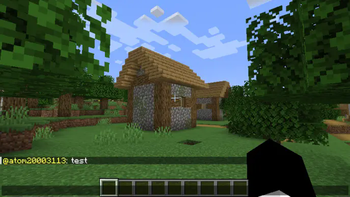
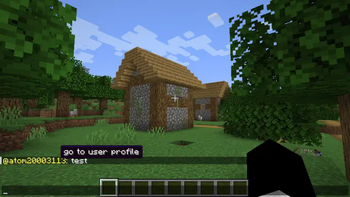
╚═ Formatting from: "<user> message" to "user: message" with the "go to user profile" tooltip in the "user" text, and when clicked redirects to https://namemc.com/profile/user
╚═ Support for multiple message formats, including markdown for bold, italic, and strikethrough text.
╚═ Direct messaging capability using the "dm!" command for private conversations between users.
╚═ Custom font selection with the #font=<minecraft font> system to change the appearance of messages.
╚═ User pinging functionality using "@" to notify online users, with appropriate tooltips and profile links.
╚═ URL detection with clickable links formatted as underlined text that open in a browser when clicked.
╚═ Support for reactions to messages using the "reaction!" command, allowing users to interact with each other.
╚═ Nickname management with the "setnick!" command for personalized display names in chat.
╚═ Avatar customization via the "setavatar!" command to enhance user identity in chat.
╚═ Channel management features with "joinchannel!" and "leavechannel!" commands to organize conversations.
╚═ Threaded conversation support using the "reply!" command for structured discussions.
╚═ Scheduled announcements feature using the "schedule!" command for automated notifications.
╚═ Polling capabilities with "poll!" and "vote!" commands to engage users in decision-making.
╚═ Changelog
╚═ Text Engine
╚═ Formatting from: "<user> message" to "user: message" with the "go to user profile" tooltip in the "user" text, and when clicked redirects to https://namemc.com/profile/user.
╚═ Support for multiple message formats, including markdown for bold, italic, and strikethrough text.
╚═ Direct messaging capability using the "dm!" command for private conversations between users.
╚═ Custom font selection with the #font=<minecraft font> system to change the appearance of messages.
╚═ User pinging functionality using "@" to notify online users, with appropriate tooltips and profile links.
╚═ URL detection with clickable links formatted as underlined text that open in a browser when clicked.
╚═ Support for reactions to messages using the "reaction!" command, allowing users to interact with each other.
╚═ Nickname management with the "setnick!" command for personalized display names in chat.
╚═ Avatar customization via the "setavatar!" command to enhance user identity in chat.
╚═ Channel management features with "joinchannel!" and "leavechannel!" commands to organize conversations.
╚═ Threaded conversation support using the "reply!" command for structured discussions.
╚═ Scheduled announcements feature using the "schedule!" command for automated notifications.
╚═ Polling capabilities with "poll!" and "vote!" commands to engage users in decision-making.
Available Versions
How to Install minecord on Your Server
Order Server
Order a Minecraft Java server with at least 3 GB RAM (4 GB recommended).
Set forge Loader
In the panel under "Egg", select the forge loader and matching Minecraft version (1.20.1).
Install Mod
Open the mod browser in the dashboard and search for "minecord". Click "Install" – done! Alternatively, upload the .jar via SFTP to the /mods folder.
Compatibility
Mod Loaders
Minecraft Versions
1.20.1
Server-side
✓ RequiredRecommended RAM
4 GB(min. 3 GB)Frequently Asked Questions
minecord server crashes on startup – what to do?
Most common cause: wrong forge version or insufficient RAM. Check the server log (latest.log) for "OutOfMemoryError" or "Mixin" errors. With Mado Hosting: ensure at least 3 GB RAM is allocated and the loader matches the mod version (1.20.1). You can switch loaders with one click in the panel.
Is minecord compatible with forge and neoforge?
minecord officially supports forge, neoforge for Minecraft 1.20.1. The Mado dashboard automatically detects incompatible loader combinations.
Server lagging with minecord – how to optimize performance?
Recommended RAM: 4 GB (per 8 players). Use /spark profiler to check if minecord consumes the most tick time. Common fixes: reduce server view-distance to 8-10, install "performant" or "starlight" as supplementary mods on Forge. With Mado Hosting, your server runs on NVMe SSDs with dedicated CPU cores for minimal latency.
Similar Mods






Rent Modded Server
Install minecord with just one click on your server.