
Minecraft But Jumping Enchants
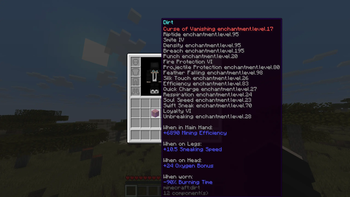
Every jump randomly enchants a random item in your inventory. Survive the chaos and defeat the Ender Dragon. A Bebu datapack for Minecraft 26.1+.
Screenshots
About this Mod
Minecraft But Jumping Enchants Items
Minecraft But Jumping Enchants Items is a chaotic vanilla datapack where every jump can randomly enchant a random item in your inventory. Start with almost nothing, keep moving, and watch your gear get stronger, weirder, and sometimes completely ridiculous as you play. With 41 enchantments spread across 3 power tiers, the datapack turns a simple survival run into a fast-paced challenge where every jump matters. It also includes multiplayer support and a themed advancement tab to guide your progress from your first wooden pickaxe to the final fight.
Features
- Every jump randomly enchants a random item in your inventory.
- 41 enchantments are available across 3 tiers: Normal, OK, and OP.
- Multiplayer support, with all players affected at the same time.
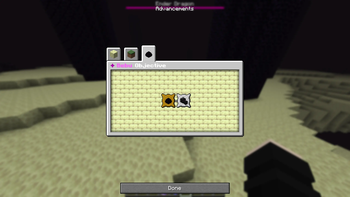
- Custom Objective advancement tab.
📦 Installation
This is a Datapack - no mods required.
- Download the .zip file
- Open Minecraft and navigate to your world's folder
- %appdata%.minecraft\saves<YourWorldName>\ on Windows
- ~/Library/Application Support/minecraft/saves/
/ on macOS
- Drop the .zip directly into the datapacks folder (do not unzip it)
- Launch your world and run /reload if the world is already open
- Watch for the Bebu load message in chat, you're live!
❓ FAQ
Q: Does this work with Fabric or Forge mods?
A: Yes. It's a vanilla datapack and runs alongside any mods without conflict.
Q: Will this enchant items I don't want enchanted?
A: Yes, that's the chaos! Swords, armor, pickaxes, bows, fishing rods, even offhand items are all fair game. Guard your elytra.
Q: Can I use this on a server?
A: Absolutely. It's designed with multiplayer in mind.
Q: Does it work on existing worlds?
A: Yes. Simply add the datapack to an existing world and reload.
Q: Does jumping in creative mode trigger enchantments?
A: Yes, the jump counter tracks all jump types, creative included.
Available Versions
How to Install Minecraft But Jumping Enchants on Your Server
Order Server
Order a Minecraft Java server with at least 3 GB RAM (4 GB recommended).
Set datapack Loader
In the panel under "Egg", select the datapack loader and matching Minecraft version (26.1.2).
Install Mod
Open the mod browser in the dashboard and search for "Minecraft But Jumping Enchants". Click "Install" – done! Alternatively, upload the .jar via SFTP to the /mods folder.
Compatibility
Mod Loaders
Minecraft Versions
26.1.2, 26.1.1, 26.1 (+1 more)
Server-side
✓ RequiredRecommended RAM
4 GB(min. 3 GB)Frequently Asked Questions
Minecraft But Jumping Enchants server crashes on startup – what to do?
Most common cause: wrong datapack version or insufficient RAM. Check the server log (latest.log) for "OutOfMemoryError" or "Mixin" errors. With Mado Hosting: ensure at least 3 GB RAM is allocated and the loader matches the mod version (26.1.2). You can switch loaders with one click in the panel.
Is Minecraft But Jumping Enchants compatible with datapack and fabric and forge and neoforge?
Minecraft But Jumping Enchants officially supports datapack, fabric, forge, neoforge for Minecraft 26.1.2, 26.1.1, 26.1. Note: Forge and Fabric mods are NOT cross-compatible – pick one loader and stick with it. The Mado dashboard automatically detects incompatible loader combinations.
Server lagging with Minecraft But Jumping Enchants – how to optimize performance?
Recommended RAM: 4 GB (per 8 players). Use /spark profiler to check if Minecraft But Jumping Enchants consumes the most tick time. Common fixes: reduce server view-distance to 8-10, install "performant" or "starlight" as supplementary mods on Forge. With Mado Hosting, your server runs on NVMe SSDs with dedicated CPU cores for minimal latency.
Rent Modded Server
Install Minecraft But Jumping Enchants with just one click on your server.